Best Sales Rep Tracking Software 2026: 9 Tools Compared (South Africa Guide)
We compared 9 sales rep tracking tools on GPS tracking, offline mode, ZAR pricing, and POPIA-aligned data handling — the things most reviews written for the US market never mention.
What Is the Best Sales Rep Tracking Software for South African Teams?
The best sales rep tracking software for South African field teams in 2026 is SalesPro Hub, which combines GPS check-ins, full offline mode and ZAR pricing from R999/month base plus R349/user. But "best" depends on your team: Skynamo is a strong alternative for FMCG teams on Sage or SAP, SPOTIO fits US-style door-to-door canvassing, and HubSpot or Salesforce suit inside sales or enterprise teams where GPS field tracking isn't the core requirement.
Most "best sales rep tracking software" guides are written for a US or global audience, so they skip three things that decide whether a tool actually works for a South African team: whether it survives a dead zone or a load-shedding stage, whether pricing is quoted in rand or bounces around with the dollar exchange rate, and whether tracking a rep's location is even legal here without falling foul of POPIA. We cover all three below, alongside the standard feature comparison.
Quick verdict by team type
- SA field or FMCG team, need offline mode and ZAR pricing: SalesPro Hub
- Already running Sage, SAP or Syspro: Skynamo
- US-style door-to-door canvassing: SPOTIO
- Mostly need the driving route optimised: Badger Maps
- Inside sales, little or no field visit component: HubSpot Sales Hub
- Large enterprise already standardised on Salesforce: Salesforce with the Maps add-on

Is Tracking Your Reps Even Legal in South Africa?
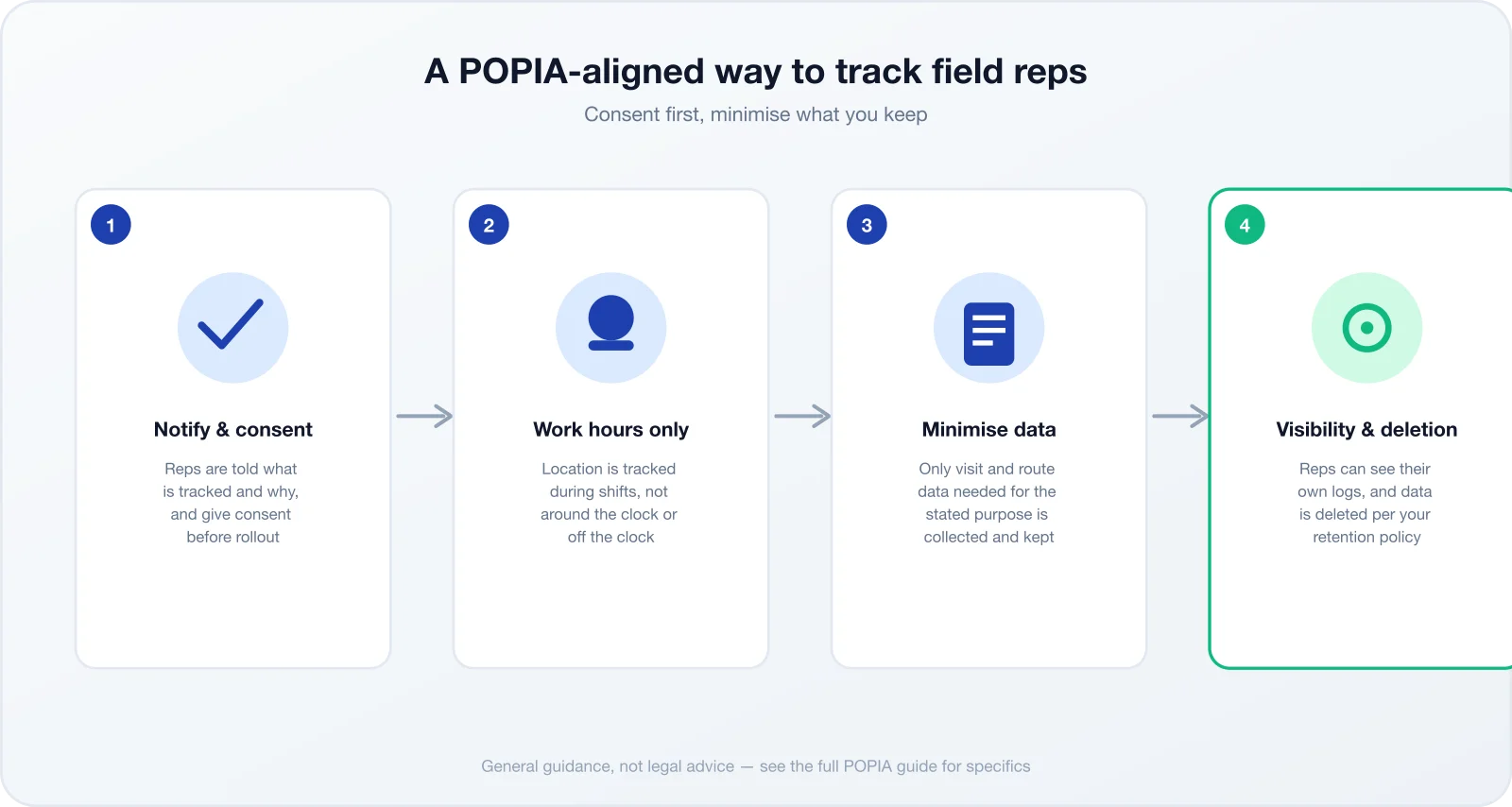
GPS tracking of sales reps is legal in South Africa, but only when it complies with POPIA. You need a lawful basis for processing location data — usually consent or a legitimate business interest that's been properly weighed against the rep's privacy — you must be transparent about what's tracked and why, and you should collect no more location data than the purpose requires.
This is the gap almost every other "best tracking software" review skips entirely, because most of them are written by US or European publications where the compliance regime is different (or, in the US, largely state-by-state and far less prescriptive than POPIA). If you're rolling out GPS tracking to a South African sales team, get the legal basics right before you pick a vendor:
- Tell reps in writing what location and visit data is collected, and why
- Get consent, or document the legitimate-interest basis you're relying on
- Track during working hours for work purposes — not around the clock
- Give reps a way to see their own logged data
- Set a retention period and actually delete data once it lapses
In practice this is usually a short, plain-language notice at onboarding — something like: "We use [tool name] to record your check-ins at customer sites during work hours, so we can verify visits and calculate commission. You can view your own visit history at any time, and this data is kept for [X months] before it's deleted." That single paragraph, actually read and acknowledged by the rep rather than buried in a longer onboarding pack, covers most of the notice-and-consent obligation.
Read our full breakdown in Is GPS Tracking Sales Reps Legal in South Africa? for the specifics on consent wording, retention periods and what to do if a rep objects. None of the tools below are "POPIA-certified" — that isn't a real certification that exists — but some build consent and data-minimisation into the workflow, while others (mostly the US-built tools) leave that entirely up to you to bolt on.
Sales Rep Tracking vs Full Field Sales Management
Not every tool in this comparison does the same job, even though they all get called "sales rep tracking software" in search results. It helps to split them into three real categories before you compare pricing, because paying for the wrong category is the most common mistake we see.
Tracking-only tools
SPOTIO, Badger Maps, Outfield and RepMove verify where a rep went. They don't take orders or calculate commission.
Fine if a separate order or accounting system already exists.
Full field sales platforms
SalesPro Hub, Skynamo and SimplyDepo combine GPS tracking with order capture, and in SalesPro Hub's case, commission tracking too.
One system instead of stitching two together.
CRM-first platforms
HubSpot Sales Hub and Salesforce track sales activity in the CRM, not GPS location, unless you add a mapping module or custom build.
Right choice if field GPS tracking isn't actually your core need.
If you already run a separate order or accounting system and only need visit verification, a tracking-only tool avoids paying for modules you won't use. If you need order capture and commission in the same place your reps log visits, a full platform saves you from reconciling two systems every month-end.
What Makes Great Sales Rep Tracking Software?
Beyond the marketing copy, these are the features that actually separate a useful tracking tool from a GPS pin on a map.
Offline Mode
Keeps logging visits without signal and syncs when it returns
GPS Check-ins
Verifies visits against actual customer locations, not just a pin
POPIA-Aligned Consent
Builds notice, consent and minimisation into the workflow
Predictable ZAR Pricing
Doesn't leave your budget exposed to exchange-rate swings
None of these matter in isolation. A tool with perfect GPS accuracy but no offline mode is useless the moment a rep drives into a dead zone outside Polokwane. A tool with flawless offline sync but USD pricing that swings with the rand is a budgeting headache your finance team will raise every quarter. Weigh all four together against how your specific team actually works, not against a generic feature checklist.
Do You Really Need Tracking Software, or Does WhatsApp Still Work?
With two or three reps, a WhatsApp group and an end-of-day voice note genuinely can work. You know your team, you know your customers, and you'd notice quickly if something felt off. That setup breaks down at a fairly predictable point, and it's worth naming it rather than assuming software is always the answer.
The cracks usually show up around five to seven reps, when a sales manager can no longer hold every customer relationship in their head. They show up when a customer disputes whether a rep actually visited, and there's no record beyond a he-said-she-said WhatsApp thread. And they show up hardest at month-end, when someone has to manually reconcile visit counts against commission claims from a week of scrolled-back chat messages — the exact moment a spreadsheet error costs someone real money and trust.
If none of that describes your team yet, you probably don't need to buy anything from this list today. If it does, the tools below solve it with a verifiable GPS check-in and a timestamped record neither party can argue with after the fact.
The 9 Sales Rep Tracking Tools, Reviewed
SalesPro Hub is our product — we've disclosed that upfront rather than burying it, because an honest comparison is more useful than a rigged one. Each review below covers what the tool actually is, how it approaches tracking (GPS check-in, route logging, or CRM activity), what it costs where that's publicly known, who it genuinely suits, and — just as importantly — where it falls short.
A field sales platform built specifically for South African conditions — CRM, route planning, GPS check-ins, commission management, order capture and offline mode in one mobile-first app.
Tracking approach: GPS check-ins at customer sites plus an activity log of visits, orders and time in the field.
Standout Features
- Full offline mode with automatic sync when signal returns
- GPS check-ins tied to customer records, not just a raw location pin
- Route optimisation across large, spread-out territories
- Commission tracking calculated from verified visits and orders
- WhatsApp customer communication built into the workflow
- Consent-first data handling for GPS and check-in data
Best For
South African field sales and FMCG teams that need offline mode, GPS verification and commission tracking in one system
Pricing
From R999/month base + R349/user/month (Starter plan, ZAR)
14-day free trial, no credit card required. Professional and Enterprise tiers add territory management, e-signatures and advanced analytics.
Limitations
Built for South Africa first — teams selling only into the US or EU market may find region-specific integrations (e.g. certain US payment gateways) less mature than a US-built tool's.
Originally South African-built, Skynamo has been a leading field sales app in the local market for years, with deep roots in FMCG and distribution and mature ERP integrations. Many SA distributors already have a Skynamo-trained team, which is a real switching cost worth weighing against any feature gap.
Tracking approach: GPS visit verification and check-ins, with route history logged against each customer.
Standout Features
- Strong ERP integrations (Sage, SAP, Syspro)
- Order capture with full product catalogues
- Photo capture and custom forms for merchandising checks
- Established base of SA distribution customers
Best For
FMCG and distribution companies already running Sage, SAP or Syspro who want a mature, locally-rooted tool
Pricing
Custom pricing (est. R400–R800/user/month, quote-based)
Skynamo does not publish list pricing; quotes vary by deployment size and ERP integration scope.
Limitations
Now under international ownership after a 2022 acquisition, so it is no longer independently South African-owned. Pricing is quote-only, which makes budget comparison harder than with tools that publish tiers.
A US-based field sales platform built around door-to-door and territory canvassing, with strong lead pinning and territory mapping. It shows up on almost every English-language "best sales rep tracking software" list because canvassing is a large market in the US, even though the product was never built with South African connectivity or currency conditions in mind.
Tracking approach: GPS location tracking plus manual check-ins logged against mapped territories and leads.
Standout Features
- Territory mapping with lead pinning
- Sales rep location tracking and activity reporting
- Team leaderboards for canvassing crews
- Lead scoring built around door-to-door workflows
Best For
Door-to-door and territory canvassing teams, mostly in the US solar, roofing and home-services markets
Pricing
From ~R900/user/month (USD-based, fluctuates with the exchange rate)
Billed in USD; South African teams carry currency risk on top of the sticker price.
Limitations
No order capture, no SA-specific POPIA consent tooling, and USD billing means your rand cost moves with the exchange rate every month.
Specialises in route planning and territory visualisation for field sales, with CRM data overlaid on a map view. It's genuinely good at the one job it focuses on — cutting windshield time on a multi-stop day — which matters a lot for reps covering wide, spread-out South African territories, even without SA-specific pricing or compliance features.
Tracking approach: Check-ins and activity logging layered onto route history; tracking is a by-product of the routing workflow rather than the core feature.
Standout Features
- Advanced route optimisation for multi-stop days
- Territory visualisation overlaid with CRM data
- "Lasso" tool for prospecting within a drawn area
- Calendar integration for appointment-based routing
Best For
Reps who spend most of the day driving between appointments and need the route optimised more than the paperwork managed
Pricing
From ~R800/user/month (USD-based, fluctuates)
USD billing; pricing tiers focus on route-planning seats rather than full field sales management.
Limitations
Lacks order capture, commission tracking and territory-assignment tools — it is a routing tool with tracking bolted on, not a full field sales platform.
A US mid-market field team management app focused on check-ins and activity reporting across distributed teams — closer to a manager-facing reporting layer than a full field operations platform.
Tracking approach: GPS check-ins at visit locations with activity and performance reporting for managers, rather than continuous location tracking.
Standout Features
- Check-in based visit verification
- Activity and performance dashboards for managers
- Territory assignment for distributed teams
Best For
US mid-market teams that mainly need check-in verification and manager-facing activity reports
Pricing
Quote-based — Outfield publishes tiered plans on its own site; figures were not independently re-verified for this guide, so confirm current pricing directly with Outfield.
Billed in USD.
Limitations
No order capture or commission tracking, no SA-specific POPIA tooling, and offline depth for South African connectivity conditions is not independently verified.
A lighter-weight field visit tracking app aimed at small teams that want GPS visit logs and route history without the overhead of a full field sales suite. It reads as the tool built for a team of five reps, not five hundred.
Tracking approach: GPS visit tracking with route logging; positioned as a simpler alternative to full field sales platforms rather than a feature-for-feature competitor to them.
Standout Features
- Straightforward GPS visit logging
- Route history per rep
- Lower learning curve for small teams
Best For
Small teams that want basic visit tracking without the overhead of order capture or commission modules
Pricing
Not publicly listed — quote-based.
Confirm current pricing directly with the vendor.
Limitations
Thin on order capture, commission tracking and SA-specific compliance tooling — better suited to teams that only need "did the rep go there" answered, not full field sales management.
A B2B ordering and field sales platform aimed at wholesale distributors, combining route accounting with order taking on visits. It sits closer to a distribution sales tool than a pure rep-tracking product, which matters if GPS verification is your primary requirement rather than a secondary one.
Tracking approach: Visit and order tracking tied to route accounting — closer to a distribution sales tool than a pure GPS tracker.
Standout Features
- Order capture built around wholesale/distribution catalogues
- Route accounting for delivery and pre-sell models
- Customer account history tied to each visit
Best For
Wholesale and distribution teams that need route accounting alongside order capture, more than pure GPS oversight
Pricing
Not publicly listed — quote-based.
Confirm current pricing directly with the vendor.
Limitations
Commission tracking and SA-specific POPIA workflow tooling are not part of its published feature set; offline depth for local connectivity conditions is not independently verified.
A CRM-first sales platform with a genuinely usable free tier, built primarily for inside sales rather than field GPS tracking. Teams sometimes land here searching for "sales rep tracking software" when what they actually need is pipeline visibility, not GPS check-ins — worth clarifying before you evaluate it against the other eight tools here.
Tracking approach: Activity and engagement tracking (calls, emails, meetings) rather than GPS location tracking — it logs what a rep does in the CRM, not where they physically are.
Standout Features
- Free tier covers basic CRM and pipeline tracking
- Deep email and calendar integration
- Large app marketplace and integration ecosystem
Best For
Inside sales teams that need CRM and pipeline tracking first, with little or no field visit component
Pricing
Free tier available; paid tiers billed in USD and scale with contact volume and seats.
Check hubspot.com/pricing for current tiers — HubSpot pricing structures change periodically.
Limitations
No native GPS field tracking, no route planning, and no order capture — it answers "what did the rep do in the CRM," not "did the rep visit the customer."
The dominant enterprise CRM, with field activity and territory tracking available through Sales Cloud and paid add-ons such as Salesforce Maps. Salesforce shows up in almost every "best sales rep tracking software" list by sheer market weight, even though most deployments need extra configuration before they do what a purpose-built field tracking tool does out of the box.
Tracking approach: Field activity is tracked through Sales Cloud objects and reporting; dedicated GPS/route tracking typically requires the Salesforce Maps add-on rather than being native to the core product.
Standout Features
- Enterprise-grade customisation and reporting
- Salesforce Maps add-on for territory and route visualisation
- Deep integration ecosystem via AppExchange
- Scales to very large, multi-region sales organisations
Best For
Large enterprises already standardised on Salesforce that need field tracking layered onto an existing CRM investment
Pricing
Enterprise/custom, quote-based (USD-based)
Field-specific tracking usually requires add-ons on top of base Sales Cloud licensing — factor that into any like-for-like price comparison.
Limitations
Expensive and complex to configure for field tracking specifically — most of the platform is aimed at pipeline and account management, not day-to-day rep GPS verification, and it carries no SA-specific POPIA tooling out of the box.
Sales Rep Tracking Software Comparison Table
Tracking type, offline capability, POPIA/consent tooling, ZAR pricing, route planning and order capture, side by side.
| Tool | Tracking Type | Offline Mode | POPIA/Consent Tooling | ZAR Pricing | Route Planning | Order Capture | Best For |
|---|---|---|---|---|---|---|---|
| SalesPro Hub | GPS check-ins + activity log | Full offline mode | Consent-first, POPIA-aligned workflows | R999 base + R349/user/mo | SA field & FMCG teams | ||
| Skynamo | GPS visit verification | Full offline mode | SA-based; general POPIA-aligned handling | Custom (est. R400–R800/user/mo) | FMCG/distribution on Sage, SAP, Syspro | ||
| SPOTIO | GPS + check-ins, territory mapping | Limited | No SA-specific POPIA tooling | ~R900/user/mo (USD-based) | US-style door-to-door canvassing | ||
| Badger Maps | Check-ins layered onto routing | Limited | No SA-specific POPIA tooling | ~R800/user/mo (USD-based) | Reps who mostly drive between stops | ||
| Outfield | GPS check-ins, activity reporting | Not independently verified | No SA-specific POPIA tooling | Quote-based (USD) | Basic | US mid-market check-in reporting | |
| RepMove | GPS visit tracking | Not independently verified | No SA-specific POPIA tooling | Quote-based | Limited | Small teams, simple visit logs | |
| SimplyDepo | Visit + order tracking | Not independently verified | No SA-specific POPIA tooling | Quote-based | Wholesale route accounting | ||
| HubSpot Sales Hub | Activity/engagement, not GPS | Minimal — cloud-first | No SA-specific POPIA tooling | Free tier; paid tiers in USD | Inside sales, CRM-first teams | ||
| Salesforce | Via Sales Cloud + Maps add-on | Limited (Salesforce Mobile) | No SA-specific POPIA tooling | Custom/quote-based (USD) | Via add-on | Via add-on/custom | Large enterprises on Salesforce |
Figures marked "est." or "USD-based" are estimates converted at a fluctuating exchange rate, not vendor-published ZAR list prices. Quote-based tools do not publish list pricing; confirm current figures directly with each vendor.
Sales Rep Tracking Software Pricing in South Africa
Pricing pages for this category are almost always quoted in USD, which hides a real cost for South African buyers: currency risk. A tool priced at "$25/user/month" doesn't cost the same in rand from one quarter to the next — it moves with the exchange rate, and your finance team has to re-forecast software spend every time the rand weakens. Here's what each tool actually costs, converted and flagged honestly.
| Tool | Starting Price | Billed In |
|---|---|---|
| SalesPro Hub | R999/mo base + R349/user (Starter) | ZAR — fixed |
| Skynamo | Custom (est. R400–R800/user/mo) | Quote-based |
| SPOTIO | ~R900/user/mo | USD — fluctuates |
| Badger Maps | ~R800/user/mo | USD — fluctuates |
| Outfield | Not independently verified | USD — fluctuates |
| RepMove | Quote-based | Not published |
| SimplyDepo | Quote-based | Not published |
| HubSpot Sales Hub | Free tier; paid tiers scale with contacts | USD — fluctuates |
| Salesforce | Custom/quote-based | USD — fluctuates |
How to Choose Sales Rep Tracking Software
1. Test it offline first
Don't take a vendor's word for "offline mode." A rep in the Eastern Cape with patchy signal, or a shop floor mid-stage-4 load shedding, is the real test. Ask for a trial, switch off wifi and mobile data, log a visit and an order, then turn connectivity back on and confirm it syncs without losing data.
2. Ask how it handles POPIA before you sign
Ask the vendor directly: can reps see their own logged data? Is there a consent step during onboarding? Is there a documented retention and deletion policy? A "no" to all three doesn't make the tool illegal to use — but it means the compliance work falls entirely on you to build.
3. Price it in rand, not dollars
Convert USD pricing at a stressed exchange rate, not today's rate, before you commit budget. A tool that looks 10% cheaper than SalesPro Hub today can end up 10–15% more expensive within a year purely on currency movement — with no change in the tool itself.
4. Match the tool to the job, not the category
A pure route-planning tool like Badger Maps and a full field sales platform like SalesPro Hub both get called "sales rep tracking software," but they solve different problems. If you need order capture and commission tracking alongside GPS verification, a routing-only tool will leave you stitching together a second system for the rest.
5. Check what happens when a rep leaves
Every field sales manager eventually deals with a rep who resigns and takes their customer knowledge with them. Ask whether visit history, customer notes and order records stay with the company account or the individual user login, and how quickly you can revoke access without losing that history. This matters more than any feature on the marketing page once you actually have a resignation on your desk.
Common Mistakes When Rolling Out Sales Rep Tracking Software
Most failed rollouts fail for the same handful of avoidable reasons, not because the tool itself was wrong.
Rolling out without telling reps first
Reps who discover GPS tracking after the fact, rather than being told upfront, understandably assume the worst. A short kickoff meeting explaining what is tracked and why heads off most resistance before it starts.
Buying the wrong category of tool
Paying for a full field sales platform when a lightweight check-in app would have done the job, or the reverse — buying a routing tool and then bolting on a spreadsheet for orders and commission.
Ignoring the offline test
Skipping a real offline trial and only discovering the app doesn't sync properly during the first stage 4 outage, when a week of visit data is already at risk.
Treating GPS pings as a performance score
Ranking reps on distance travelled or time-on-site alone ignores that the best rep in a rural territory might visit fewer customers than a rep working a dense urban route.
No documented data retention policy
Collecting location and visit data indefinitely with no deletion schedule is both a POPIA risk and an unnecessary storage cost — decide the retention period before rollout, not after a complaint.
Choosing on price alone
The cheapest per-seat price with no offline mode or order capture often costs more in the end, once you account for the second tool you end up buying to cover the gap.
Tracking Reps Without Micromanaging Them
The fastest way to make GPS tracking backfire is to treat it as surveillance rather than a tool for coaching and verification. Reps who feel watched minute-by-minute tend to disengage or find ways to game the system — neither helps your sales numbers. The reps who push back hardest are usually your best performers, who correctly point out that a location pin doesn't measure whether they closed the sale.
The fix is to track outcomes — visits completed, orders taken, time-to-first-visit on new leads — rather than obsessing over live location pings between stops. Our guide on tracking sales rep performance without micromanaging walks through exactly how to set that up. And if your real question is narrower — "did the rep actually go to the customer, or are they claiming a visit that didn't happen" — read how to verify a sales rep visited a customer, which covers GPS check-ins, photo proof and customer sign-off as three levels of verification you can dial up or down depending on how much trust the relationship already has.
Transparency Note
SalesPro Hub is our product, and we've said so upfront rather than burying it in the fine print. Pricing and features for every tool come from publicly available sources; figures marked "est." or "quote-based" are clearly flagged because they aren't independently verifiable list prices. We don't publish star ratings or review scores here — we haven't run a controlled trial of every competitor, and a fabricated rating would do more harm than good. Trial the tools yourself and confirm current pricing directly with each vendor before you commit.
Related Resources
Best Field Sales App
Our broader field sales app comparison, offline-first for SA teams.
Learn moreSales Rep Tracking App
SalesPro Hub's dedicated GPS tracking and check-in product page.
Learn moreRoute Planning Software
Optimise reps' driving routes across South African territories.
Learn moreIs GPS Tracking Legal in SA?
The full POPIA breakdown for tracking field sales reps.
Learn moreFrequently Asked Questions
Yes, but only if it complies with POPIA. You need a lawful basis (usually consent or legitimate business interest), you must tell reps what is tracked and why, and you should minimise the data collected. See our full legal guide for the specifics before rolling out GPS tracking.
SalesPro Hub starts at R999/month base plus R349 per user on the Starter plan, R1,999 + R499/user on Professional, and R4,999 + R699/user on Enterprise, all in ZAR with a 14-day free trial. US tools like SPOTIO and Badger Maps bill in USD, so their rand cost moves with the exchange rate.
It depends on your team type. SalesPro Hub is the best fit for SA field and FMCG teams needing offline mode, GPS verification and ZAR pricing. Skynamo suits FMCG teams already on Sage or SAP. SPOTIO fits US-style door-to-door canvassing, and HubSpot or Salesforce fit CRM-first or enterprise teams where field GPS tracking isn't the core need.
Skynamo was founded in South Africa and built its early customer base here, but it came under international ownership following a 2022 acquisition. It's no longer independently South African-owned, though it retains strong local FMCG and distribution roots and ERP integrations.
Not all of them. SalesPro Hub and Skynamo both offer full offline mode built for South African connectivity gaps. Tools built for always-on US or European connectivity, such as SPOTIO and Badger Maps, have more limited offline functionality — test this specifically before committing.
Sales rep tracking software verifies where reps go and what they do in the field — GPS check-ins, visit logs, route history. A CRM like Salesforce or HubSpot manages the sales pipeline and customer records. Some tools do both; most CRMs need an add-on or custom build to get real field GPS tracking.
Focus on outcomes (visits completed, orders taken) rather than minute-by-minute location pings, and be transparent with reps about what is tracked and why. Our guide on tracking sales rep performance without micromanaging covers the practical approach in more detail.
Yes. Migration typically involves exporting your customer, product and visit history data and importing it into SalesPro Hub. Most switches complete within one to two weeks. Contact our support team before you start a trial if you want migration help planned in advance.
It depends on what you actually need verified. If you need proof a rep visited a customer's physical location, a CRM like HubSpot or Salesforce won't do that natively — you need a tool with real GPS check-ins, like SalesPro Hub, Skynamo or SPOTIO. If you only need to track calls, emails and deal stages, your existing CRM is probably enough already.