B2B Customer Portal Software
Built for distributors with field reps — not a generic online store. Give every trade customer self-service ordering, their own negotiated prices, live stock, and invoice access, on the same platform your reps already use.
14-day free trial, no credit card required. Included from the Professional plan.
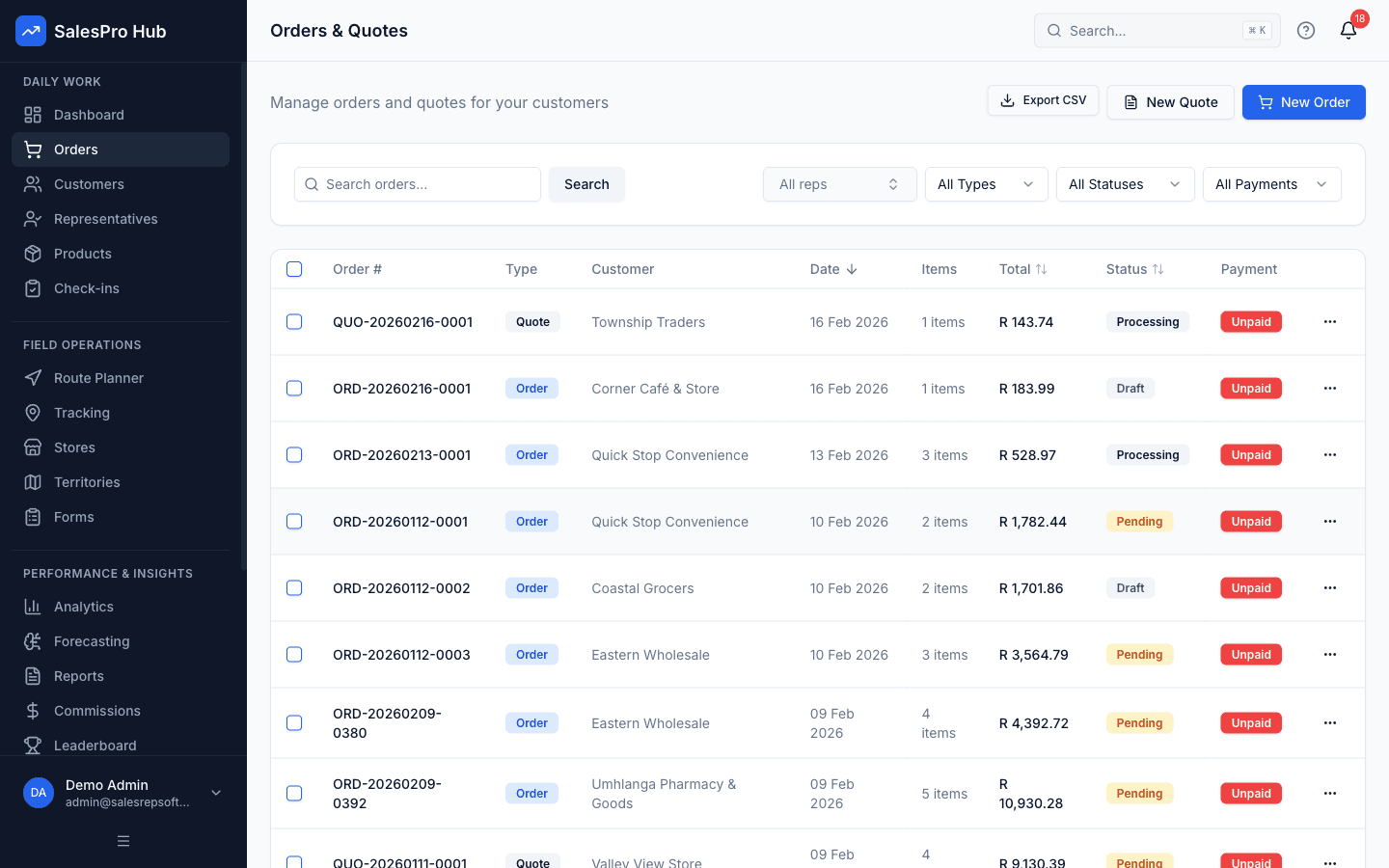
What is a B2B Customer Portal?
A B2B customer portal is a secure, self-service website or app where a business’s wholesale and trade customers log in to place orders, see their own negotiated prices, check available stock, download invoices, and follow order status — without phoning or emailing a sales rep or office admin.
For a distributor, the portal is not a separate system bolted onto the business — it is a self-service front end onto the same customer accounts, price lists, stock levels and order management your reps and office staff already work with every day. A wholesale buyer, a retail store owner or a contract account signs in from their own phone or laptop, browses exactly what they are entitled to buy at exactly the price you have agreed with them, and submits an order that lands in your system the same way a rep-captured order would.
That distinction matters because most software marketed as a “customer portal” is either a generic e-commerce cart with a login screen stuck on top, or an enterprise platform built for retail shoppers rather than trade accounts with customer accounts and negotiated pricing. A portal built for distributors treats the customer as an account, not an anonymous shopper.
In practice, the people logging in are rarely a single “customer” in the consumer sense. A wholesale account might have a buyer placing the order, an accounts contact who only needs invoices, and a warehouse manager checking stock — three logins against one account, each seeing what is relevant to their role. A retail store owner reordering the same twenty lines every week wants speed above everything else. A contract customer negotiating seasonal volumes wants an easy way to request a quote outside the standard price list. A portal built for distributors has to serve all three without becoming three different products.
- Staff time wasted taking phone and email orders manually
- Constant invoice and order status requests via phone and email
- Limited ordering hours frustrating customers outside business hours
- Order errors from miscommunication and manual data entry
- Inability to scale customer service as business grows
- Fewer manually retyped phone and email orders
- 24/7 customer access to ordering, invoices, and account information
- Improved order accuracy through direct customer data entry
- Enhanced customer satisfaction with instant access and control
- Scalable solution supporting unlimited customers without added staff
Transform Your Customer Experience Today
Join South African businesses empowering customers with self-service portals that reduce admin work, improve satisfaction, and enable 24/7 ordering convenience.
*Time savings and efficiency improvements based on customer feedback and industry research. Individual results may vary depending on order volumes and implementation.
How a B2B Customer Portal Works for Distributors
A B2B customer portal for distributors works in five steps: the customer logs into a secure account, browses a live product catalog, sees their own negotiated price on every item, submits a standard order or a request for quote, and the order lands directly in your fulfilment queue — the same one your reps and dispatchers already use.
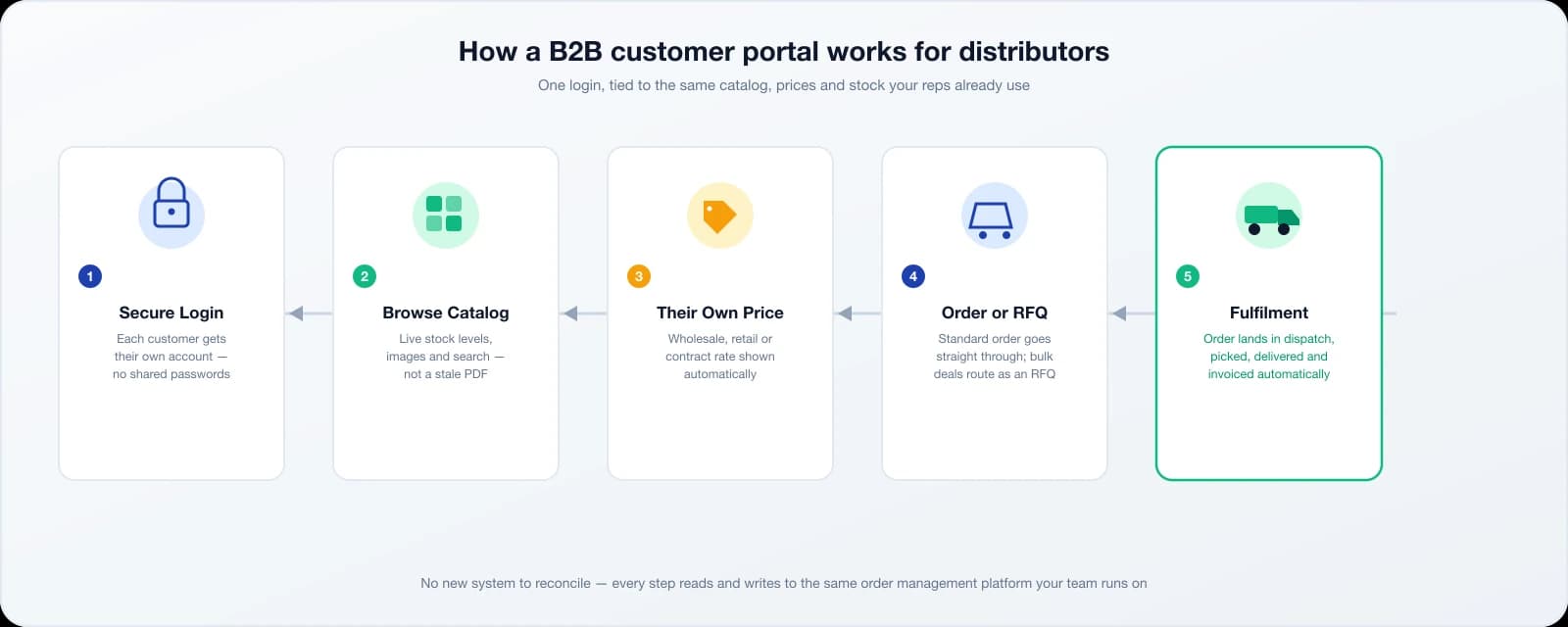
Each customer gets a secure login tied to one account — no shared passwords, no confusion about who placed an order.
Customers browse products with images, descriptions, and live stock — reflecting your actual warehouse position, not a stale PDF.
Every price shown is the wholesale, retail or contract rate you have already agreed for that account — never another customer’s price.
Standard orders submit instantly; bulk or custom requests route as an RFQ for a rep or dispatcher to price and approve.
The order lands in dispatch ready to pick, pack, deliver and invoice — with nothing re-typed from a call or message.
This is the part most generic e-commerce platforms get wrong for distributors: a consumer storefront shows one price to every visitor and expects payment at checkout. A distributor’s customer base is the opposite — the same product can carry three or four different prices depending on the account, orders are recorded against a customer account rather than a consumer checkout, and a meaningful share of demand (bulk quantities, custom combinations, new product requests) does not fit a fixed price list at all. Building the portal around the account — not the shopping cart — is what makes it usable for a trade customer on day one.
Core Portal Features
A B2B customer portal’s core features are self-service ordering, per-customer pricing, available stock visibility, invoice access, order history with one-click reorder, and order status tracking — all tied to the same data your reps and office staff already use, not a separate system to maintain.
Customers can browse products, check availability, add items to cart, and submit orders 24/7 without calling or emailing your team. See the full breakdown of our app for customers to place orders, including per-customer pricing and live stock.
- • Product catalog browsing
- • Shopping cart functionality
- • Direct order submission
- • Requested delivery date, address and notes
Complete order history with purchase details, the latest recorded order status, and the ability to search and filter current and past orders.
- • Complete order history
- • Order status tracking
- • Delivery confirmations
- • Search and filter orders
Access, download, and manage all invoices from a centralized portal, eliminating email requests and phone calls for invoice copies.
- • Invoice viewing and download
- • Payment status tracking
- • Balance and payment status
- • PDF invoice generation
Browse your complete product catalog with images, descriptions, pricing, and availability information tailored to each customer’s account.
- • Product search and filtering
- • Customer-specific pricing
- • Stock availability
- • Product images and details
Customers can open an order to see its latest recorded workflow status, delivery date when one has been assigned, totals, address and line items.
- • Order status updates
- • Pending, confirmed, processing and delivered states
- • Assigned delivery date
- • Downloadable order PDF
One-click reordering from order history makes repeat purchases fast and easy, increasing order frequency and customer convenience.
- • One-click reorder
- • Current customer pricing applied again
- • Unavailable products excluded
- • Quantity adjustments
Multiple logins per customer account for a buyer, an accounts contact, and warehouse staff, each with the right level of access.
- • Multiple users per account
- • Order and quote permissions per login
- • Shared account order history
- • Secure password-based access
Customers can request a quote, review confirmed pricing, download the quote PDF, and accept a valid quote into an order.
- • Customer-submitted RFQs
- • Quote history and expiry dates
- • Downloadable quote PDFs
- • Quote-to-order acceptance
The catalog reads current on-hand stock minus existing reservations, so customers see the quantity that is available to new orders.
- • Current available stock
- • Out-of-stock flags
- • Reservation-aware availability
- • Configurable oversell controls
Feature checklists tend to look similar across portal vendors on paper — most claim ordering, invoices and tracking. The difference shows up in how deep each feature goes: whether pricing can differ by customer and not just by a single discount code, whether stock shown in the catalog is live rather than a nightly batch update, and whether a rep working in the field sees the exact same order the after a customer submits it, instead of reconciling a separate storefront. Those details are where a portal built specifically for distributors earns its keep.
How Long Does It Take to Go Live?
Implementing a B2B customer portal typically takes about three weeks: week one imports your catalog, prices and customer accounts; week two invites and trains a first wave of customers; week three goes live with real orders; remaining customers are migrated in waves afterward with support on call.
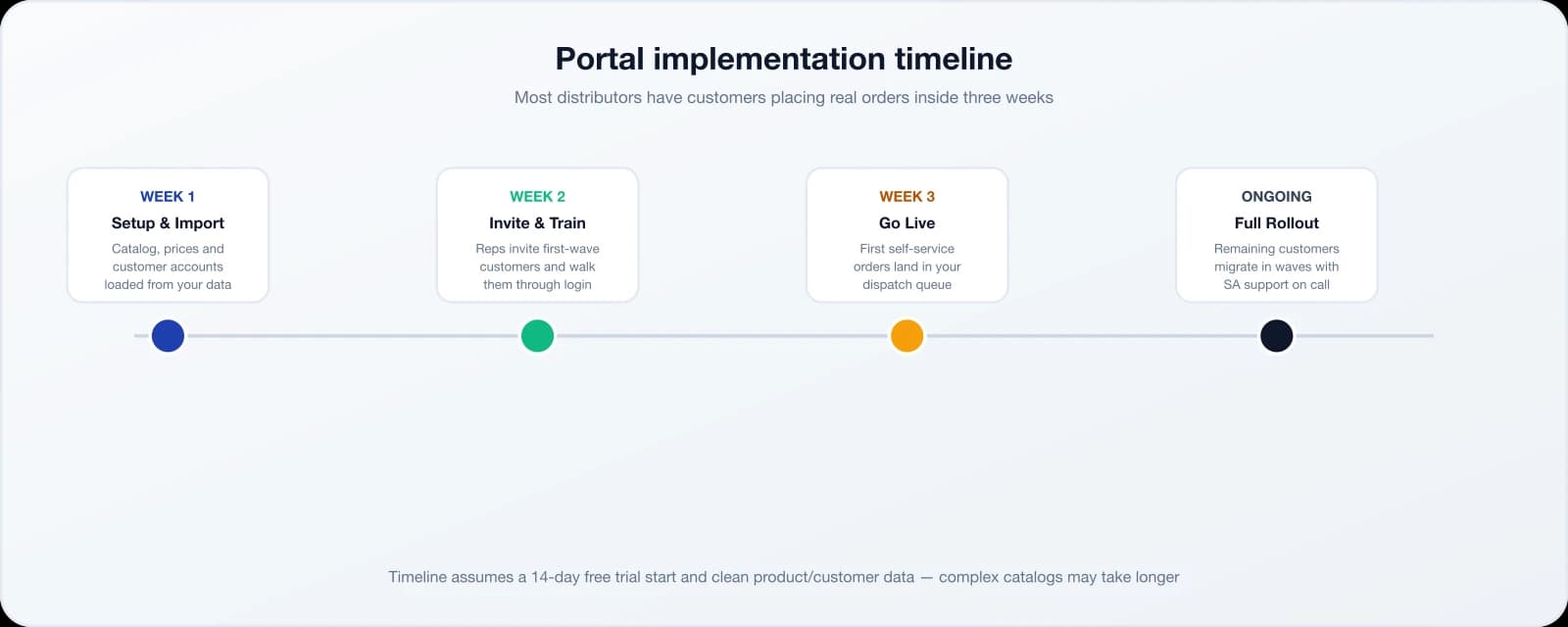
The switch rarely happens all at once, and it shouldn’t. Most distributors start with a handful of high-volume, tech-comfortable accounts, let those customers get used to logging in and reordering, and use that early success to bring the rest of the customer base across over the following month or two. Reps stay involved throughout — placing a customer’s first order in the portal for them, on a call, is often enough to get them ordering on their own the next time.
Setup time depends mostly on how clean your existing product and customer data is. A business with an up-to-date spreadsheet of products, prices and customer accounts can be ready to invite its first customers within days. A business piecing together pricing from memory and paper files should budget more time for the import step, since that data has to exist somewhere before customers can see it.
Is a Customer Portal Secure?
A B2B customer portal secures customer data with encrypted connections (HTTPS/TLS) and encryption at rest, per-account login credentials, role-based access so customers see only their own pricing and orders, and audit logging of account activity — aligned with South Africa’s POPIA requirements for personal data processing.
- Encrypted in transit (HTTPS/TLS) and at rest
- Per-account logins — no shared credentials between customers
- Pricing and orders scoped strictly to the logged-in account
- Data minimization and access controls aligned with POPIA
Each customer account only ever holds the personal and business information needed to place and fulfil an order — contact details, delivery addresses, pricing and order history. Access is least-privilege by default: a portal login can place orders and view its own invoices, and nothing more, unless you explicitly grant additional permissions.
Each customer account is isolated — there is no view, report or export that surfaces another customer’s pricing, orders or contact details.
Distributor Portal vs. Generic E-Commerce Platforms vs. Building Custom
Distributors choosing a B2B portal have three real options: a platform built specifically for distributors with field reps, a generic e-commerce platform retrofitted for B2B (Adobe Commerce/Magento B2B, Shopify Plus B2B), or a custom build. Each trades off setup time, cost, and how well it fits per-customer pricing and rep workflows.
| Capability | Portal built for distributors | Generic e-commerce B2B (Adobe/Magento, Shopify Plus) | Building custom |
|---|---|---|---|
| Typical setup time | Days to a few weeks | Weeks to months of configuration | Months to a year or more |
| Per-customer pricing | Built in from day one | Possible via B2B modules/add-ons | Whatever you build and maintain |
| Rep + portal on one platform | Same system as field rep order-taking | Separate system for reps, usually | Only if you build it that way |
| Live stock visibility | Included | Requires inventory integration work | Custom integration required |
| SA support, ZAR pricing & VAT | Local team, ZAR invoicing, VAT handled | Offshore support, USD/foreign billing typical | You own all support |
| Monthly cost (indicative) | From R1,999/mo + R499/user | Enterprise licensing + dev/agency fees | Developer salaries + ongoing maintenance |
To be fair to the alternatives: enterprise platforms like Adobe Commerce/Magento B2B genuinely out-flex a purpose-built portal on deep customization — complex approval hierarchies, bespoke storefront design, and integrations across a large enterprise stack. If you have a dedicated development team and a multi-year budget, that flexibility can be worth the cost. Most distributors don’t have that team or that budget, and don’t need that level of customization — they need their reps and their customers ordering against the same prices and stock, live, within weeks rather than quarters.
The custom-build route deserves the same honesty. It can, in theory, produce exactly the workflow you want with no compromises — but it also means you own every bug, every security patch, and every future integration indefinitely, with no vendor support line to call when something breaks at month-end. That ongoing maintenance cost rarely shows up in the initial project quote, which is why it is worth budgeting for years two and three, not just the first build.
Order from Your Phone
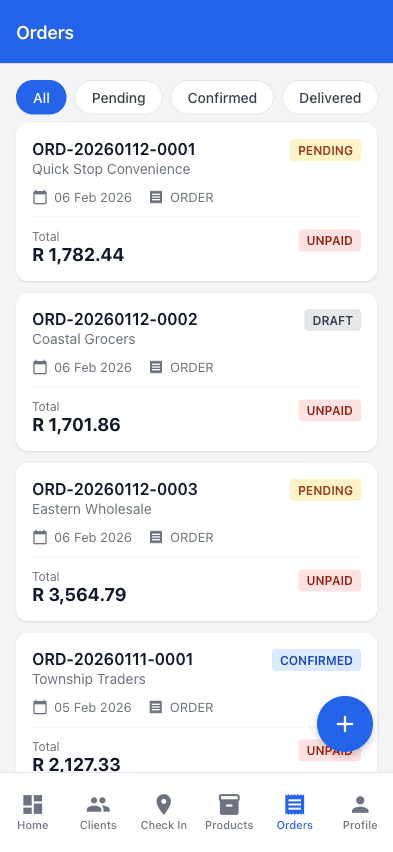
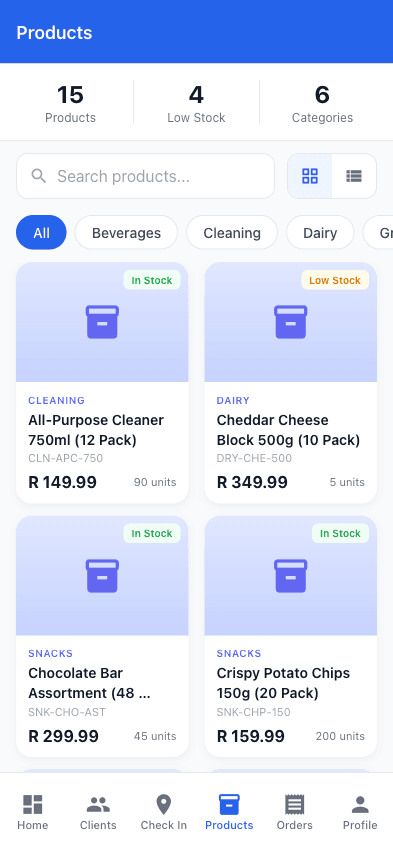
Customers can place orders, check delivery status, and download invoices directly from their mobile device, providing ultimate convenience and flexibility.
- Place orders anytime from mobile device
- Check the latest order status and assigned delivery date
- Download order and invoice PDFs on the go
- Quick reorder from previous purchases
Benefits of Customer Portal Software
Customer portals benefit distributors by cutting administrative order-taking time, giving customers 24/7 ordering and invoice access, improving order accuracy through direct data entry, and increasing repeat order frequency through one-click reordering — without adding headcount as the customer base grows.
Customer portals reduce repetitive work by letting customers enter orders, retrieve invoice PDFs, and check recorded order status themselves.
Measure it: Track time spent retyping orders and answering invoice or status requests before rollout, then compare after adoption.
24/7 access to ordering, invoices, and tracking improves satisfaction by giving customers control and convenience on their schedule.
- • Order anytime, day or night
- • Instant access to information
- • No waiting for callbacks
- • Self-service convenience
Direct customer data entry eliminates miscommunication and transcription errors, ensuring orders are accurate from the start.
- • No phone miscommunication
- • Customer verifies before submitting
- • Reduced order corrections
- • Fewer returns and complaints
Easy reordering and 24/7 access encourages more frequent purchases, increasing order values and customer lifetime value.
Support unlimited customers without proportionally increasing staff, allowing your business to grow efficiently.
- • No staffing constraints
- • Handle growth without hiring
- • Consistent customer experience
- • Lower cost per customer
Frequently Asked Questions
Common questions about B2B customer portal software and self-service ordering
A B2B customer portal is a secure, self-service website or app where a business’s wholesale and trade customers log in to place orders, see their own negotiated prices, check live stock, download invoices, and track deliveries — without phoning or emailing a sales rep or office admin.
A portal can reduce manual order entry, invoice-copy requests and status calls. The result depends on order volume and customer adoption, so compare those tasks before and after rollout.
Customers receive secure login credentials and can access the portal through any web browser on desktop or mobile devices. The portal is available 24/7, allowing customers to place orders and access information at their convenience.
Yes, customers can browse your product catalog, add items to cart, specify quantities and delivery dates, and submit orders directly through the portal. They can also quickly reorder from their order history with a single click, or submit a request for quote for bulk or non-standard requirements.
The customer portal is included from the Professional plan: R1,999/month base plus R499/user/month (ZAR + 15% VAT), for your internal team of reps and staff — there is no separate portal licence fee. See the full pricing breakdown or start a 14-day free trial, no credit card required.
No. Your customers’ portal logins are free and unbilled — pricing is based on your internal team members (reps, dispatchers, admins), not on how many customer accounts you invite to order through the portal. You can invite as many customers as you have.
Yes. The portal catalog reflects your actual stock position, updated as orders are placed and dispatched, so customers see what is genuinely available before they order rather than finding out after the fact when a line is out of stock.
The portal supports account-based ordering and shows invoice payment status and balances. It does not currently collect card or EFT payments inside the portal.
Yes, the customer portal is fully responsive and mobile-optimized, allowing customers to place orders, check status, and download invoices from smartphones and tablets while on the go.
Customers can view invoices assigned to their account, download PDFs, and check payment status and balance. Account-statement generation is not currently part of the portal.
You can assign customer-specific pricing and control whether each portal login may place orders or request quotes. All active catalog products are currently visible to portal users for that tenant. Start your free trial to test the portal workflow.
A customer portal serves your existing trade accounts with login-gated, per-customer pricing and self-service ordering — it is not built to attract new public shoppers. A B2B e-commerce site is a separate, public-facing storefront for discovery and new customer acquisition. Most distributors need the portal first; some later add a public site on top. We cover the trade-offs in detail in B2B Ecommerce vs Customer Portal: What You Need.
Simple, Transparent Pricing
Monthly base fee plus a per-user fee. All prices in ZAR, with 15% VAT shown separately where applicable.
Perfect for small sales teams getting started
+ R349/user/month
For growing teams that need more power
+ R499/user/month
For large teams with complex needs
+ R699/user/month
14-Day Trial
Test the Professional workflow without a credit card
Annual Discount
Pay annually and get 2 months free (save 17%)
Cancel Anytime
Review the current subscription terms before purchase
Related Solutions
Customer Ordering App
The self-service ordering piece of the portal, in depth — catalog, live stock and per-customer pricing.
Order Taking App
See how reps take orders in the field and customers order themselves, on one platform.
Field Sales Software
Route planning, check-ins and order capture for reps working alongside a self-service portal.
Pricing
Full plan breakdown, including which plans include the customer portal.