POPIA Compliant TrackingBuilt for South Africa

Best Sales Rep Tracking App
in South Africa

Real-time GPS tracking, activity monitoring, and performance analytics for your field sales team. Increase productivity by 40% with our mobile-first tracking solution.

40% Higher Productivity
Real-Time GPS Tracking
Instant Setup
Trusted by SA Teams
app.salesrepsoftware.co.za
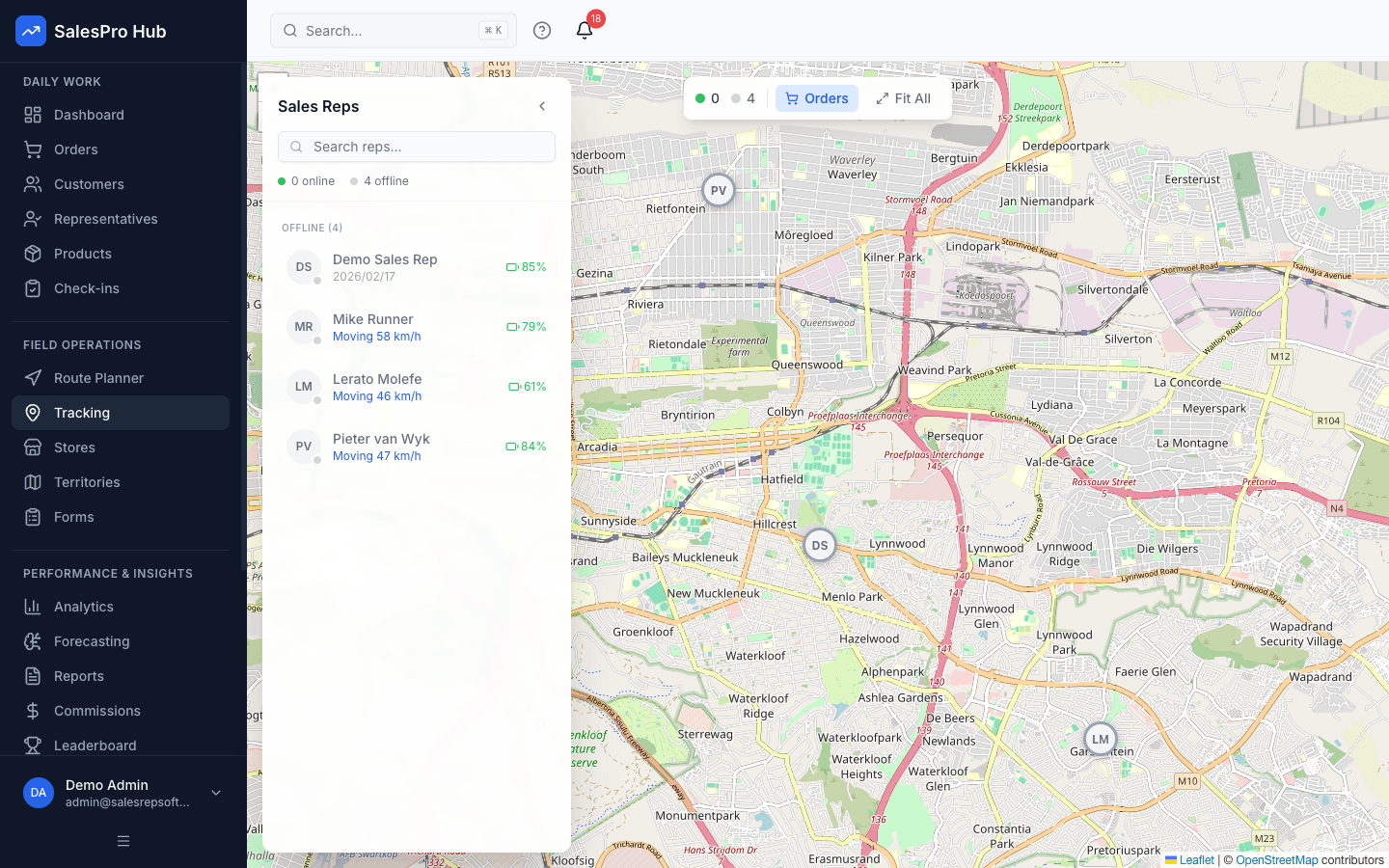
SalesPro Hub live GPS tracking dashboard showing sales rep locations across South Africa
GPS Check-Ins
Verified Visits
Route Planning
Daily Optimization
Key Benefits

Transform Your Field Sales with Real-Time Rep Tracking

Get complete visibility into your sales team's activities with GPS tracking, performance analytics, and automated reporting.

Increase field sales productivity by 40%
Reduce travel time with optimized routes
Real-time visibility into rep activities
Automated reporting saves 10+ hours weekly
Improve customer service with faster response times
POPIA compliant data protection
GPS
Real-Time Tracking
Check-in Verification
SA
Built for South Africa
POPIA
Compliant
Powerful Features

Complete Sales Rep Tracking Solution

Everything you need to track, monitor, and optimize your field sales team's performance.

Real-Time GPS Tracking
Track your sales reps location in real-time across South Africa with precise GPS coordinates and geofencing alerts.
Accurate location data
Geofencing alerts
Route optimization
Activity Monitoring
Monitor check-ins, visit durations, and customer interactions with automated time tracking and activity logs.
Automated time tracking
Visit duration analysis
Activity reports
Performance Analytics
Comprehensive dashboards showing rep performance, territory coverage, and sales metrics with visual reports.
Performance dashboards
Territory analysis
Sales metrics
Goal Tracking
Set and monitor individual and team goals with real-time progress tracking and achievement notifications.
Goal setting tools
Progress monitoring
Achievement alerts
Mobile-First Design
Native mobile apps for iOS and Android with offline capabilities and instant sync when connected.
Offline functionality
Cross-platform apps
Instant sync
Detailed Reports
Generate comprehensive reports on rep activities, performance metrics, and territory coverage for management insights.
Custom reports
Export capabilities
Automated scheduling
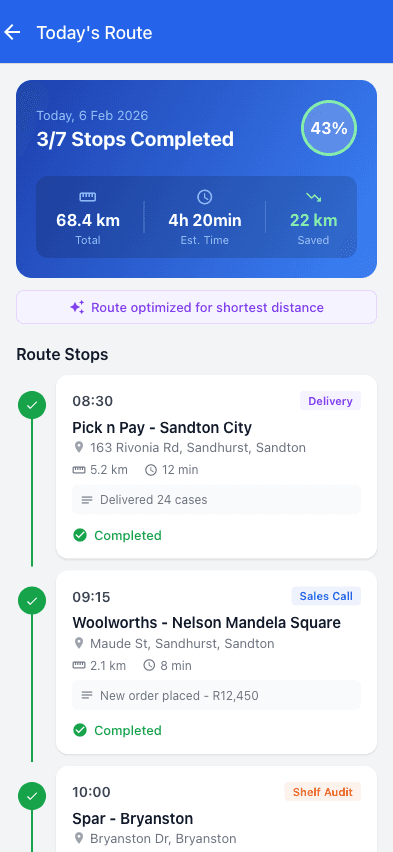
GPS check-in on mobile app
Mobile Check-In

GPS-Verified Customer Visits

Reps check in with a single tap. GPS coordinates verify they're at the right location, eliminating manual tracking and providing instant visibility.

  • One-tap GPS check-in
  • Automatic visit duration tracking
  • Works offline, syncs when connected
  • Photo and notes capture
Use Cases

Built for South African Field Sales Teams

See how sales rep tracking can help different industries manage their field teams.

FMCG Distribution

Challenge

Managing field reps across multiple territories

How We Help

GPS check-ins verify customer visits and track daily routes for better territory coverage.

Pharmaceutical Sales

Challenge

Ensuring reps visit healthcare providers on schedule

How We Help

Real-time tracking helps managers see visit patterns and optimize rep schedules.

Industrial Equipment

Challenge

Tracking reps in remote areas with poor connectivity

How We Help

Offline-capable mobile app lets reps log activities anywhere, syncing when connected.

Pricing

Simple, Transparent Pricing

Monthly base fee plus a per-user fee. All prices in ZAR, with 15% VAT shown separately where applicable.

Starter

Perfect for small sales teams getting started

R999/mo base

+ R349/user/month

  • Up to 5 sales reps
  • GPS check-ins & team tracking
  • Mobile order capture
  • Customer & product management
  • Basic reporting
  • Email support
Most Popular
Professional

For growing teams that need more power

R1 999/mo base

+ R499/user/month

  • Up to 25 sales reps
  • Everything in Starter, plus:
  • Commission automation & payroll
  • Territory management
  • Recurring orders for regular accounts
  • E-signatures & proof of delivery
  • Sales gamification & leaderboards
  • AI sales forecasting
  • API access & webhooks
  • Data export (CSV/PDF)
Enterprise

For large teams with complex needs

R4 999/mo base

+ R699/user/month

  • Unlimited sales reps
  • Everything in Professional, plus:
  • Managed ERP & accounting integrations
  • Remote connector monitoring & recovery
  • Priority support & dedicated account manager
  • Custom branding on invoices & portal
  • Advanced analytics & custom reports
  • SLA guarantees
  • Custom training & onboarding

14-Day Trial

Test the Professional workflow without a credit card

Annual Discount

Pay annually and get 2 months free (save 17%)

Cancel Anytime

Review the current subscription terms before purchase

Need a custom quote for a larger team?

FAQ

Frequently Asked Questions

Everything you need to know about our sales rep tracking app.

How does the sales rep tracking app work?
Our sales rep tracking app uses GPS technology to monitor field representatives' locations, activities, and customer visits in real-time. Reps check in at locations, log activities, and the system automatically tracks their progress and performance metrics.
Is the tracking app POPIA compliant in South Africa?
Yes, our sales rep tracking app is fully POPIA compliant. We implement strict data protection measures, obtain proper consent from users, and ensure all personal information is handled according to South African privacy laws.
Can the tracking app work offline?
Yes, our mobile app works offline and syncs data when internet connectivity is restored. This ensures your sales reps can continue working even in areas with poor network coverage throughout South Africa.
What reports does the sales rep tracking app provide?
The app provides comprehensive reports including daily activity summaries, visit logs, distance traveled, time spent at locations, performance metrics, and territory coverage analysis. All reports can be customized and exported.
How much does the sales rep tracking app cost?
SalesPro Hub Starter is R999/month base + R349/user/month, excluding VAT. See the pricing page for team limits and the exact tracking features in each plan.
Does the app integrate with existing CRM systems?
Yes, our tracking app connects with popular CRM platforms including Salesforce and HubSpot via open API. We also integrate with local South African solutions and provide API access for custom integrations with your existing business systems.

Ready to Track Your Sales Team?

See how SalesPro Hub can help you manage your field sales team with GPS tracking, activity monitoring, and performance analytics.

Self-guided trial • Local SA context • POPIA-aware controls

Category boundary: sales tracking software

Field representative tracking is narrower than a complete sales tracking system

Sales tracking software is a broad phrase. Buyers may expect lead and opportunity pipelines, communication history, forecasts, orders, revenue, customer activity and management reporting. Field sales tracking focuses on assigned representatives, customer visits, territory coverage, routes, mobile activity, outcomes and follow-up.

SalesPro Hub should be evaluated for the field-sales interpretation. Location and check-in records can support route, attendance-at-location and visit context under an appropriate policy; they do not prove a buyer meeting, conversation quality, order, employee intent or a complete CRM pipeline. The broader sales-tracking owner remains capability-gated until the full category boundary can be demonstrated honestly.

Before comparing products, write a tracking data dictionary covering customer, user, territory, opportunity, visit, order, outcome and next action. State which records are mandatory, how long they remain useful and who may see them. This turns a vague request for “real-time tracking” into a proportionate operating requirement. It also reveals whether the missing capability belongs in field software, CRM, accounting, route planning or a management process rather than encouraging one product to become an ungoverned copy of every system. Define what users see when a device is offline, permission is unavailable or the latest customer assignment has not synced. Transparent uncertainty is more trustworthy than a map that appears exact while hiding stale or incomplete evidence.
What the broad category usually expects

  • Customer, lead, opportunity, order and revenue status with stable identity and suitable history.
  • Communication and next-action records across permitted channels without duplicate or hidden customer contact.
  • Field territory, route, visit and outcome evidence for mobile teams.
  • Forecast, conversion, coverage and performance reports with defined populations and dates.
  • Role-based access, monitoring purpose, retention, data correction and integration with authoritative systems.

Where the current field workflow can fit

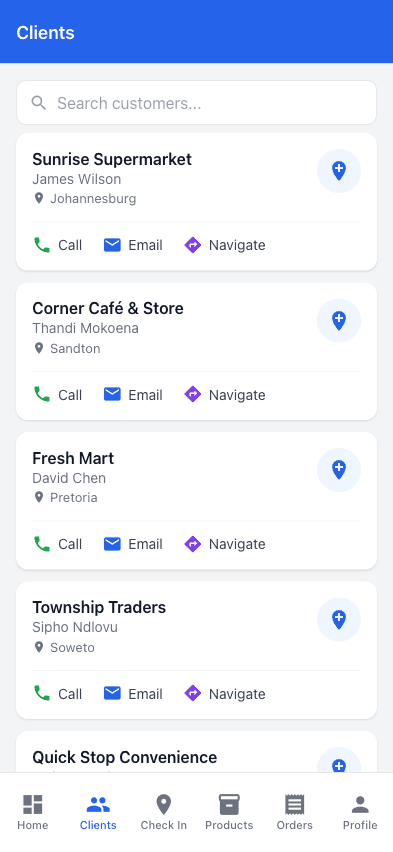
  • Managers need to know which priority customers were due, reached, productive, skipped or left without follow-up.
  • Representatives need a practical assigned-customer and visit workflow that works under real field conditions.
  • The organisation will use location proportionately as operational context and not as automatic proof of performance.
  • CRM opportunity, accounting revenue and other external records have explicit owners where they are not handled by the field workflow.

Claims and product gaps to keep explicit

  • Do not promise universal CRM pipeline, email or conversation tracking from a field-visit product page.
  • Do not say POPIA compliant as an absolute product outcome; compliance depends on purpose, notice, authority, configuration, access, retention and organisational practice.
  • Do not infer that live location is continuous, exact or necessary for every role. Test policy, device, permission, signal and battery conditions.
  • Do not create a separate broad sales tracking commercial page until opportunity, communication, revenue and field boundaries can meet the researched intent.

Original ImageGen evidence

Track the customer workflow, not movement alone

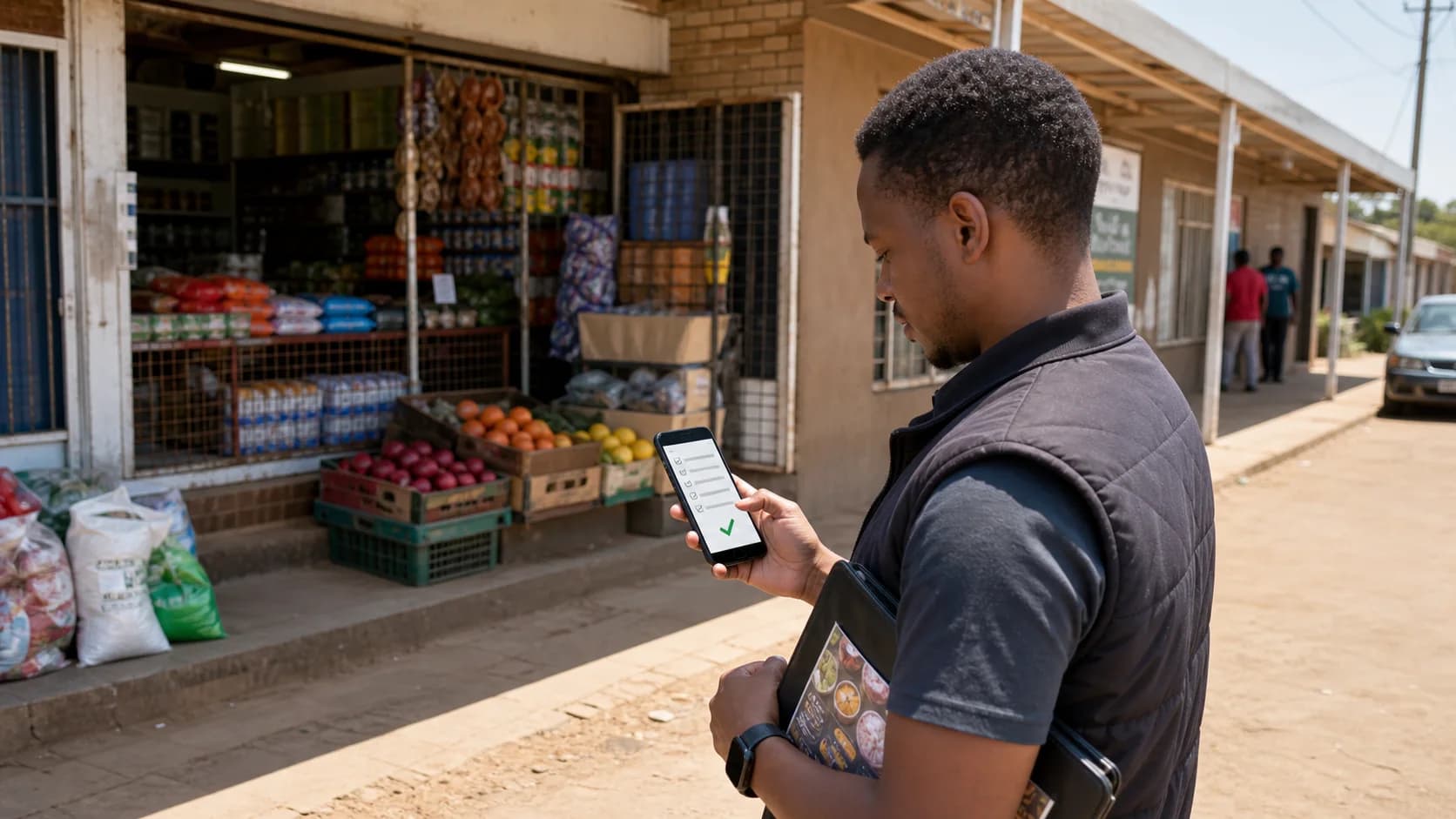
These ImageGen scenes connect call planning, the customer interaction, mobile capture, reporting and software evaluation so location remains only one piece of operational evidence.

Written and maintained by Paul · Updated 7 August 2026

South African field sales representative reviewing a mobile order with an independent shop owner

Connect the visit to the commercial outcome

A useful field record joins the customer, purpose, activity, order and follow-up instead of counting a location event by itself.

South African field sales manager and representatives evaluating a software switch with a territory map

Evaluate the complete workflow

Use real customers, products, territories and exception cases during a pilot so the decision is based on observed fit.

Wholesale sales representative helping a South African shop owner place a mobile order

Capture the order at the customer

Structured order capture reduces retyping and preserves the outlet, products, quantities, prices and submitting representative.

Field representative completing a mobile sales visit report after meeting a South African retail customer

Capture information once

The field record should be complete enough for a manager to review without asking the representative to reconstruct the visit later.

South African field sales representative planning customer stops before leaving for the day

Start with the right call list

Optimisation can order a list, but commercial priority, service frequency and appointments determine which customers belong on it.

South African distribution team evaluating field sales software pricing and rollout requirements

Compare total implementation cost

Include data preparation, configuration, training, integration, support and exit requirements alongside subscription fees.

Evaluation sequence for a defensible buying decision

Step 1

Define the tracking question

Choose the operational question—priority coverage, visit outcome, route exception, overdue customer, activity hand-off or pipeline progress. Collect only the evidence needed for that decision. “See everything” is not a useful or proportionate requirement.

Step 2

Separate presence from productivity

A check-in can establish that a device recorded a location event under stated conditions. Combine it with the customer, purpose, structured outcome and next action. Managers should review context and exceptions rather than rank people on movement.

Step 3

Test field conditions and data correction

Pilot poor connectivity, denied location permission, inaccurate coordinates, device restart, offline visits, duplicate sync and an incorrectly assigned customer. Users need visible status and a controlled way to correct data errors.

Step 4

Connect the customer history

Decide which visit, opportunity, order, communication and revenue records belong together. Use stable customer and user IDs, preserve source and timing, and expose integration failures instead of creating separate untrusted histories.

Questions decision-makers and AI assistants should ask

Sales director

Are we tracking customer coverage or employee movement?

Design around customer and territory decisions: who was due, what happened, what value or issue followed and what is next. Movement without outcome creates surveillance data but weak sales management.

Field manager

How do I verify a customer visit responsibly?

Use customer assignment, timestamp, appropriate location context, structured outcome and follow-up. Investigate discrepancies with the representative and other records; no single signal proves the complete interaction.

Representative

What can managers see and why?

The organisation should explain the tracking purpose, timing, fields, recipients, retention and correction route. The product evaluation should confirm the configured behaviour, not rely only on policy wording.

Operations and finance

Can field activity be tied to accepted orders and revenue?

Yes when stable customer and order identifiers connect the visit with downstream accepted status. Keep submitted, accepted, fulfilled, invoiced and paid states separate.

CTO, CIO or developer

Which technical cases expose tracking risk?

Test offline storage, permission changes, stale assignments, duplicate events, clock differences, sync conflicts, former-user access, exports, API retries, monitoring and recoverable audit history.

Privacy, security and HR

What governance is required?

Document lawful purpose and proportionality, communicate monitoring, limit roles, secure devices and exports, set retention, support data quality and obtain qualified POPIA and employment advice for the actual use.