See Every Rep, Every Visit, Every Rand — in Real Time
Know exactly where your reps are, what they've sold, and what they're owed — updated live. One platform built for South African field sales teams.
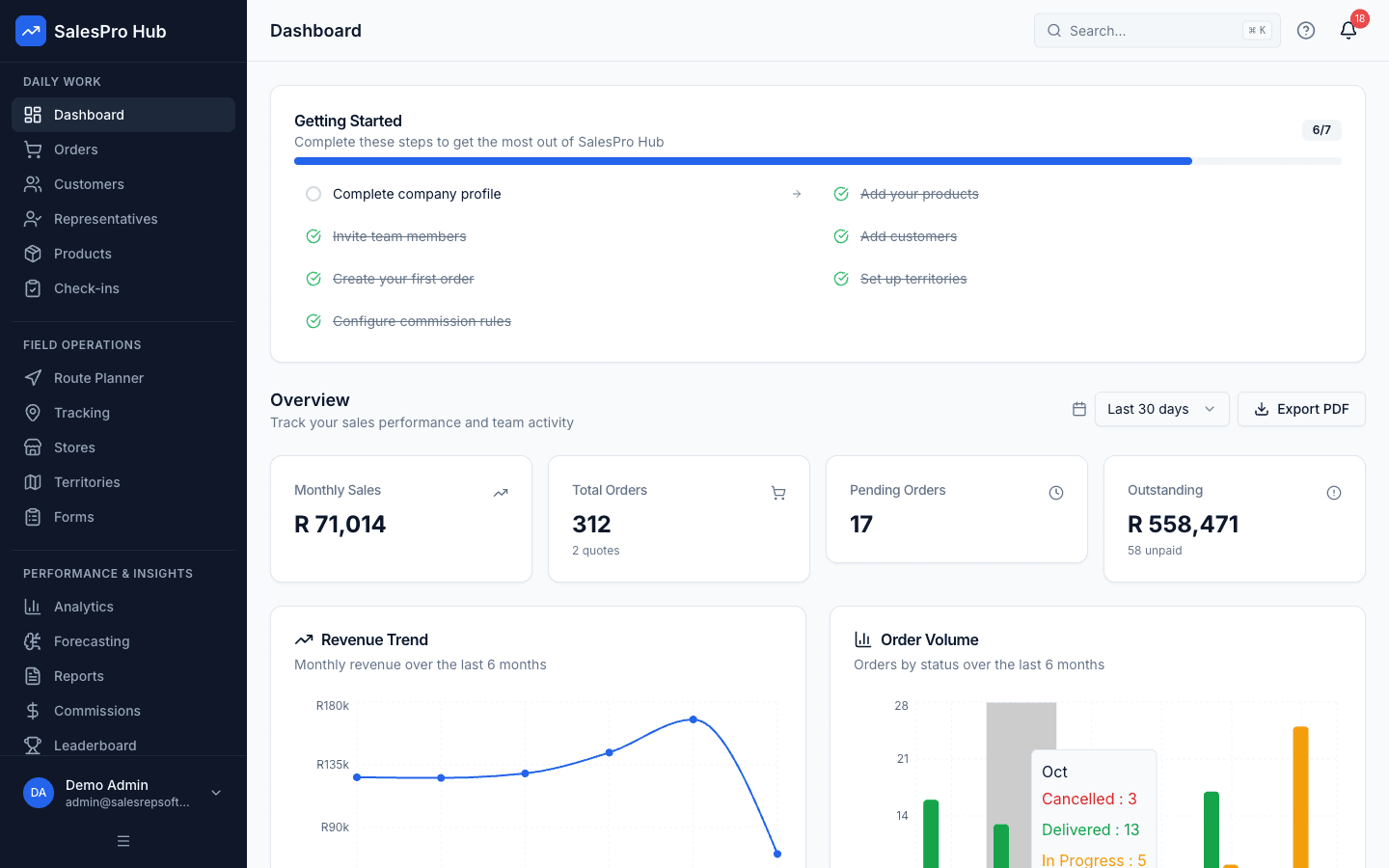
Stop Losing Sales to Poor Visibility
Managing a field sales team without the right tools costs you time, money, and opportunities every single day.
No Accountability
You can't see where your reps actually are. Are they visiting customers or sitting in traffic? Without GPS tracking, you're flying blind.
Commission Chaos
Spreadsheets for commission tracking lead to calculation errors, payment disputes, and hours of admin work every month. Your reps deserve better.
Data Silos
Customer info in WhatsApp, orders in spreadsheets, commissions in another file. Important data scattered across a dozen different places.
The good news? These problems are solvable with the right tools.
See SalesPro Hub in Action
Watch a quick walkthrough of the platform — GPS tracking, orders, commissions, gamification, and more.
Track Reps. Capture Orders. Pay Commissions.
All From One Screen.
Every tool your field sales team needs — GPS tracking, mobile orders, commissions, and performance dashboards. Built specifically for South African businesses.
Verify rep locations with timestamped GPS check-ins at customer sites. Know who visited where and when.
Explore GPS trackingReps capture orders on their phone, synced instantly to your system. No more paper order forms.
Explore mobile order captureApply configured commission rules automatically, with a reviewable calculation trail before payroll.
See commission automationSee your entire team's activity live. Track visits, orders, and performance at a glance.
Explore sales dashboardsAssign territories, prevent overlap, and ensure complete coverage of your market.
Explore territory managementWorks without internet. Reps can take orders and check in even in areas with poor connectivity.
See the offline mobile app
Go live in a day.
Even with messy data.
Export your customers, products, and stock levels from Excel, Google Sheets, or your old system as CSV. Our smart import wizard auto-detects your columns, cleans your data, and lets you review every change before anything goes live. Close mid-import? Your draft is autosaved.
01
Upload your spreadsheet
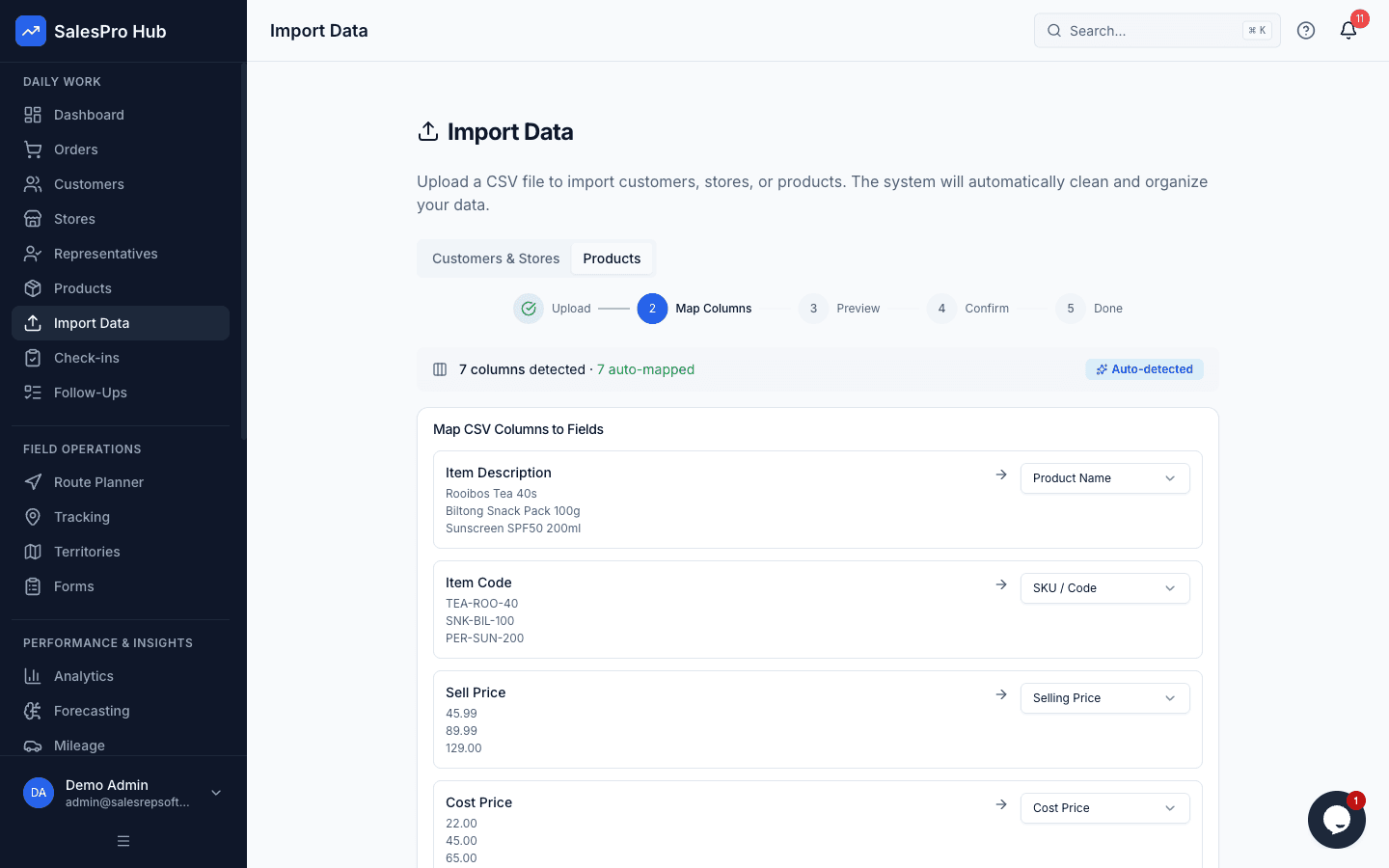
Drop in any CSV. Column names don't need to match ours — headers like "Item Description", "CUST NAME", or "Sell Price" all work.
02
Columns mapped automatically
The wizard detects which column is which and groups store branches under the right customer — even when names are inconsistent.
03
Review before anything goes live
See a full before-and-after preview. Every auto-fix is listed. Edit names, fix types, or remove rows — all before you confirm.
04
Fine-tune with the spreadsheet editor
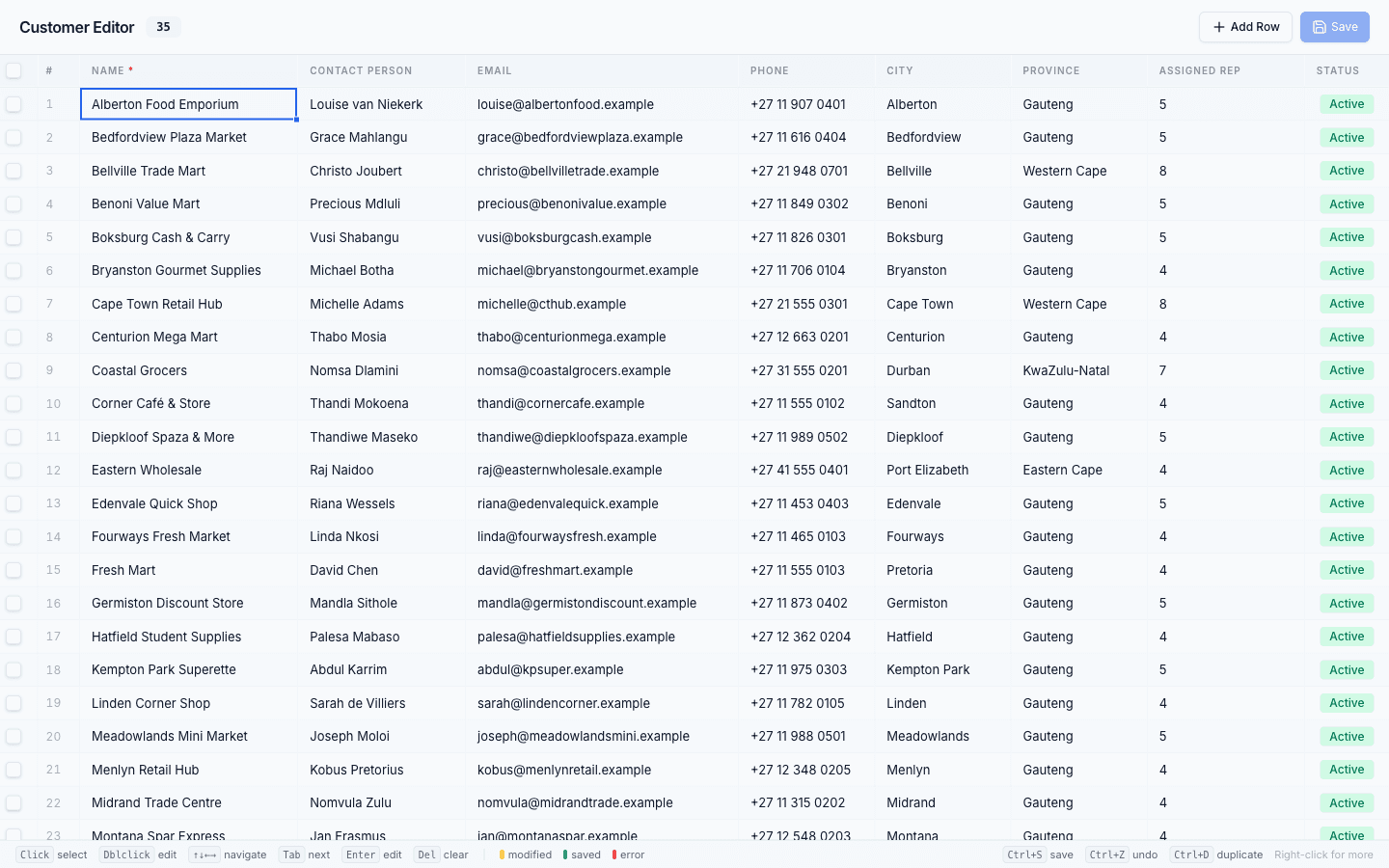
After import, our Excel-like editor lets you update records in bulk. Keyboard shortcuts, copy-paste, colour-coded rows, column visibility toggles and brand filters.
Non-standard headers like "Item Description", "Sell Price" and "Cat" are matched to the right fields automatically.
Fix anything after import
Once your data is in, the spreadsheet editor lets you clean up anything that needs a human eye. It works like Excel — no new skills needed.
- Keyboard navigation — arrow keys, Tab, Enter
- Bulk copy-paste from Excel or Google Sheets
- Colour-coded rows: modified, saved, error
- Ctrl+Z to undo any change
- Right-click for bulk actions
Features Other Tools Don't Have
Most field sales software covers GPS and orders. SalesPro Hub goes further with capabilities you won't find elsewhere.
Commission Automation
Tiered, percentage, and fixed commission rules calculated automatically. Reps see real-time earnings.
Sales Gamification
XP systems, leaderboards, contests, achievement badges and streaks that drive performance.
AI Sales Forecasting
See whether you're on track to hit target this month. Plan ahead with AI-powered revenue predictions instead of gut feel.
Smart Import
Import messy spreadsheets without reformatting first. Auto column detection, branch grouping, full data preview. Go live in a day.
Integrations via Open API
Connects with Sage, Xero, QuickBooks, and more via open API and webhooks
Built for South African Businesses
We're not a foreign product adapted for SA. We built this software from the ground up for the South African market.
South African Market Focus
ZAR pricing, local buyer context, and workflows designed around mobile field sales, wholesale and distribution.
Transparent ZAR Pricing
See the monthly base fee, per-user fee, plan limits, annual option and VAT context before starting a trial.
POPIA-Aligned Controls
Role-based access, encryption and data-handling controls can support your POPIA operating policy and procurement review.
Self-Service Evaluation
Use the product tour and a 14-day trial first. Email support is available when a workflow or procurement question needs a person.
Hosting Disclosed for Procurement
Current hosting, subprocessors and data-transfer safeguards are confirmed during procurement instead of being implied by marketing copy.
Inspectable Product Boundaries
Security, exports, integrations, plan limits and unsupported workflows are documented so buyers know what to test.
Verify one real workflow in a 14-day trial before you commit. No credit card required.
Simple, Transparent Pricing
Monthly base fee plus a per-user fee. All prices in ZAR, with 15% VAT shown separately where applicable.
Perfect for small sales teams getting started
+ R349/user/month
For growing teams that need more power
+ R499/user/month
For large teams with complex needs
+ R699/user/month
14-Day Trial
Test the Professional workflow without a credit card
Annual Discount
Pay annually and get 2 months free (save 17%)
Cancel Anytime
Review the current subscription terms before purchase
No sales call required
See it, test it, and decide on your own schedule
The standard evaluation path is fully self-service. Human help stays available for complex imports, integrations, security reviews and larger rollouts.
14 days · no credit card · cancel before choosing a plan
- 01
Preview without signup
Watch the walkthrough and explore the interactive sample workspace.
- 02
Open your own workspace
Start a 14-day Professional trial without entering card details.
- 03
Prove one real workflow
Load sample data or import your customers and products, then run a small pilot.
Frequently Asked Questions
Everything you need to know about SalesPro Hub.
You can start the self-service trial immediately with sample data or import your own customers and products. The time for a full rollout depends on data quality, integrations, and team size. The in-product checklist guides a standard pilot, with human help reserved for complex implementation questions.