App for Customers to Place Orders
Built for wholesalers and distributors — not restaurants. Give every trade customer their own login to browse your live catalog, order at their own negotiated price, and submit orders 24/7 without another phone call or WhatsApp message.
14-day free trial, no credit card required. See real customer orders come through in your first week.
An Ordering App Built for Wholesale, Not Takeout
Search “app for customers to place orders” and almost every result is a restaurant ordering app, a food delivery listing, or a generic app-store page. None of them are built for how a distributor actually sells: bulk quantities, credit accounts, negotiated pricing per customer, and orders that need to be checked against real stock before they are confirmed.
A customer ordering app is simply a self-service front end onto your existing order management system — the same product catalog, prices, stock and customers your reps and office staff already work with, opened up so the customer can place the order directly instead of relaying it through a person. For a distributor that means a wholesale buyer, a retail store owner or a contract customer signing in from their own phone or laptop, browsing exactly what they are entitled to buy, and submitting an order that lands in your system the same way a rep-captured order would.
It is not a shopping cart bolted onto a website. It is tied into the same pricing engine, customer accounts and stock records your business runs on, so an order placed by a customer at 9pm on a Sunday is treated exactly the same as one taken by a rep on Monday morning — checked against the same rules, queued in the same dispatch list, and invoiced the same way.
- Orders scattered across WhatsApp threads, calls and emails
- Customers can only order during office hours, if a rep is free
- No visibility of stock, so orders get promised and then cancelled
- Staff have to remember or look up each customer’s price manually
- Nothing to review when a delivery dispute comes up weeks later
- Every order comes in through one system, in a consistent format
- Customers order any time, from any device, without waiting on staff
- Current available stock is shown before the order is placed
- Each customer automatically sees their own agreed price
- A dated, searchable order record for every account
The Same Buyer, Every Time
Wholesalers who move customers off WhatsApp and onto a self-service ordering app consistently report fewer missed orders, fewer pricing disputes, and hours of admin time returned to the office each week.
*Results vary by order volume and how many customers adopt the app. Figures are based on customer feedback, not an independent audit.
How Customers Log In and Order
No account setup for you to manage by hand. Each customer gets a secure login tied to their own account, price list and order history.
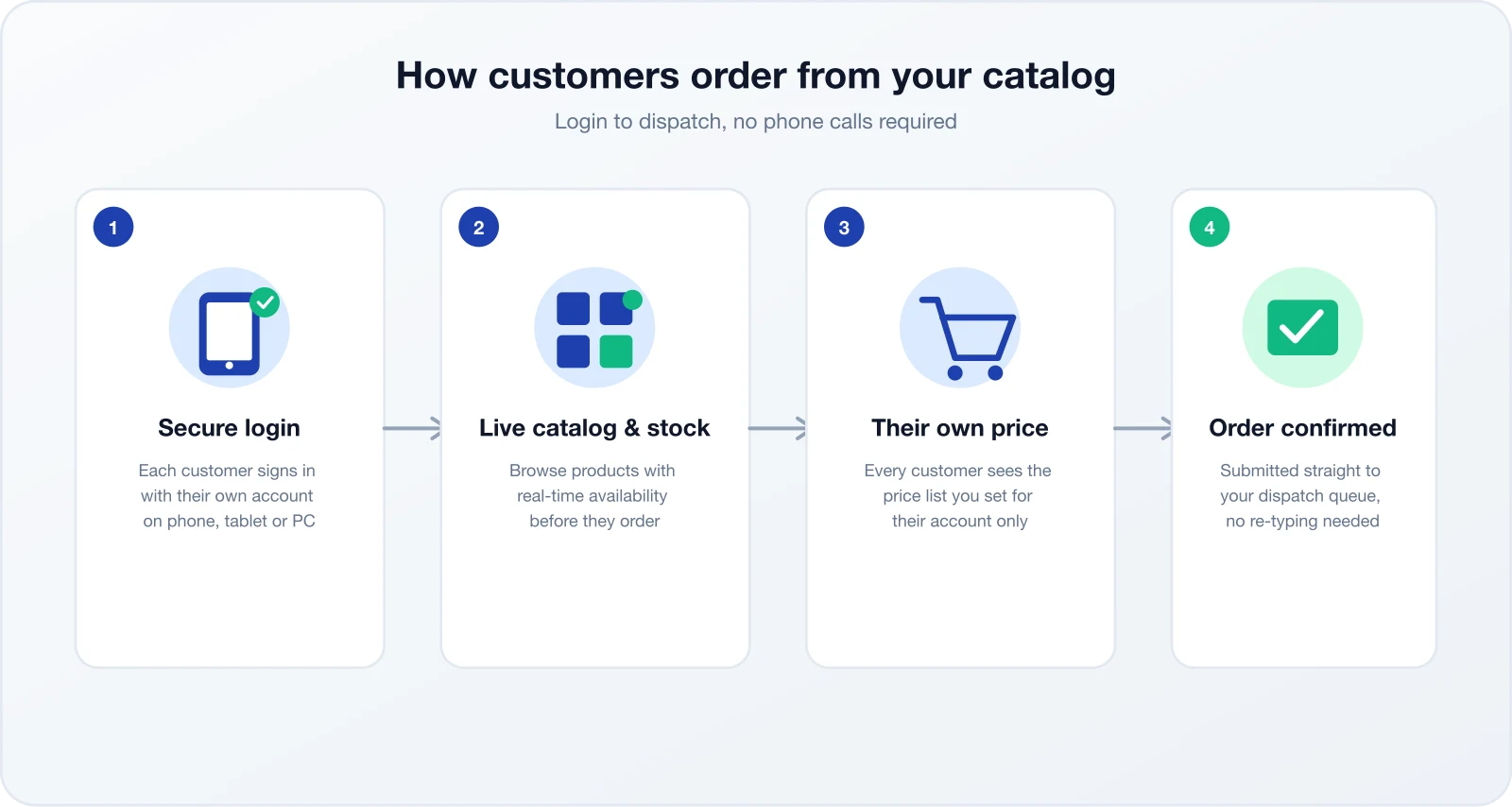
You send each customer an invite. They set a password once and log in from then on — no shared logins, no confusion about which account is ordering.
Customers search and filter your product range with images, descriptions and current available stock, so they can see availability before checkout.
Every price shown is theirs — the wholesale, retail or contract rate you have already agreed. No spreadsheets to check, no calls to confirm a discount.
The order lands in your queue immediately, ready to pick, pack and invoice — with no re-typing from a message thread or notepad.
A Catalog With Real Stock, Not a Static Price List
A PDF price list or a WhatsApp catalog photo goes stale the moment stock moves. The customer ordering app reflects your actual stock position, so customers see what is genuinely available before they commit to an order — not after you have called to say a line is out of stock.
- Stock levels update automatically as orders are placed and dispatched
- Out-of-stock items are clearly flagged instead of hidden or guessed at
- Search and category filters so customers with large product ranges find items fast
- Product images and specs reduce wrong-item orders and returns
Per-Customer Price Lists
A wholesale account, a retail shop and a key account can all buy the same product at three different prices — and each of them only ever sees their own.
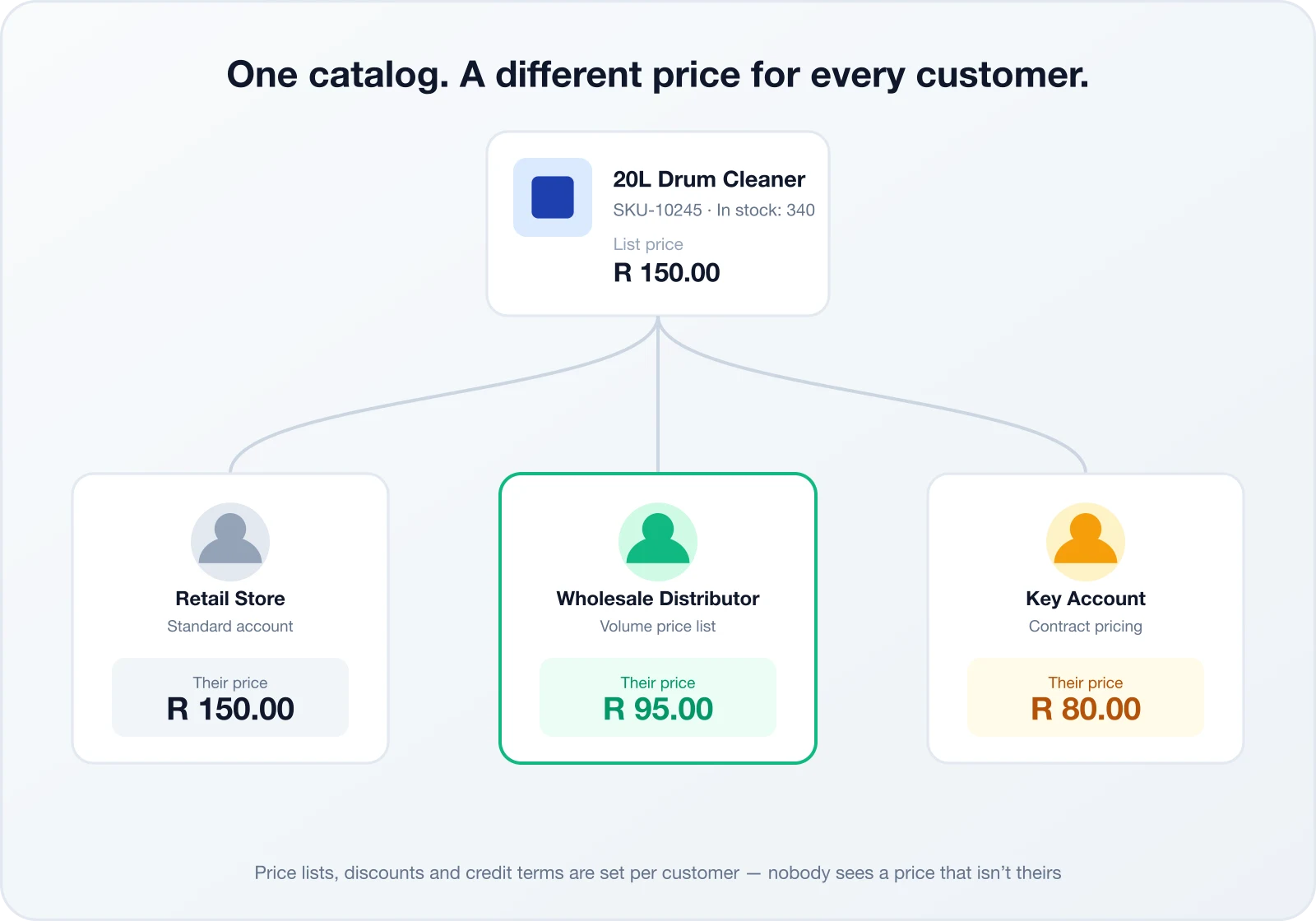
Assign a price list, discount group or contract rate to each customer. Changing one customer’s pricing never affects another.
Orders are recorded against the customer account with unpaid, partial or paid status and a visible balance. Portal checkout does not collect payment.
Pricing is tied to the logged-in account. A customer can never browse another customer’s rate, even on the same product.
Who Uses a Customer Ordering App
Any business selling to trade or repeat B2B customers — where the same buyer orders the same range of products again and again — benefits from letting that customer place the order themselves.
The common thread across every industry below is a repeat buyer with an established account, not a first-time consumer deciding what to have for dinner. If your customers place broadly the same order every week or month, against an account you already manage, a self-service ordering app pays for itself quickly in reduced admin time alone.
Retailers and cleaning contractors reorder the same lines weekly. Self-service ordering turns a routine call into a two-minute reorder.
Contractors and builders order materials against project accounts with credit terms and site-specific delivery addresses.
Farms and co-ops order seasonal inputs at negotiated seasonal pricing, with stock visibility that matters most at planting and harvest time.
Bottle stores, restaurants and spaza shops reorder stock at their own wholesale price without waiting for a rep visit.
Standard Orders and Requests for Quote
Not every order fits a fixed price list. Customers can submit a standard order instantly, or raise a request for quote when they need bulk pricing, a custom combination, or an item outside the normal catalog.
- • Instant submission at the customer’s live price
- • Requested delivery date, address and notes
- • One-click reorder from previous orders
- • Full order history and status tracking
- • For bulk quantities or non-standard combinations
- • Routed to a rep or dispatcher to price and approve
- • Converts straight into an order once accepted
- • Keeps large or negotiated deals out of the standard price list
This matters because most B2B buying does not fit neatly into a fixed price list. A customer opening a second branch, ordering a pallet quantity instead of a case, or asking for a custom bundle needs a human to price it — but they should not have to phone to start that conversation. The RFQ flow lets them describe what they need inside the same app, and routes it straight to the right person to quote, without losing the request in an inbox or a missed call.
Restaurant Ordering Apps vs. a Wholesale Ordering App
It is worth being explicit about the difference, because most search results for “app for customers to place orders” are built for the wrong buyer entirely.
| Capability | Restaurant ordering app | SalesPro Hub |
|---|---|---|
| Pricing | One menu price for everyone | A different price list per customer account |
| Order size | Single-meal, consumer basket | Bulk quantities, cases and pallets |
| Payment | Card at checkout only | Account ordering; payment status tracked separately |
| Non-standard requests | Not supported | Requests for quote (RFQs) built in |
| Rep involvement | None | Same platform as your reps’ order-taking app |
Add It to a Home Screen — No App Store Needed
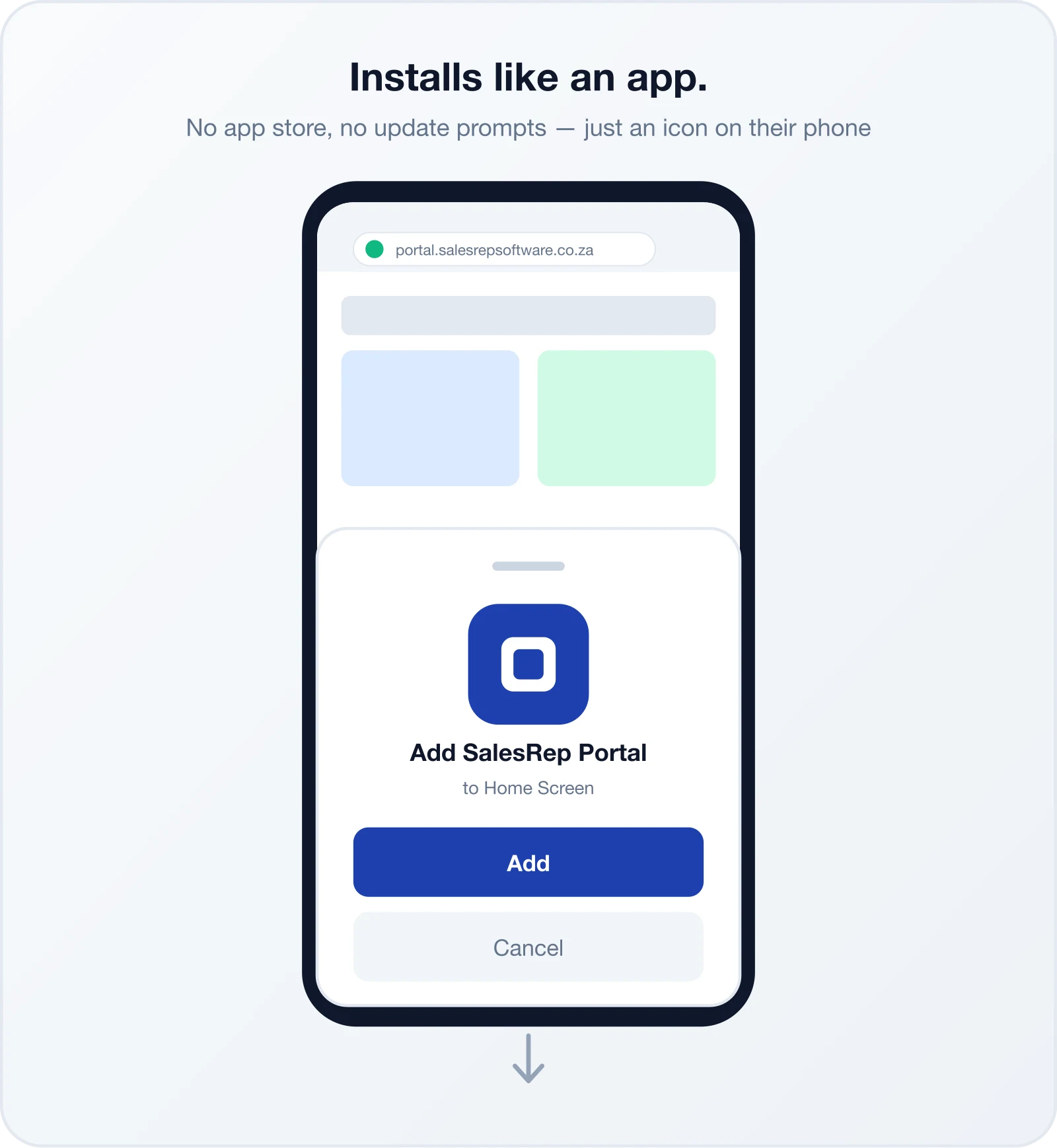
The customer portal includes an installable web-app manifest. Supported browsers can add it to a phone home screen, while iOS users can use Safari’s Add to Home Screen action. It still requires connectivity for ordering.
- Works on Android, iOS, desktop and tablet from one link
- Browser-based Add to Home Screen — no app-store account
- The latest portal version loads from the web
- Responsive interface for phones, tablets and desktops
Control Who Can Order or Request Quotes
Invite multiple users against a customer account and decide whether each login may place orders, request quotes, or use both. Customer-specific price lists are resolved automatically; all active tenant products are currently visible.
- Customer-specific price lists and product overrides
- Multiple logins per account for buyer, accounts and warehouse staff
- Separate order and quote permissions per portal login
- Password-based access and encrypted web transport
What It Costs
The customer ordering app is included with SalesPro Hub plans — there is no separate licence per customer account. See the full breakdown of plans and what is included on our pricing page, or start a 14-day free trial to try it with your own catalog and customers before you decide.
Replacing WhatsApp and Phone Orders
Most South African distributors we speak to still take a large share of orders through WhatsApp, calls, or a mix of both. It feels convenient because customers are already there — but it comes with real, measurable costs: orders buried in message threads, no stock visibility at the point of order, prices quoted from memory, and no clean record when a delivery is disputed.
We wrote up exactly what those hidden costs look like and how distributors are moving customers across without losing the relationship in Why WhatsApp Orders Are Costing Your Business. The short version: keep WhatsApp for the relationship, move the order itself into a system built to hold it.
In practice, the switch rarely happens all at once. Most businesses start with a handful of high-volume, tech-comfortable accounts, let those customers get used to logging in and reordering, and use that early success to bring the rest of the customer base across over a month or two. Reps stay involved throughout — placing a customer’s first order in the app for them, on a call, is often enough to get them ordering on their own the next time.
- Migrate customers gradually, starting with your highest-volume accounts
- Keep phone and WhatsApp open for support — just not for placing the order
- Reps can place the first few orders on a customer’s behalf to build the habit
Before → After
Built for South African Wholesale
SalesPro Hub prices in ZAR and calculates VAT on submitted orders. The sales-rep mobile app can capture orders offline; the customer web portal requires a connection. Customer data is handled with POPIA-aligned access controls and encrypted transport; contact us for the current hosting and subprocessor details required by your procurement policy. Support is available during SA business hours, over phone, email or WhatsApp.
South African wholesalers have to plan around connectivity. Reps can use the native mobile app to queue orders offline and sync them when signal returns. Customers use the responsive web portal while connected to browse their account pricing, submit orders and download documents. Pricing displays in ZAR, and submitted orders use the tenant VAT rate. Customer data is protected with account access controls and encrypted transport; contact us for current hosting and subprocessor details. Our support team works South African business hours and responds over phone, email or WhatsApp — not a ticket queue in a different time zone.
Frequently Asked Questions
Common questions about apps for customers to place orders
Yes. SalesPro Hub gives every customer their own login to a branded ordering portal where they can browse your catalog, check available stock, and submit orders directly. Supported browsers can add it to a home screen without an app-store download; ordering still requires connectivity.
Yes. Every customer account is linked to its own price list, so a wholesale account, a retail account and a key account can each see a different price for the same product. Customers only ever see the price you have set for them — never a competitor’s or another tier’s pricing.
Yes — this is who it is built for. Most ordering apps on the market are designed for restaurants and consumer food delivery. This app is built specifically for B2B wholesalers and distributors selling to trade customers: bulk quantities, credit accounts, per-customer pricing and RFQs, not single-consumer checkout carts.
Yes. The catalog shows current on-hand stock minus existing reservations. Out-of-stock items are flagged, and checkout applies the tenant’s configured validation, reservation or deduction policy.
The portal supports account-based ordering and shows invoice payment status and balances. It does not currently collect card or EFT payments inside the portal.
Yes. Start your 14-day free trial with no credit card required, so you can set up your catalog, invite a handful of customers, and see real orders come through the portal before committing to a plan.
Yes. Catalog prices display in South African Rand. Submitted orders calculate VAT using the tenant VAT rate, and order and invoice documents show VAT and total amounts.
The customer web portal requires an internet connection and does not queue offline checkouts. The separate sales-rep mobile app supports offline order capture and syncs queued orders after connectivity returns.
Simple, Transparent Pricing
Monthly base fee plus a per-user fee. All prices in ZAR, with 15% VAT shown separately where applicable.
Perfect for small sales teams getting started
+ R349/user/month
For growing teams that need more power
+ R499/user/month
For large teams with complex needs
+ R699/user/month
14-Day Trial
Test the Professional workflow without a credit card
Annual Discount
Pay annually and get 2 months free (save 17%)
Cancel Anytime
Review the current subscription terms before purchase
Related Solutions
Order Taking App
See how reps take orders in the field and customers order themselves, on one platform.
Customer Portal Software
The full self-service portal — invoices, order history, and account management alongside ordering.
Van Sales Software
Mobile order capture, route optimization, and stock management for van sales and DSD teams.