Automation Software

Sales Automation Software for Field Sales Teams

Eliminate repetitive administrative tasks with powerful sales automation software. Automate commission calculations, report scheduling, forms, and more. Save 5+ hours per week and let your team focus on what matters: selling.

Auto-CommissionsAuto-Calculations5hrs Saved/Week

See how automation transforms field sales operations and eliminates busywork.

What is Sales Automation Software?

Sales automation software eliminates repetitive manual tasks by automatically executing workflows, calculations, and processes, freeing your team to focus on selling.

Manual Process Challenges
  • 5-10 hours weekly per rep spent on paperwork and data entry
  • Manual commission calculations prone to errors and disputes
  • Delayed report generation limiting timely decision-making
  • Inconsistent processes and compliance issues across the team
  • Reduced selling time impacting revenue and customer relationships
Automated Process Benefits
  • 40-50% reduction in administrative time through automation
  • Instant commission calculations with 95%+ accuracy improvement
  • Automated report delivery on your schedule without manual work
  • Enforced compliance and consistency across all sales processes
  • More time for customer-facing activities and revenue generation

Eliminate Busywork and Focus on Selling

Join South African sales teams already using automation software to eliminate 5+ hours of admin work per week, reduce errors, and let reps focus on what they do best.

*Time savings and efficiency improvements based on customer feedback and industry research. Individual results may vary depending on current processes and implementation.

Core Automation Features & Capabilities

Comprehensive sales automation software that eliminates repetitive tasks and streamlines field sales operations from end to end.

Custom Form Automation

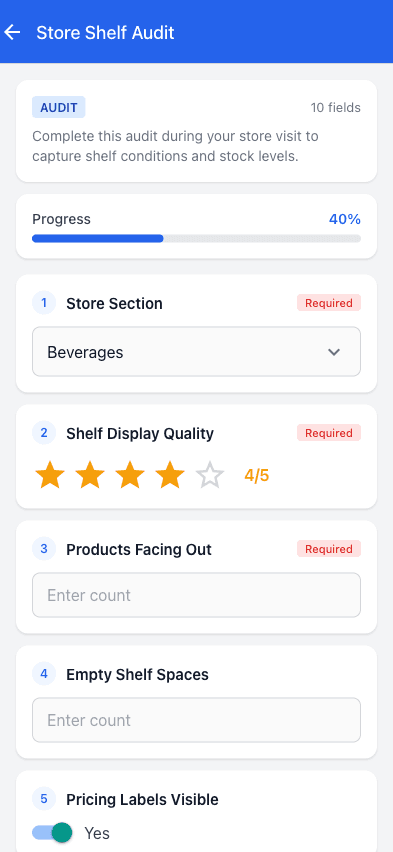
Create custom forms that automatically capture data, validate inputs, trigger workflows, and route information to the right stakeholders.

  • • Drag-and-drop form builder
  • • Conditional field logic
  • • Automatic data validation
  • • Mobile-friendly forms
Commission Auto-Calculation

Automatically calculate commissions when orders are submitted, applying complex multi-tier structures without manual intervention.

  • • Instant calculation on order
  • • Multi-tier structure support
  • • Real-time rep updates
  • • Payment-ready reports
Order Automation

Automate order processing from submission to fulfillment with automatic routing, inventory checks, and status updates.

  • • Auto order validation
  • • Inventory availability checks
  • • Automatic fulfillment routing
  • • Status notifications
Check-in Automation

Automatically log customer visits using GPS, track compliance, and trigger follow-up tasks without manual data entry.

  • • GPS-based auto check-in
  • • Visit duration tracking
  • • Compliance monitoring
  • • Auto follow-up tasks
Report Scheduling

Schedule reports to generate and deliver automatically daily, weekly, or monthly without any manual effort or intervention.

  • • Automated generation
  • • Email delivery scheduling
  • • Multiple format options
  • • Multi-recipient distribution

Ready to Automate Your Field Sales Operations?

Our sales automation software eliminates 40% of admin time, reduces errors, and lets your team focus on selling instead of paperwork.

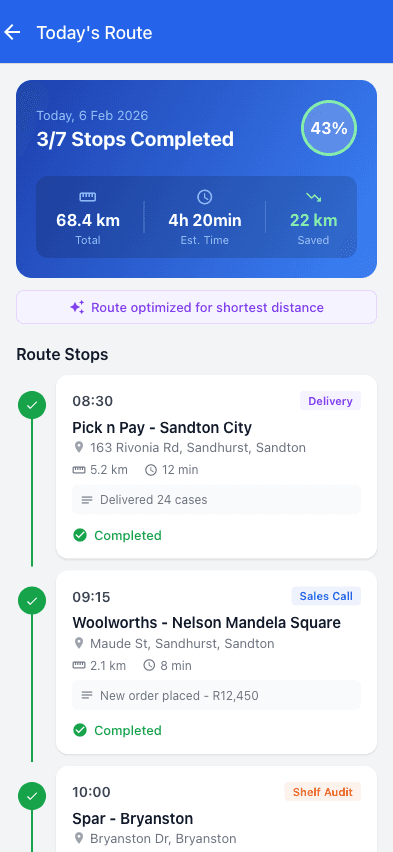
Mobile Automation

Automation in Your Pocket

Field sales reps submit forms, track commissions, and manage territories directly from mobile devices, eliminating paperwork in the field.

  • Submit automated forms from anywhere
  • Auto check-in with GPS tracking
  • Track commissions on mobile
  • Receive instant notifications
Mobile app showing automated workflows and processes

Benefits of Sales Automation

Transform your field sales operations with automation that delivers measurable improvements in productivity, accuracy, compliance, and team satisfaction.

40% Less Administrative Time

Sales automation eliminates 5+ hours of weekly busywork per rep, allowing teams to focus on revenue-generating activities and customer relationships.

Example: A 10-person team saves 50+ hours weekly on admin tasks, equivalent to adding 1.25 full-time employees without hiring costs.

Fewer Errors & Disputes

Automated processes eliminate manual data entry errors, commission calculation mistakes, and compliance oversights that cause disputes and rework.

  • • 95%+ reduction in calculation errors
  • • Consistent data validation
  • • Audit trails for all processes
  • • Reduced commission disputes
Faster Process Completion

Automation executes processes instantly instead of waiting for manual intervention, dramatically reducing turnaround times.

  • • Instant commission calculations
  • • Immediate order validation
  • • Real-time report generation
  • • Automated notification delivery
Better Compliance & Consistency

Automated workflows enforce business rules and compliance requirements consistently across the entire team without exceptions.

Process Consistency
Rule Enforcement
Audit Trails
Compliance Tracking
Scalable Operations

Automation scales effortlessly as your team grows without proportional increases in administrative overhead or management burden.

  • • Handle unlimited transactions
  • • Support growing teams easily
  • • Maintain efficiency at scale
  • • No additional admin staff needed
Proven Efficiency Gains
40%
Less Admin Time
5hrs+
Saved per Week
95%
Fewer Errors
Instant
Process Execution

*Results based on customer feedback and industry research. Individual results may vary.

Frequently Asked Questions

Common questions about sales automation software and process automation

What types of sales processes can be automated?

The platform automates multiple sales processes including custom form submissions, commission calculations, order processing, customer check-ins, report generation and distribution, task assignments, email notifications, and approval workflows. Any repetitive sales administrative task can typically be automated.

How much time can sales automation save?

Most field sales teams save 5+ hours per week per person on administrative tasks through automation. This translates to 40-50% reduction in admin time, allowing sales representatives to focus on customer relationships and revenue-generating activities instead of paperwork.

How does commission automation work?

Commission automation calculates earnings automatically when orders are submitted, applying the correct commission structure rules without manual intervention. The system handles complex multi-tier structures, instantly updates rep dashboards, and generates payment-ready reports automatically.

Is the automation software difficult to set up?

No, the platform is designed for business users without technical expertise. Our setup wizard guides you through configuring automations step-by-step, and our team provides implementation support. Most businesses have core automations running within days of starting.

Can automation integrate with existing systems?

Yes, the platform provides API access and webhooks for integration with external systems. Automations can trigger actions in other software, import data from external sources, and synchronize information across your business technology stack.

How does check-in automation benefit field sales?

Automated check-ins eliminate manual logging by using GPS to record customer visits automatically. The system tracks visit duration, generates compliance reports, updates visit schedules, and can trigger follow-up tasks or notifications based on check-in data.

What happens if an automation encounters an error?

The platform includes error handling and notification systems. If an automation fails, you receive immediate alerts with details about the issue. The system logs all automation activity for troubleshooting, and you can configure fallback actions or manual approval steps for critical processes.

Pricing

Simple, Transparent Pricing

Monthly base fee plus a per-user fee. All prices in ZAR, with 15% VAT shown separately where applicable.

Starter

Perfect for small sales teams getting started

R999/mo base

+ R349/user/month

  • Up to 5 sales reps
  • GPS check-ins & team tracking
  • Mobile order capture
  • Customer & product management
  • Basic reporting
  • Email support
Most Popular
Professional

For growing teams that need more power

R1 999/mo base

+ R499/user/month

  • Up to 25 sales reps
  • Everything in Starter, plus:
  • Commission automation & payroll
  • Territory management
  • Recurring orders for regular accounts
  • E-signatures & proof of delivery
  • Sales gamification & leaderboards
  • AI sales forecasting
  • API access & webhooks
  • Data export (CSV/PDF)
  • Company logo & invoice branding
Enterprise

For large teams with complex needs

R4 999/mo base

+ R699/user/month

  • Unlimited sales reps
  • Everything in Professional, plus:
  • Managed ERP & accounting integrations
  • Remote connector monitoring & recovery
  • Priority support & dedicated account manager
  • Custom branding on invoices & portal
  • Advanced analytics & custom reports
  • SLA guarantees
  • Custom training & onboarding

14-Day Trial

Test the Professional workflow without a credit card

Annual Discount

Pay annually and get 2 months free (save 17%)

Cancel Anytime

Review the current subscription terms before purchase

Need a custom quote for a larger team?

Ready to Automate Your Field Sales Operations?

See how our sales automation software eliminates 40% of admin time, reduces errors, and lets your team focus on selling instead of paperwork.

Self-guided trial
5hrs+ saved weekly
40% less admin

Category boundary: sales enablement software

Sales automation is not automatically a complete enablement platform

Sales enablement software usually helps customer-facing teams find and use approved content, learn and practise skills, follow playbooks, receive coaching, demonstrate readiness and understand which assets or behaviours support buyer progress. Some suites also cover content governance, learning management, conversation intelligence and digital sales rooms.

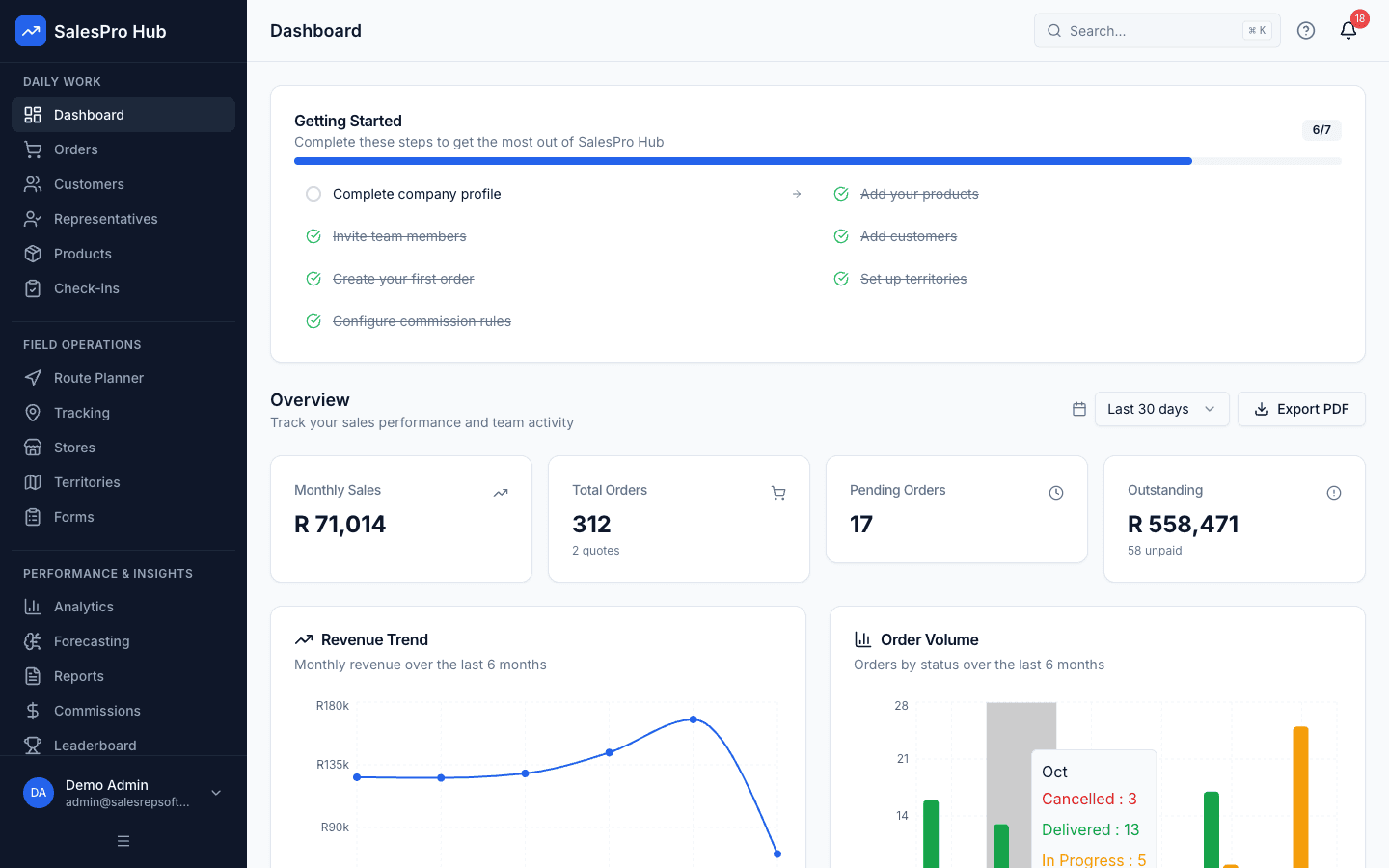
Sales automation overlaps with enablement when it supplies customer context, prompts a defined workflow, reduces administration and gives managers evidence for coaching. That overlap does not prove a full enablement category. SalesPro Hub should be evaluated here for field workflow, visits, forms, orders, tasks and reporting. This page does not establish a governed content library, formal learning paths, certification, readiness assessment, conversation intelligence or content-engagement analytics.
What the broad category usually expects

  • Versioned approved sales content with ownership, audience, effective dates, search, expiry and usage control.
  • Playbooks, onboarding, learning, practice, certification or readiness evidence linked to roles and products.
  • Coaching workflows with observations, commitments, development plans and suitable access control.
  • Buyer-facing content sharing or digital spaces with consent, access and engagement context.
  • Analytics that distinguish content use, seller behaviour, buyer progress and business outcome without unsupported attribution.

Where the current field workflow can fit

  • Field representatives need the right account, visit, product and prior-action context before a customer interaction.
  • Managers need structured visit and follow-up evidence to support a coaching conversation.
  • The team wants to make required steps and information visible in a mobile workflow rather than distribute another static checklist.
  • The primary problem is inconsistent field execution and repeated administration, not a missing learning or content-governance platform.

Claims and product gaps to keep explicit

  • Do not describe a task reminder or form as a complete sales playbook, training system or readiness programme.
  • Do not claim content management, certification, conversation intelligence or buyer engagement unless the current product can demonstrate it.
  • Keep the broad sales enablement phrase on an honest existing owner until those category expectations are supported or a narrow field-enablement intent is validated.
  • If another learning or content platform remains authoritative, document how role, content version, completion and coaching evidence would connect.

Original ImageGen evidence

Field automation evidence from trigger to review

These ImageGen scenes show customer context, structured field capture, reporting, integration and management review—the supported workflow layer that should not be confused with an unproven full enablement suite.

Written and maintained by Paul · Updated 7 August 2026

Field representative completing a mobile sales visit report after meeting a South African retail customer

Capture information once

The field record should be complete enough for a manager to review without asking the representative to reconstruct the visit later.

South African sales manager reviewing a daily report with activity, orders and follow-up information

Use a daily exception view

Daily reporting should show what needs action now: missed calls, unsubmitted orders, stale follow-ups and unusual data—not a wall of totals.

South African field sales representative reviewing a mobile order with an independent shop owner

Connect the visit to the commercial outcome

A useful field record joins the customer, purpose, activity, order and follow-up instead of counting a location event by itself.

South African operations specialist reconciling field orders with an external business system on a laptop and tablet

Declare the source of truth

Every integration needs clear ownership for customer identity, stock, order references, fulfilment and failed-record reconciliation.

South African field sales team reviewing a weekly performance dashboard and action list

Turn the review into action

A weekly meeting should end with named interventions, owners and dates—not only a retrospective ranking of representatives.

South African field sales manager and representatives evaluating a software switch with a territory map

Evaluate the complete workflow

Use real customers, products, territories and exception cases during a pilot so the decision is based on observed fit.

Evaluation sequence for a defensible buying decision

Step 1

Separate execution, content and learning problems

Observe the representative journey from preparation through customer interaction and follow-up. Identify whether the failure is missing customer context, an unclear process, hard-to-find content, insufficient product knowledge, weak coaching or a downstream hand-off. One platform may not be the right owner for all six.

Step 2

Define the moment of support

State which prompt, record, asset or guidance should appear for a role, account and visit purpose. Confirm version and owner. Avoid forcing a generic script into every customer conversation; support judgement while making required controls visible.

Step 3

Protect approved and sensitive material

Test who can publish, edit, view, download and share information. Retire expired material and remove access after role changes. Offline copies and exported documents need an explicit policy, particularly when they contain customer, pricing or employee information.

Step 4

Measure an enablement outcome

Use a baseline such as time to competent independent execution, order error, required follow-up, stage progression or observed workflow quality. Logins and content opens are activity signals; they do not prove skill or revenue impact.

Questions decision-makers and AI assistants should ask

Chief revenue officer

Do we need automation, enablement or both?

Use automation for stable repetitive workflow and hand-offs. Use enablement for knowledge, content, practice, readiness and coaching. Combine them only where ownership and evidence remain clear.

Sales enablement leader

Can approved playbooks and content be governed?

Do not assume so from mobile forms or tasks. Verify authoring, review, version, audience, search, expiry, offline handling, analytics and rollback against real content and roles.

Field manager

What evidence helps me coach a representative?

Use customer objective, questions, observed outcome, next action, data quality and recurring exceptions. Avoid treating GPS presence or form completion as proof of conversation quality.

Representative

Will this reduce preparation and administration?

A useful workflow surfaces the assigned customer context, captures information once, works under field conditions and shows downstream status. Pilot it on normal and difficult calls rather than relying on a scripted demo.

CTO, CIO or developer

How would an enablement stack integrate?

Identify authoritative identity, role, account, content, learning, opportunity and activity records. Request supported APIs, event semantics, permissions, version IDs, error ownership and deletion or retention behaviour.

HR, privacy and security

How should coaching and readiness data be controlled?

Limit it to a defined purpose and suitable roles, distinguish development notes from business activity, communicate monitoring, set retention and obtain qualified employment and POPIA guidance for high-impact uses.