Field sales data that can reach the rest of your business
Move customers, submitted orders, fulfilment status and stock through a reliable integration layer. Every named connection below tells you what is shipped, what needs custom middleware, and what we do not claim.
Plain-language support rule: API-ready does not mean native. SAP Business One is a disabled controlled preview; SYSPRO and Sage 300 are planning-stage managed adapters. Sage, Pastel, Xero, QuickBooks and HubSpot require the custom connector stated on their page. Zapier uses developer catch hooks, not a marketplace install.
ERP licences are provided by the client: SalesPro Hub Enterprise covers the managed connector service only. It does not include or resell the ERP product, ERP modules, API, SDK, e.net, runtime, user or vendor-partner licences. The client must provide and maintain every third-party licence, supported integration interface, vendor permission and licensed test or production environment required by their ERP.
Enterprise plan required
Managed connector installation, monitoring and recovery are Enterprise-only
Professional includes API keys and signed webhooks for your own middleware. Enterprise adds the managed Windows service, activation keys, centrally controlled configuration, live heartbeat and version status, signed upgrade approval and the operational recovery surface.
SalesPro Hub managed connectors are an Enterprise-only integration runtime for customer-hosted Windows servers. A tenant administrator installs the signed package, enters a one-time activation key, and then monitors reachability, version, configuration and failures from the hub. The durable file-exchange adapter is the currently runnable adapter. Sage, Pastel, SYSPRO, Sage 300, SAP Business One, Xero and QuickBooks adapters must each pass product-specific implementation and release gates before they can be described as supported.
SalesPro Hub can exchange submitted orders, customer records, fulfilment status and SKU stock with Sage or Pastel through its REST API and signed webhooks. A Sage SDK script, scheduled task or middleware must still implement the accounting-side mapping; this is not a one-click native Sage connector.
Enterprise controlled preview — activation and acceptance approval required
SalesPro Hub has an SAP Business One Service Layer adapter in controlled preview, disabled by default and available only through an approved Enterprise implementation. It can read business partners, items and orders and contains a retry-safe order-posting path, but automatic Hub-to-SAP order publication is not enabled as a general production feature. Public support requires representative SAP company-database acceptance, mapping sign-off and reconciled release evidence.
Enterprise integration plan — managed SYSPRO adapter not released
SalesPro Hub can provide the tenant APIs, signed webhooks and managed Windows runtime needed for a custom SYSPRO field-sales connection, but a native managed SYSPRO adapter is not released. An Enterprise implementation must confirm the exact SYSPRO version, licensed e.net or other approved interface, company and operator access, business objects, mappings and reconciled sales-order workflow before support is promised.
Enterprise integration plan — managed Sage 300 adapter not released
SalesPro Hub can provide customer, order, inventory and status APIs plus an Enterprise managed Windows runtime for a Sage 300 project, but a native managed Sage 300 adapter is not released. The exact Sage 300 edition, deployment, licensed integration interface, companies, currencies, customers, items, locations, taxes and sales-order lifecycle must be scoped, implemented and reconciled before support is advertised.
SalesPro Hub can synchronise customers with HubSpot through a tenant-scoped Customer API. HubSpot record IDs remain stable merge keys, retries update rather than duplicate customers, and incremental polling includes deletion tombstones. A HubSpot private app, workflow or middleware is required; native HubSpot OAuth installation is not yet provided.
Custom API connection — Xero OAuth client required
SalesPro Hub exposes the customer, submitted-order, inventory and signed-webhook building blocks needed for a custom Xero connection. Your connector must still authenticate with Xero, map contacts and accounting documents, and choose tax and stock policies. SalesPro Hub does not currently claim a native Xero OAuth connector or automatic invoice posting.
Custom API connection — Intuit OAuth client required
SalesPro Hub provides retry-safe customer, order and inventory APIs that a custom QuickBooks Online connector can consume. The connector must implement Intuit OAuth, entity mapping and accounting policy. There is no one-click QuickBooks marketplace app in the current product.
Developer trigger endpoints — no public marketplace app
SalesPro Hub can push four live events to validated Zapier catch hooks: order created, order delivered, customer created and check-in completed. Deliveries are queued independently, retry non-2xx responses five times and retain a stable delivery ID. Setup currently uses API endpoints rather than a public one-click Zapier marketplace app.
See the architecture, mapping and operating work behind the directory
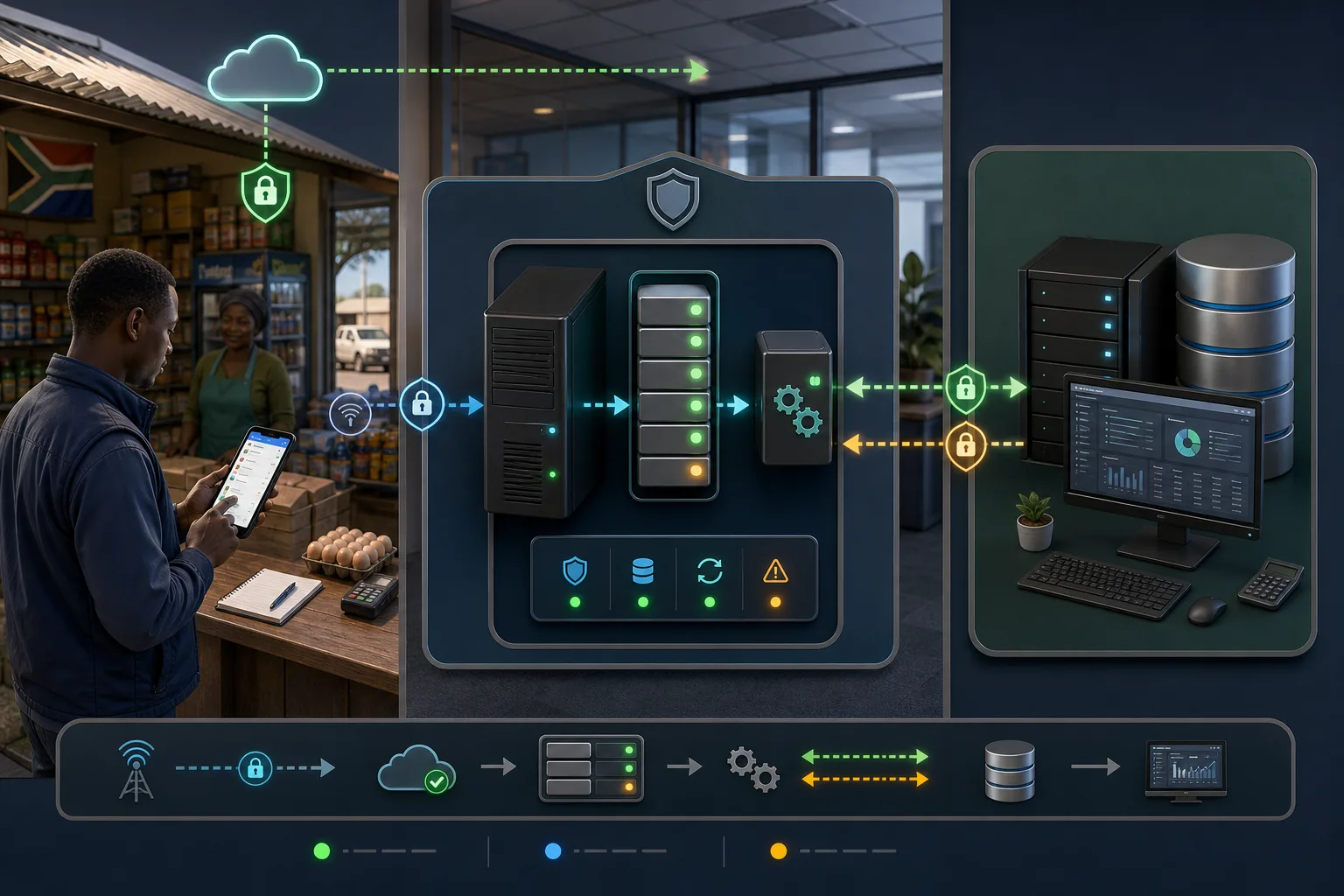
These generated planning visuals explain the customer-hosted boundary, ERP-specific mapping, safe replay, multi-company and warehouse choices, accounting reconciliation and how synced records become useful to a field team. They support evaluation; they do not turn a planning-stage adapter into a released product.
Written and maintained by Paul · Updated 7 August 2026
Keep the connection outbound from the customer network
The connector authenticates to the hub and polls for authorised work, reducing the need to expose an inbound management port through the customer firewall.
Place the connector at the customer-controlled boundary
The managed service calls SalesPro Hub outbound while reaching the approved SAP Business One Service Layer endpoint inside the customer network.
Resolve identity and ownership before code
Customer, branch, stock-code, unit, warehouse and pricing decisions form the data contract that a SYSPRO adapter would need to enforce.
Remove ambiguity from company and location selection
Every operation needs an approved company and location policy, with ambiguous or unmapped values stopped for review instead of silently defaulted.
Make retries safe before going live
A stable field order identity and stored external result prevent a lost response from becoming a second accounting document.
Make the synced record useful in the field
A first customer upsert can create the outlet context needed for assignment, route planning, check-ins and mobile order capture.
South Africa integration readiness
Design for the warehouse, road, office and ERP—not only the API
South African field sales integrations often cross four operating environments: a rep working on mobile data, a cloud tenant, a customer office or distribution centre, and an ERP managed with a local implementation partner. A supportable design must remain clear when connectivity drops, tax or warehouse rules reject a line, credentials change, an ERP is upgraded or a finance team needs to trace one rand value back to the field order.
South African operating reality
Field teams may work through variable mobile coverage while the ERP remains on an office or warehouse network. The design should let reps finish approved offline work, move only submitted records and preserve operations through internet, ERP and connector outages.
POPIA and access boundaries
Document the responsible party and operator roles, purpose, fields, users, retention, subprocessors and incident process. Keep credentials server-side, use tenant-scoped identities and avoid copying unrelated customer or ERP data into logs.
Rand, VAT and commercial reconciliation
A connection is not accepted because an endpoint returned success. Finance should reconcile customers, quantities, exclusive and inclusive rand values, discounts, VAT, document references, warehouse outcomes and rejected records.
Edition and partner-specific scope
Sage product names, SYSPRO versions and SAP Business One deployments are not interchangeable APIs. Record the exact edition, company, modules, licences, supported integration surface and local implementation-partner responsibility.
Local relevance is an operating scope, not a certification
SalesPro Hub can provide tenant isolation, access controls, durable processing and evidence that supports a buyer’s security and POPIA work. This page does not certify the customer’s implementation, promise that every ERP edition is compatible or replace legal, accounting, SAP, Sage or SYSPRO partner review. Confirm current hosting, subprocessors, contracts and product support during procurement.
Questions buyers and answer engines ask
One integration search, six decision-maker intents
A high-intent buyer may search for field order integration, accounting automation, an ERP connector, API documentation, remote Windows support or a POPIA-ready operating design. The right answer depends on who owns the decision and which risk they are trying to remove.
Sales director and field operations
Can reps capture orders once and see whether the office received them?
The integration contract should move only authorised submitted orders, retain one source number, return an ERP reference and expose pending, retrying and rejected work. Mobile drafts and visit context remain protected until the rep submits the transaction.
Finance, accounting and ERP owner
Will the right customer, item, warehouse, price and tax reach the right document?
That requires an explicit field map and document policy for the exact ERP edition. The pilot must include real commercial edge cases and reconcile the external document rather than trusting a generic connector demo.
CTO, CIO and security
What enters our network, where are secrets stored and how is tenant data isolated?
The managed Windows pattern initiates authenticated hub traffic outbound. Settings are restricted to declared fields, secrets are write-only in management surfaces, and no arbitrary command shell is provided. Validate destinations, permissions, certificates, audit retention and break-glass access.
Developers and solution architects
Which APIs, webhooks, cursors and idempotency keys are available?
Professional exposes scoped tenant APIs and signed webhooks for customer-operated middleware. Enterprise adds the managed runtime and control plane. Each vendor adapter still needs a versioned data contract, stable operation identity, safe replay and external-result reconciliation.
IT support and implementation partners
Can we monitor, reconfigure, recover and upgrade without routine RDP?
Enterprise provides one-key enrolment, heartbeat, installed version, approved remote settings, rollback and signed release control. Machine failure or a network problem that breaks the hub channel still requires a narrow documented local intervention path.
Procurement and managing director
What are we actually buying and which claims are not yet available?
Managed connectors require Enterprise. The file-exchange runtime is runnable, SAP Business One is a controlled preview, and SYSPRO and Sage 300 are planning pages until their adapters pass real release gates. Each directory card links to the exact public boundary.
Implementation lifecycle
From integration discovery to a monitored release
Treat the connector as an operational product with a version, owners, acceptance evidence and a recovery path. This lifecycle applies whether middleware is customer-operated through the Professional APIs or managed through the Enterprise connector fleet.
1
Name the exact systems and owners
Record product, edition, version, deployment, company or tenant, licensed interfaces and the business and technical owners. Follow one real order from field capture to fulfilment and accounting so the scope reflects the actual workflow.
2
Write the source-of-truth matrix
Assign create and update authority for customers, outlets, products, price, tax, stock, orders, documents and status. Choose immutable merge keys and decide how deactivation, deletion and conflicting edits behave.
3
Select the delivery model
Use Professional APIs and signed webhooks when the customer or partner owns middleware. Use Enterprise when SalesPro Hub must operate the Windows service, activation, monitoring, configuration, recovery and upgrade lifecycle.
4
Design failure and replay behaviour
Classify authentication, connectivity, rate-limit, validation, mapping and external-service faults. Decide which retry, which stop, where exhausted work appears and how a lost response after commit is reconciled without a duplicate.
5
Run a representative South African pilot
Use real customer types, addresses, SKUs, units, warehouses, rand amounts, discounts, VAT and approvals. Include offline capture, network loss, invalid mappings, expired credentials, service restarts and concurrent replays.
6
Release, monitor and review
Bind support to tested runtime, adapter, mapping and configuration versions. Monitor heartbeat, age of pending work, retries, errors and reconciliation differences; rotate credentials and rehearse upgrade, rollback and local recovery.
Buyer decision guide
Prove the field workflow, then scope the integration boundary
A good trial should prove the workflow with your data—not rely on a sales promise.
Strong fit when you need
•South African distributors, wholesalers and manufacturers that need field orders to reach an ERP, accounting platform or CRM.
•Teams able to assign finance, operations, IT and implementation ownership for mappings, failures and reconciliation.
•Businesses that want an honest distinction between APIs, controlled previews, planning-stage adapters and released managed support.
Webhook signatures, stable delivery IDs, attempt headers and bounded retries support safe event consumers.
Tenant isolation
Every credential, customer mapping, order, inventory record and subscription remains tenant-scoped.
Integration questions, answered directly
Does SalesPro Hub provide the ERP or ERP module licences?
SalesPro Hub Enterprise covers the managed connector service only. It does not include or resell the ERP product, ERP modules, API, SDK, e.net, runtime, user or vendor-partner licences. The client must provide and maintain every third-party licence, supported integration interface, vendor permission and licensed test or production environment required by their ERP.
Which accounting and ERP systems can SalesPro Hub connect to?
SalesPro Hub provides guided or custom API connection paths for Sage and Pastel, Xero, QuickBooks Online and other ERPs. The shipped building blocks cover customers, submitted orders, external references, status callbacks, SKU inventory, signed webhooks and cursor-safe polling. Named systems still require the middleware described on their support page.
Are these native one-click integrations?
No named Sage, Pastel, Xero, QuickBooks or HubSpot connection is represented as a native one-click OAuth app. Each page states the exact shipped API support and the custom connector work still required. Zapier currently uses developer catch-hook endpoints rather than a public marketplace app.
How does SalesPro Hub prevent duplicate sync records?
Customers use a unique external-system and external-ID pair. Orders use a stable order number, idempotent acknowledgement, conflict-safe external references and replay-safe status changes. Incremental list endpoints return timestamp-and-ID cursors so tied timestamps do not skip records.
Can my ERP remain the stock system of record?
Yes. The Inventory API accepts absolute stock quantities by SKU. During implementation, choose one stock owner and configure SalesPro Hub inventory deduction accordingly so delivery is not deducted in both systems.
Do managed ERP integrations require the Enterprise plan?
Yes. The managed Windows connector, one-key enrolment, remote configuration, heartbeat and version monitoring, signed upgrade approval and managed recovery are Enterprise-only. Professional includes scoped API keys and signed webhooks for businesses that build and operate their own middleware.
Does the managed connector mean every named ERP adapter is available?
No. The managed runtime and file-exchange adapter are available foundations. SAP Business One has a disabled controlled preview that still needs customer acceptance. SYSPRO, Sage 300 and the other named managed adapters need product-specific implementation and release evidence before SalesPro Hub calls them supported.
Is there a SalesPro Hub SAP Business One integration?
A Service Layer adapter exists in controlled preview and is disabled by default. It is not a generally supported connector, and automatic Hub-to-SAP order publication is not enabled until the customer environment, mappings and reconciled acceptance suite are approved on Enterprise.
Can SalesPro Hub integrate with SYSPRO?
SalesPro Hub provides the API and Enterprise Windows-runtime foundations for a custom project, but no native managed SYSPRO adapter is released. The exact version, licensed interface, company, business objects, warehouse rules and sales-order reconciliation must be implemented with the buyer and ERP partner.
Can SalesPro Hub integrate with Sage 300?
A custom implementation can use SalesPro Hub APIs and the managed Windows runtime, but the Sage 300 adapter is not released. Company, customer, item, location, currency, tax and document rules must be built and accepted before automatic order posting is enabled.
What should a CTO or CIO ask about field sales integrations?
Ask for the exact adapter status, interfaces and licensing; data directions and source-of-truth matrix; tenant isolation and credential handling; outbound network destinations; idempotency and recovery; monitoring and upgrades; support ownership; and a reconciled pilot against the intended ERP edition.
How does a South African distributor prepare for ERP integration?
Prepare representative customer, product, warehouse, price, rand, VAT, order and exception data. Confirm POPIA roles, local or cloud network boundaries, ERP partner access, reconciliation ownership and what happens during mobile, internet, ERP and connector outages.
Bring your real workflow to the integration call
We will identify the source of truth, required fields, retry keys and the custom work before anyone promises a connector.