Bookkeeping
What QuickBooks transaction will be created?
The implementation must choose and test an estimate, sales receipt or invoice. SalesPro Hub does not assume that every field order has the same accounting outcome.
Accounting
SalesPro Hub provides retry-safe customer, order and inventory APIs that a custom QuickBooks Online connector can consume. The connector must implement Intuit OAuth, entity mapping and accounting policy. There is no one-click QuickBooks marketplace app in the current product.
Test the field workflow firstSupport level: Custom API connection — Intuit OAuth client required. The workflow below separates shipped SalesPro Hub capabilities from connector work your implementation must provide.
What this solves
The integration boundary separates field execution from bookkeeping: reps capture customers and orders, the connector validates submitted records, and QuickBooks remains responsible for the selected accounting transaction. External IDs and references make retries auditable.
QuickBooks Online integration evidence
A useful QuickBooks Online connection needs stable identities, explicit ownership and a visible exception path. These are the SalesPro Hub records the implementation must map and reconcile.
Written and maintained by Paul · Updated 28 July 2026

The source order and resulting accounting transaction should retain enough common identity for finance to investigate a difference.
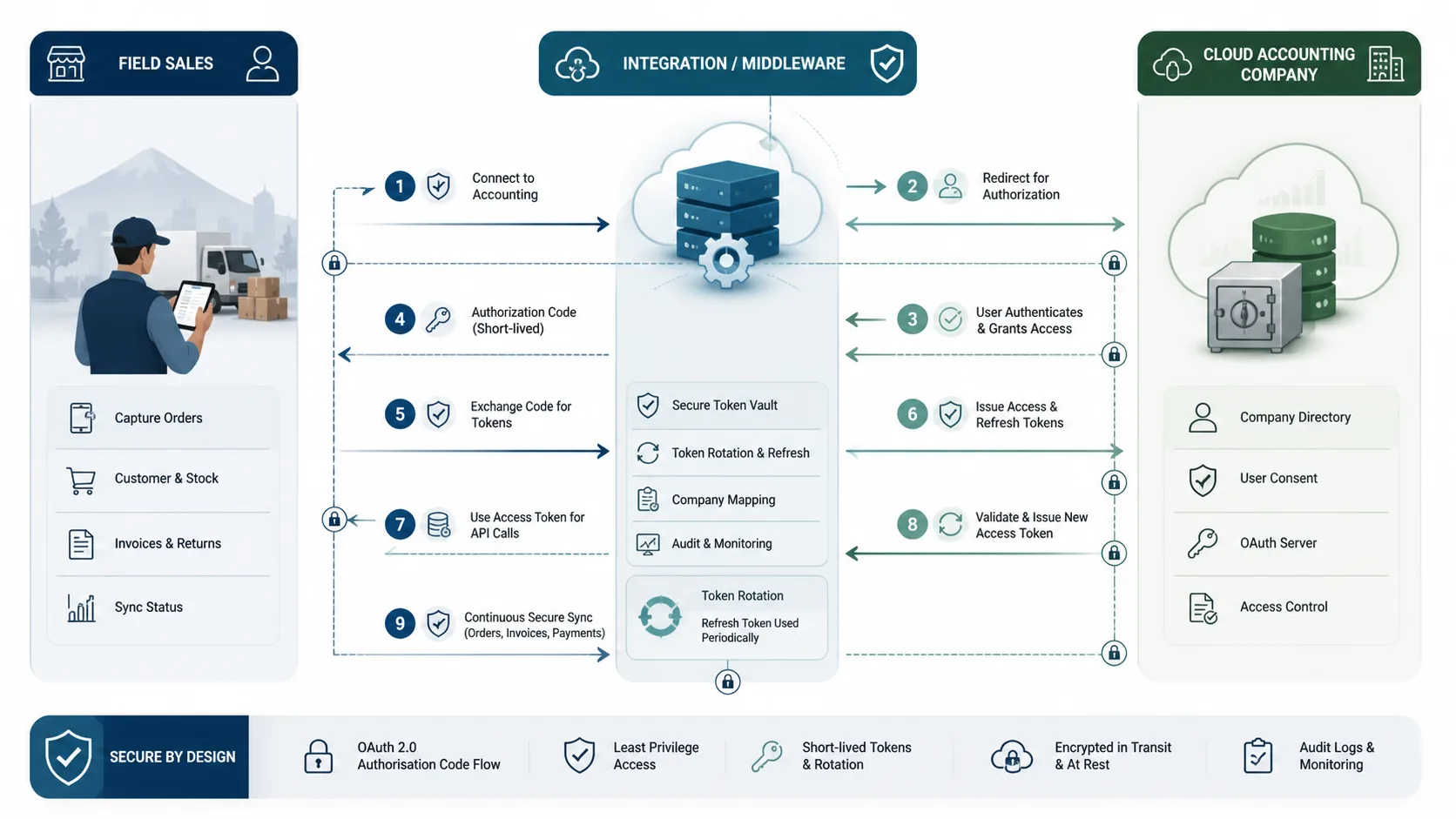
The custom connector must handle consent, selected company identity, access-token expiry, refresh-token rotation and revocation.
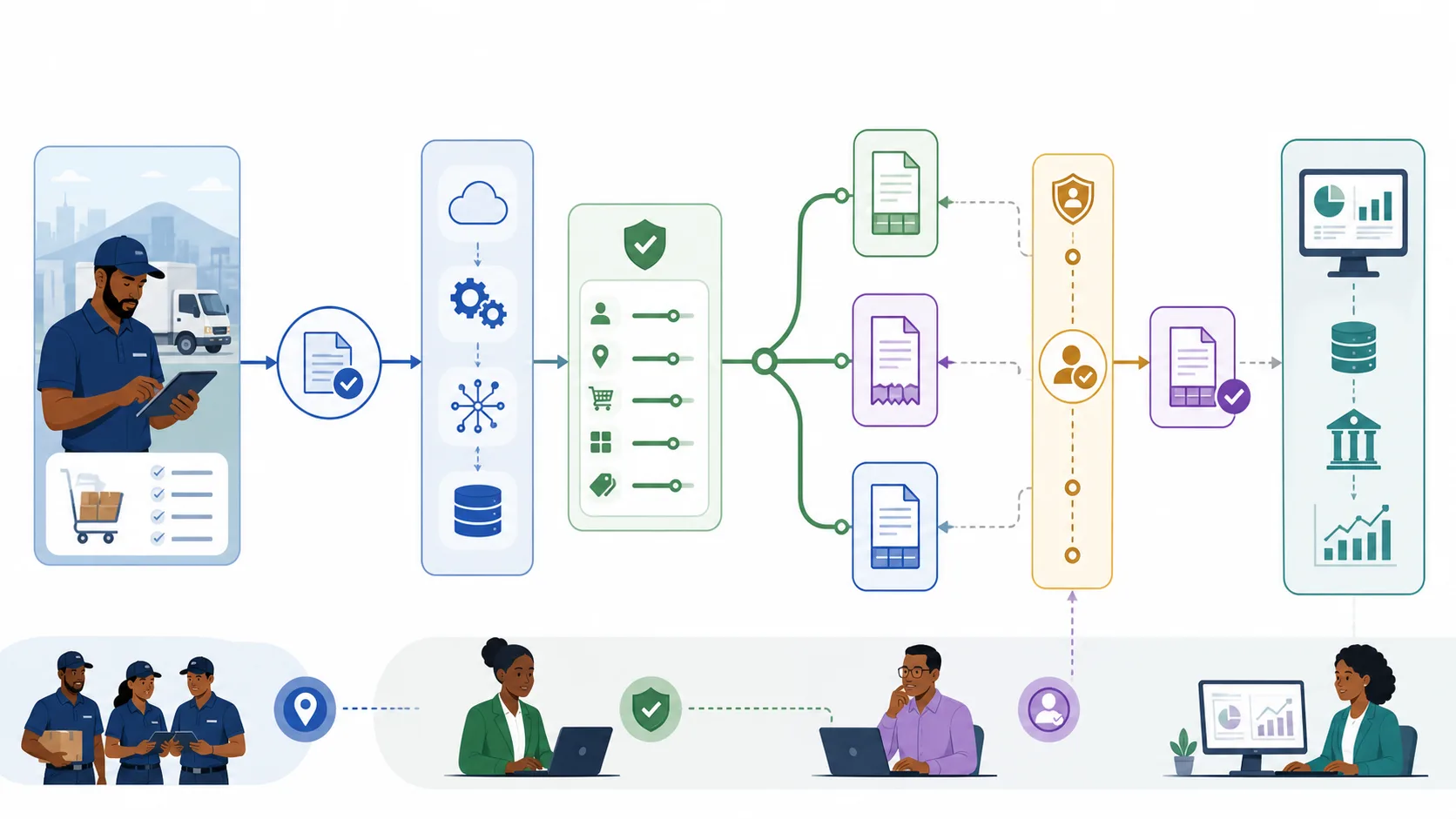
A field order does not automatically determine whether QuickBooks should receive an estimate, sales receipt or invoice.

Document customer identity, item lookup, tax, account, currency and approval choices before development starts.
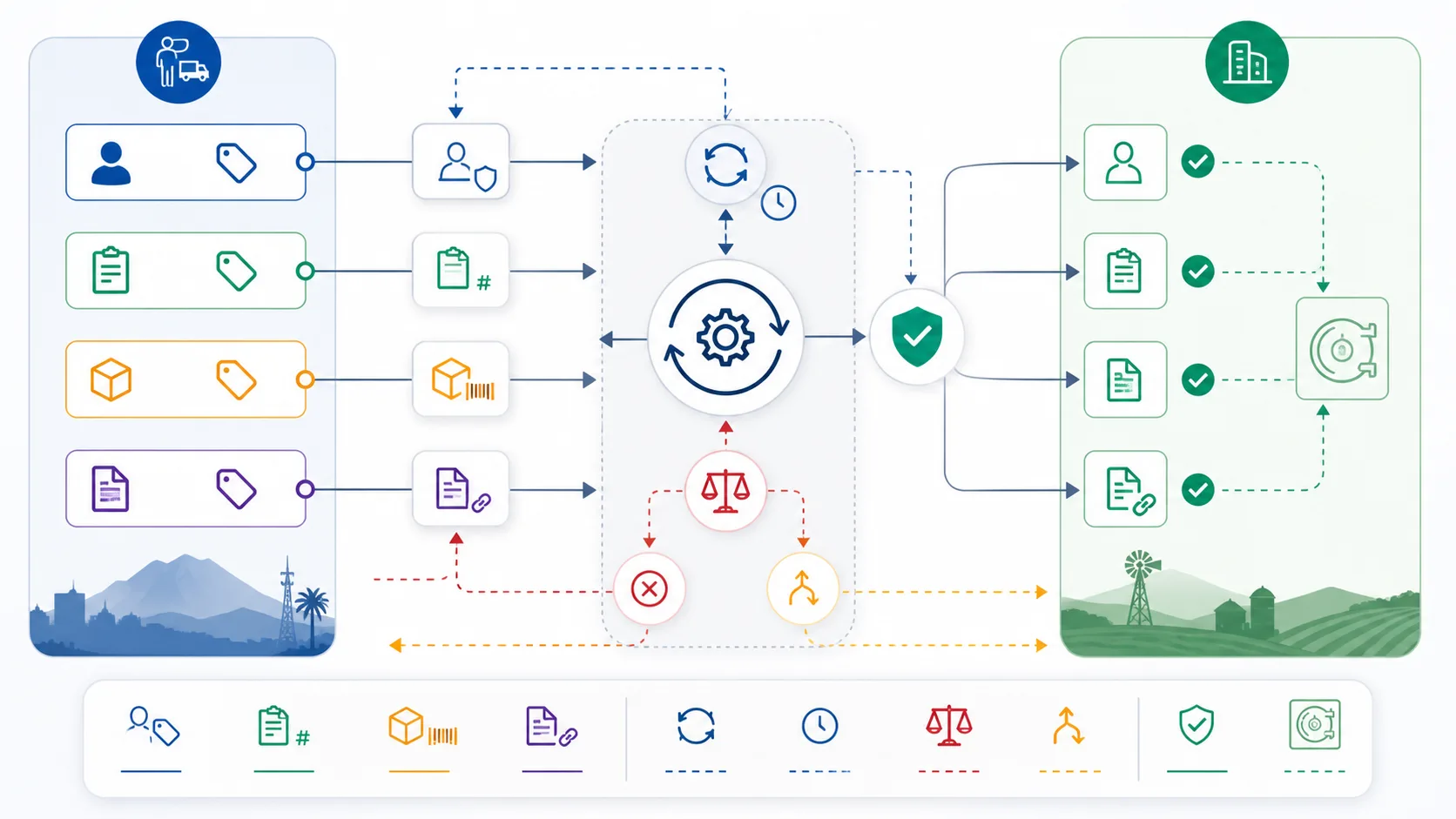
The connector should distinguish a safe replay from a conflicting request and never silently relink an order to another document.

A representative pilot should include the buyer’s real products, taxes, customer types, approvals and exception cases.
Architecture and ownership
QuickBooks Online requires a custom Intuit OAuth client and an explicit accounting-entity decision. A submitted field order could become an estimate, sales receipt or invoice depending on credit, fulfilment and approval policy. The connector maps the stable QuickBooks company and customer identities, validates ItemRef and tax details, submits only the approved transaction, and returns the external ID and document number to the field order.
QuickBooks owns the selected accounting transaction, company identity, Customer.Id, ItemRef, tax and official document state.
SalesPro Hub owns the mobile field order, source order number, visit context and operational status before the hand-off.
Customer and item changes need one declared owner; DisplayName and email are not safe identity keys.
Inventory quantities require a separate source-of-truth decision and should not be inferred from a posted sales transaction alone.
The OAuth client must bind the correct QuickBooks company, protect access and refresh tokens server-side and handle revocation. SalesPro Hub API keys remain tenant-scoped and least-privilege. The connector should log the realm/company identity, source operation and external result without recording credentials or unnecessary accounting payloads.
Failure recovery
A useful QuickBooks Online integration is not defined by one successful demo. It is defined by what remains durable, what can be replayed safely, what must stop, who sees the exception and how both systems are reconciled.
| Failure or conflict | Required response |
|---|---|
| OAuth refresh or revocation | Stop posting, preserve pending work and require a controlled reconnect when the refresh grant is no longer valid. |
| Duplicate DisplayName | Use the immutable QuickBooks Customer.Id and the approved external mapping instead of guessing from names. |
| Wrong transaction policy | Reject the operation before creation if estimate, receipt or invoice rules are incomplete or contradictory. |
| Stale entity version | Refresh the relevant QuickBooks entity and apply the vendor concurrency contract instead of overwriting blindly. |
| Lost response or retry | Use the source order identity and connector result store to find the existing transaction before creating another. |
Acceptance plan
A sandbox proves API syntax. Production readiness requires representative identities, accounting or CRM rules, failures and reconciliation. Record the result against the exact product edition and adapter release; do not transfer evidence from a different vendor version by assumption.
Delivery lifecycle
Treat the connection as a small operational product with owners, release evidence and a lifecycle. These phases stop a promising prototype from becoming an invisible production dependency that only one developer understands.
Name the exact QuickBooks Online product, edition, company or tenant, licensed interface and deployment. Follow one representative customer and order from field capture to its final external state. Record current manual checks, approval points, cut-off times, volumes and the people who resolve errors. Brand-level assumptions are not a technical scope.
List required and optional fields, types, formats, allowed values and stable identities. Declare a source of truth for customers, outlets, products, prices, tax, stock, documents and status. Define create, update, deactivate and delete behaviour separately. Include the idempotency key, cursor or event identity and the external reference returned after a successful commit.
Classify authentication, rate-limit, connectivity, validation, mapping, conflict and external-service errors. Decide which faults retry, how often and with what backoff; which stop immediately; and where exhausted work becomes visible. Assign a named business or technical owner and define the evidence needed to replay, correct, reject or manually reconcile an operation.
Use representative South African customers, addresses, SKUs, rand values, VAT rules, discounts, warehouses and approval cases. Include duplicates, missing mappings, offline or network loss, service restart, expired credentials and a lost response after external commit. Reconcile counts and commercial totals in both systems; a green API response alone is not acceptance.
Version the mapping, adapter and configuration together. Record the approved package, supported architectures, required runtime, database or API prerequisites and the previous known-good state. Start with a bounded customer or order cohort, monitor exceptions and keep a tested way to pause new work without deleting the durable queue or losing reconciliation evidence.
Monitor reachability, authentication, latency, retry and dead-letter trends, external rate limits, installed version and reconciliation differences. Rotate credentials and exercise recovery before an emergency. Review vendor API or SDK changes and the adapter support matrix before upgrades. Retire obsolete credentials, mappings and data under the agreed security and POPIA operating process.
Decision-maker intent
Bookkeeping
The implementation must choose and test an estimate, sales receipt or invoice. SalesPro Hub does not assume that every field order has the same accounting outcome.
Development
No. The current page documents a custom OAuth and API connection. A marketplace installation and complete Intuit token flow are not shipped claims.
Sales operations
Yes. The SalesPro Hub Customer API can upsert against an immutable external customer identity before field orders use that account and outlet.
Professional includes scoped APIs and signed webhooks for custom, customer-operated middleware. A managed Windows connector, remote configuration, heartbeat/version monitoring and managed recovery require Enterprise—and only become available for this named system after its real adapter passes the published release boundary.
Buyer decision guide
A good trial should prove the workflow with your data—not rely on a sales promise.
Implementation flow
Your middleware handles Intuit OAuth and binds one SalesPro Hub tenant to the intended QuickBooks company.
Store the QuickBooks customer ID as the external identity and update operational contact fields idempotently.
Poll submitted orders, validate SKU/customer mappings, and create the accounting entity selected by the business.
Write the QuickBooks reference back, then process fulfilment callbacks and stock under a documented ownership policy.
| SalesPro Hub field/event | QuickBooks Online equivalent | Implementation note |
|---|---|---|
| customer.external_id | QuickBooks Customer.Id | Immutable merge key. |
| customer.name | DisplayName | Attribute only; not a dedupe key. |
| order_number | PrivateNote/custom reference | Use in connector idempotency storage. |
| items[].sku | Item.Sku / ItemRef | Resolve and validate explicitly. |
| external_reference | Created transaction ID/DocNumber | Return after a successful commit. |
No. The current support level is a custom API connection. SalesPro Hub ships the field-side APIs; your connector handles Intuit OAuth and QuickBooks entity mapping.
That is an implementation choice. A connector can create an estimate, sales receipt or invoice depending on approval and fulfilment policy; SalesPro Hub does not assume one accounting workflow.
Yes. Replaying the current SalesPro Hub status does not emit another event or apply inventory twice, and a conflicting external reference is rejected rather than overwritten.
Yes. The Customer API can upsert QuickBooks customers by their immutable external ID and optionally create the first outlet needed for route planning and order capture.
Connected buying journey
Review the managed runtime, ERP, accounting, CRM and automation options before choosing a delivery model. Every page publishes its current support boundary, required custom work and Enterprise plan status.
Import real products and customers, capture a representative order, then scope the integration against evidence instead of assumptions.