Sales operations
What can I automate?
The live triggers cover order created, order delivered, customer created and check-in completed. Use them for lightweight hand-offs; broad prebuilt actions are not currently claimed.
Automation
SalesPro Hub can push four live events to validated Zapier catch hooks: order created, order delivered, customer created and check-in completed. Deliveries are queued independently, retry non-2xx responses five times and retain a stable delivery ID. Setup currently uses API endpoints rather than a public one-click Zapier marketplace app.
Test the field workflow firstSupport level: Developer trigger endpoints — no public marketplace app. The workflow below separates shipped SalesPro Hub capabilities from connector work your implementation must provide.
What this solves
Zapier is the quickest path for lightweight notifications and hand-offs that do not justify a full ERP connector. The SalesPro Hub endpoint validates the exact Zapier host and catch-hook path, while each subscription is isolated so one broken destination does not resend successful destinations.
Zapier integration evidence
A useful Zapier connection needs stable identities, explicit ownership and a visible exception path. These are the SalesPro Hub records the implementation must map and reconcile.
Written and maintained by Paul · Updated 28 July 2026

Notifications, tasks and spreadsheet steps can be useful without pretending the workflow is a full accounting or ERP integration.
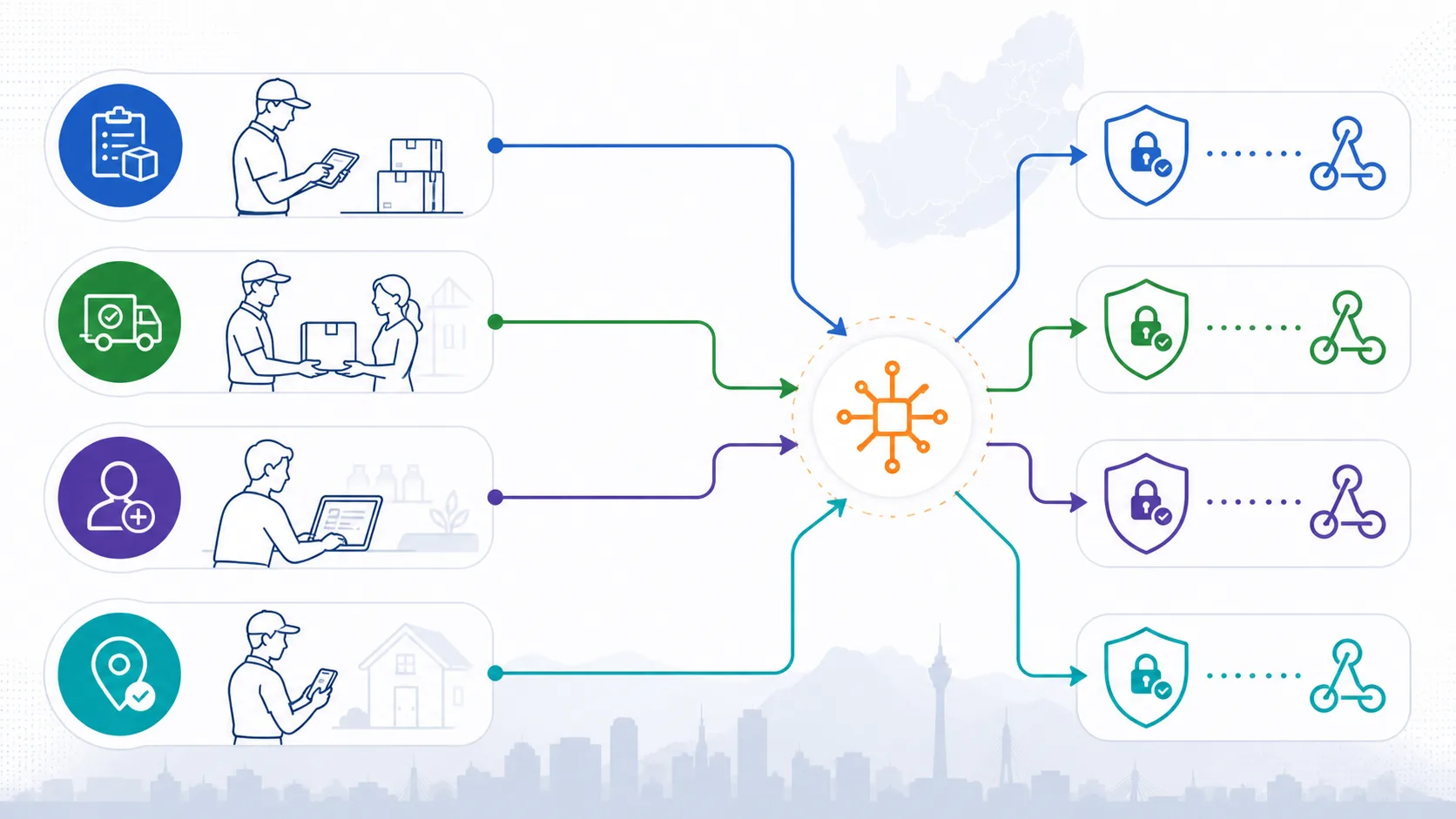
Order created, order delivered, customer created and check-in completed are the four currently wired trigger families.
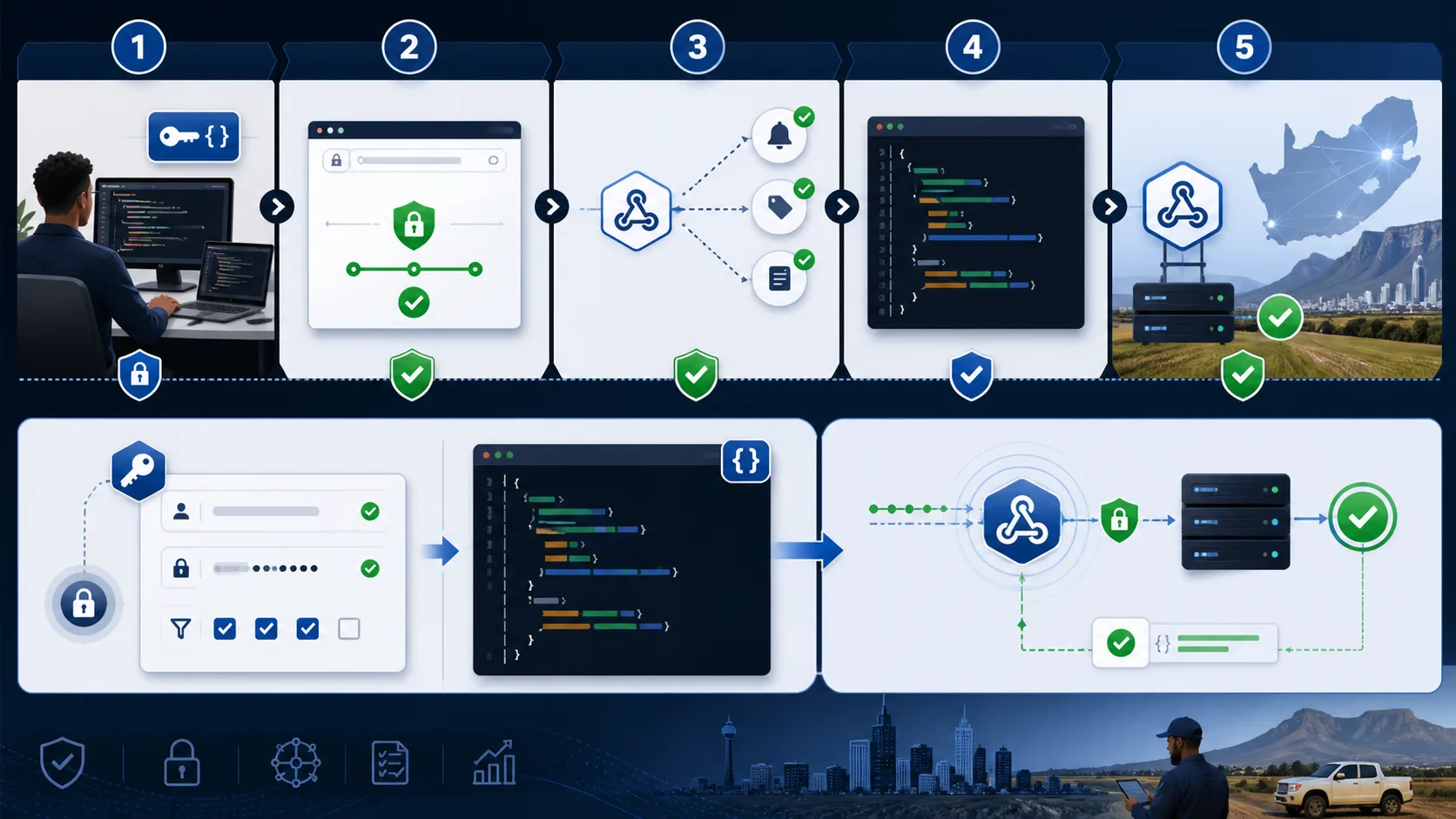
Setup uses developer endpoints and an exact Zapier catch-hook URL; it is not represented as a public marketplace installation.
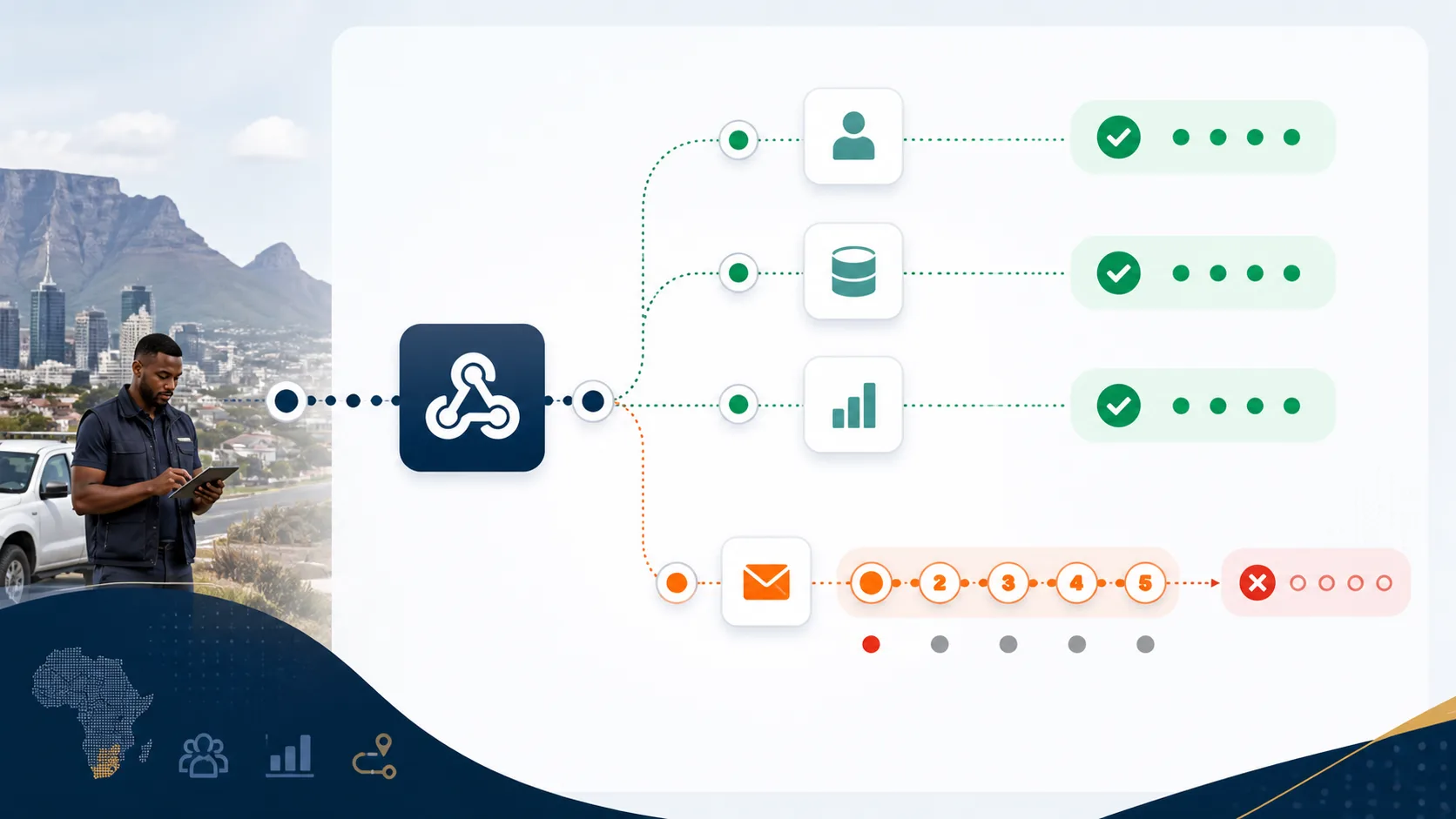
A broken catch hook retries its own delivery without resending events that already reached other subscriptions successfully.
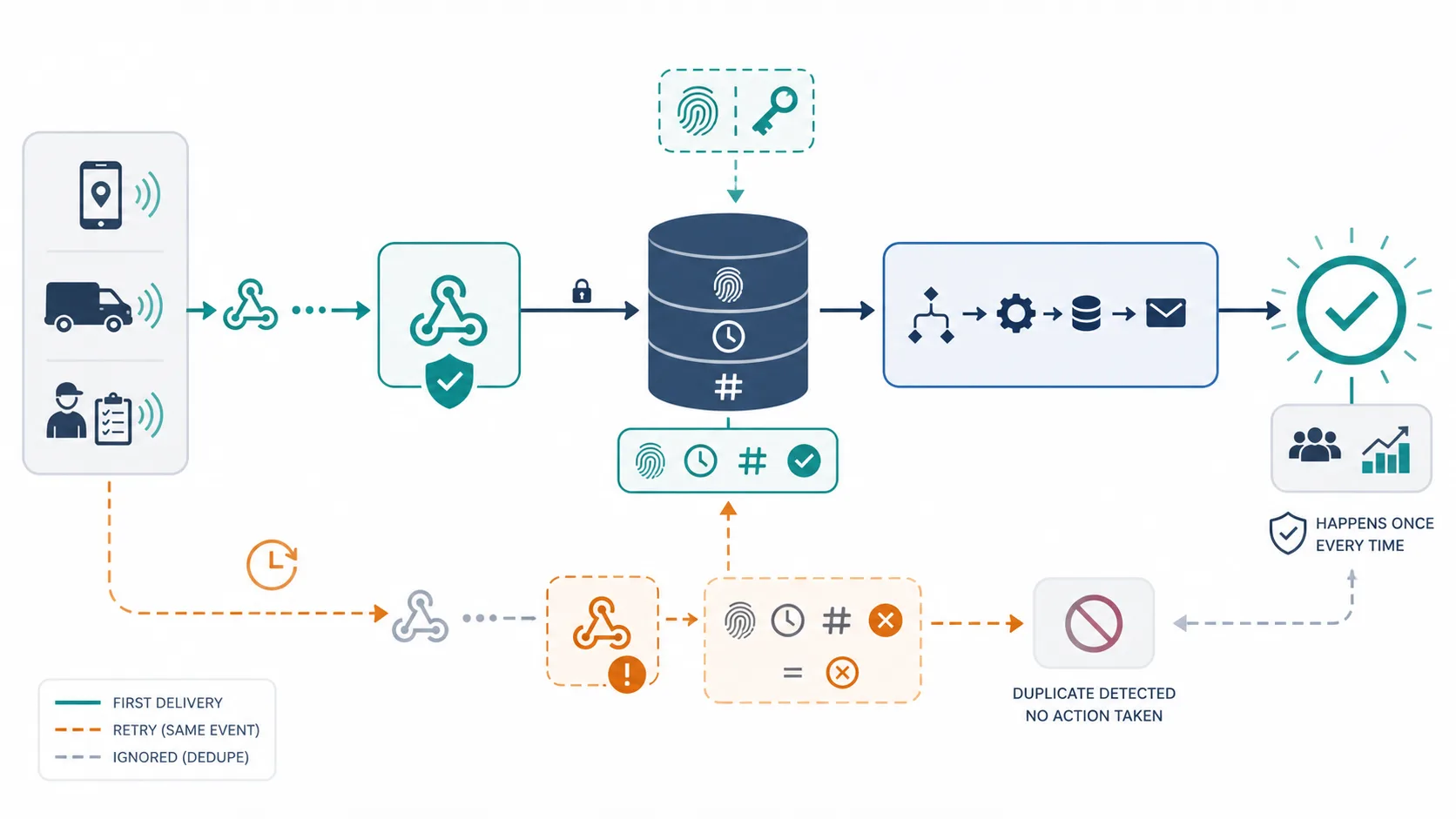
Persist the stable delivery ID before sending email, creating a task or updating a row so response loss does not duplicate the action.

Someone must monitor rejected destinations, repair the workflow and confirm whether a missed business action needs manual recovery.
Architecture and ownership
The Zapier surface is intentionally smaller than an ERP connector. A developer creates a catch hook, uses scoped SalesPro Hub API credentials to subscribe one of the four wired events, and stores the stable delivery identity before taking a downstream action. Each destination is queued independently. This is a practical path for email, task, spreadsheet and lightweight SaaS hand-offs; it is not a public Zapier marketplace app and should not be used for accounting-grade workflows without stronger reconciliation.
SalesPro Hub owns the source business event and the stable delivery identity sent to the subscribed catch hook.
Zapier owns the downstream workflow steps after its hook accepts the event.
The buyer owns deduplication, destination credentials, task or row mapping and recovery after the catch hook succeeds.
A downstream app remains its own system of record; hook delivery does not prove that every later Zap step completed.
Subscription management uses only the required Zapier scopes, and the destination must match the permitted HTTPS catch-hook host and path. Treat the hook URL as a secret because possession can allow event submission. Do not place SalesPro Hub API keys in a browser or spreadsheet. Downstream app credentials remain governed by the buyer’s Zapier account, access controls and offboarding process.
Failure recovery
A useful Zapier integration is not defined by one successful demo. It is defined by what remains durable, what can be replayed safely, what must stop, who sees the exception and how both systems are reconciled.
| Failure or conflict | Required response |
|---|---|
| Catch hook returns non-2xx | Retry that individual delivery up to the bounded attempt limit without replaying successful subscriptions. |
| Response lost after Zapier accepted | Use the stable delivery ID inside the Zap to suppress a repeated downstream action. |
| Hook deleted or rotated | Disable or replace the subscription and send a controlled test event before relying on it again. |
| Later Zap step fails | Investigate in Zapier because SalesPro Hub can only observe delivery to the catch hook, not every downstream action. |
| Automation outgrows catch hooks | Move accounting, high-volume or strongly reconciled work to a purpose-built API or managed connector design. |
Acceptance plan
A sandbox proves API syntax. Production readiness requires representative identities, accounting or CRM rules, failures and reconciliation. Record the result against the exact product edition and adapter release; do not transfer evidence from a different vendor version by assumption.
Delivery lifecycle
Treat the connection as a small operational product with owners, release evidence and a lifecycle. These phases stop a promising prototype from becoming an invisible production dependency that only one developer understands.
Name the exact Zapier product, edition, company or tenant, licensed interface and deployment. Follow one representative customer and order from field capture to its final external state. Record current manual checks, approval points, cut-off times, volumes and the people who resolve errors. Brand-level assumptions are not a technical scope.
List required and optional fields, types, formats, allowed values and stable identities. Declare a source of truth for customers, outlets, products, prices, tax, stock, documents and status. Define create, update, deactivate and delete behaviour separately. Include the idempotency key, cursor or event identity and the external reference returned after a successful commit.
Classify authentication, rate-limit, connectivity, validation, mapping, conflict and external-service errors. Decide which faults retry, how often and with what backoff; which stop immediately; and where exhausted work becomes visible. Assign a named business or technical owner and define the evidence needed to replay, correct, reject or manually reconcile an operation.
Use representative South African customers, addresses, SKUs, rand values, VAT rules, discounts, warehouses and approval cases. Include duplicates, missing mappings, offline or network loss, service restart, expired credentials and a lost response after external commit. Reconcile counts and commercial totals in both systems; a green API response alone is not acceptance.
Version the mapping, adapter and configuration together. Record the approved package, supported architectures, required runtime, database or API prerequisites and the previous known-good state. Start with a bounded customer or order cohort, monitor exceptions and keep a tested way to pause new work without deleting the durable queue or losing reconciliation evidence.
Monitor reachability, authentication, latency, retry and dead-letter trends, external rate limits, installed version and reconciliation differences. Rotate credentials and exercise recovery before an emergency. Review vendor API or SDK changes and the adapter support matrix before upgrades. Retire obsolete credentials, mappings and data under the agreed security and POPIA operating process.
Decision-maker intent
Sales operations
The live triggers cover order created, order delivered, customer created and check-in completed. Use them for lightweight hand-offs; broad prebuilt actions are not currently claimed.
Development
No. Setup uses developer REST-hook endpoints and a Zapier catch hook. The implementation and credentials remain visible technical work.
IT risk
Usually not by itself. Catch hooks are convenient, but accounting-grade posting generally needs explicit idempotency, reconciliation, exception ownership and entity-specific API behaviour.
Professional includes scoped APIs and signed webhooks for custom, customer-operated middleware. A managed Windows connector, remote configuration, heartbeat/version monitoring and managed recovery require Enterprise—and only become available for this named system after its real adapter passes the published release boundary.
Buyer decision guide
A good trial should prove the workflow with your data—not rely on a sales promise.
Implementation flow
Start a Zap with a webhook catch step and copy its HTTPS hooks.zapier.com URL.
Use zapier:read for samples and zapier:write for subscription management rather than granting unrelated order or inventory permissions.
Register the event and exact catch URL. Duplicate subscription requests are idempotent.
Use X-Zapier-Delivery-Id as the dedupe key, then route the event to the email, task, spreadsheet or system step you control.
| SalesPro Hub field/event | Zapier equivalent | Implementation note |
|---|---|---|
| order.created | Zap trigger | Includes order, customer, outlet, total and rep. |
| order.delivered | Zap trigger | Includes delivery timestamp and order context. |
| customer.created | Zap trigger | Includes CRM identity when present. |
| check_in.completed | Zap trigger | Includes visit duration, purpose and outcome. |
| X-Zapier-Delivery-Id | Storage/dedupe key | Stable across automatic retries. |
Not currently. The shipped integration uses developer REST-hook endpoints and Zapier catch hooks, so it should not be represented as a one-click marketplace app.
Order created, order delivered, customer created and check-in completed are wired to real product events.
The individual delivery throws back to the queue and can retry five times. Other successful subscriptions are not replayed because each destination has its own job.
Persist the X-Zapier-Delivery-Id header. It remains stable if SalesPro Hub retries after a failed or lost response.
Connected buying journey
Review the managed runtime, ERP, accounting, CRM and automation options before choosing a delivery model. Every page publishes its current support boundary, required custom work and Enterprise plan status.
Import real products and customers, capture a representative order, then scope the integration against evidence instead of assumptions.