


All integrations

ERP and distribution

SAP Business One Field Sales Integration South Africa

Enterprise controlled preview — activation and acceptance approval required

SalesPro Hub has an SAP Business One Service Layer adapter in controlled preview, disabled by default and available only through an approved Enterprise implementation. It can read business partners, items and orders and contains a retry-safe order-posting path, but automatic Hub-to-SAP order publication is not enabled as a general production feature. Public support requires representative SAP company-database acceptance, mapping sign-off and reconciled release evidence.

Test the field workflow first

Support level: Enterprise controlled preview — activation and acceptance approval required. The workflow below separates shipped SalesPro Hub capabilities from connector work your implementation must provide.

What this solves

One operational hand-off, with explicit ownership

The intended South African distribution pattern places the managed connector where it can reach the customer’s SAP Business One Service Layer over HTTPS while continuing to call SalesPro Hub outbound. The adapter establishes a company-database session, follows paged Service Layer responses and maps stable customer, item and order identities into the hub. A controlled order path preserves the SalesPro Hub order number as the correlation reference before accepting an SAP document result. The page distinguishes that implemented preview capability from an activated production integration: company database, warehouse, tax, price-list, user-defined field and approval behaviour still need proof against the buyer’s real SAP Business One edition and operating rules.

Available in SalesPro Hub today

  • SalesPro Hub APIs for submitted orders, customer upserts, SKU inventory, external references and fulfilment status
  • Controlled-preview Service Layer session handling with company database, username and password configuration
  • Business partner, item and order reads through paged Service Layer responses
  • In-memory session-cookie handling with one controlled re-authentication after an unauthorised response
  • Stable SalesPro Hub order-number correlation for retry-safe external order reconciliation
  • Managed Windows runtime enrolment, heartbeat, installed version and approved remote configuration on Enterprise
  • Durable work, bounded retry and visible exception handling in the common connector runtime
  • Configurable incremental rescan interval for master-data and transaction polling

Custom work and limitations

  • The SAP Business One adapter is a controlled preview, disabled by default and not a generally supported public connector.
  • Automatic production publication of SalesPro Hub orders into SAP Business One is not enabled until the Hub producer, customer approval and end-to-end acceptance gate are complete.
  • No inbound SAP inventory mutation is claimed; inventory direction and the stock system of record must be agreed during scope.
  • Company databases, warehouses, price lists, tax codes, currencies, user-defined fields and approval procedures vary and require customer-specific mapping.
  • Service Layer access, SAP licensing, network reachability, certificates, user permissions and partner requirements remain the buyer’s prerequisites.
  • A successful API call is not release evidence; counts, quantities, totals, VAT, document identities, failures and replays must reconcile in the representative environment.
Do not buy implementation work until the source of truth, idempotency key, failure owner and reconciliation process are written down.
SAP Business One Service Layer API reference

SAP Business One integration evidence

Connect the operating records—not just the brand names

A useful SAP Business One connection needs stable identities, explicit ownership and a visible exception path. These are the SalesPro Hub records the implementation must map and reconcile.

Written and maintained by Paul · Updated 7 August 2026

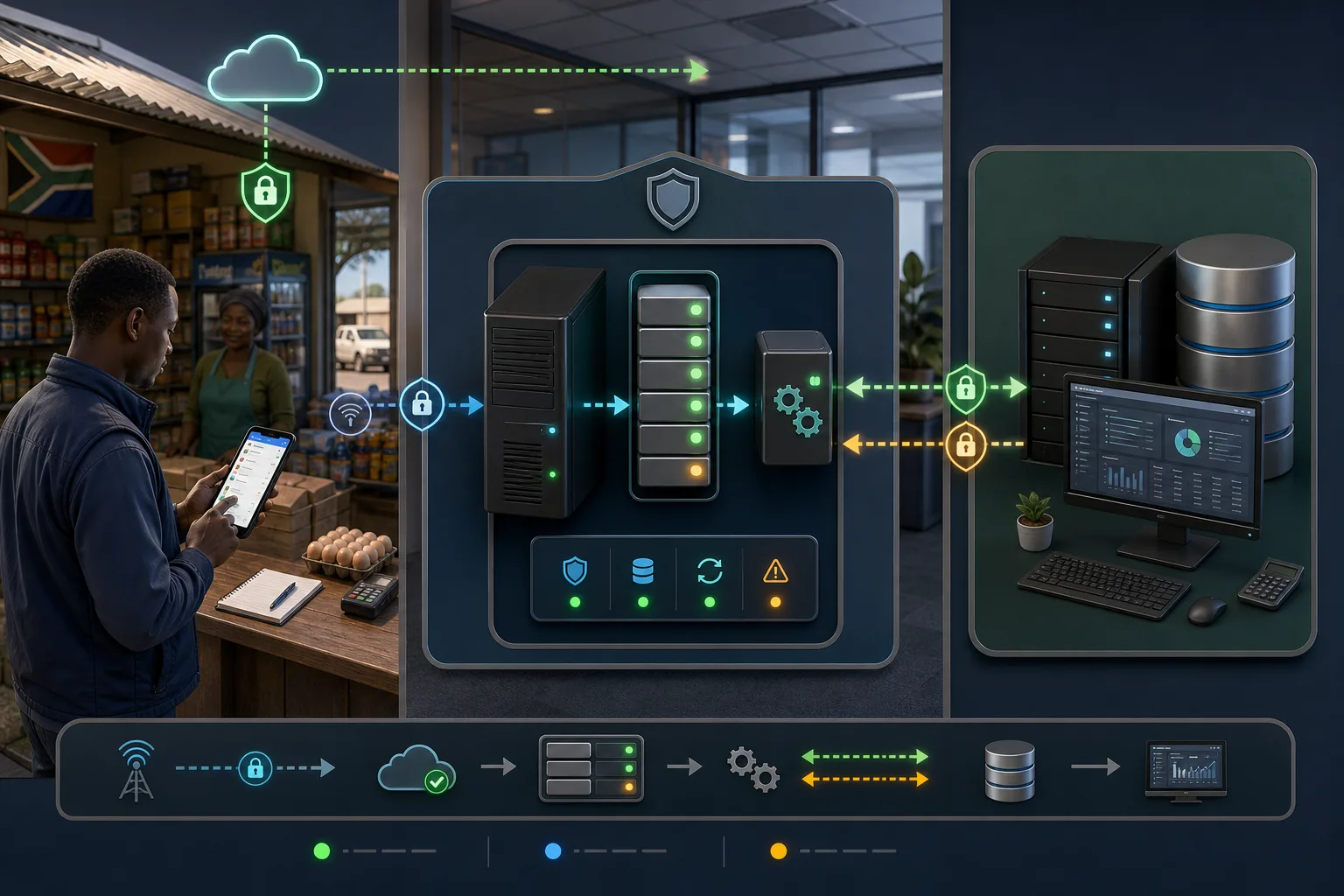
Architecture showing a South African field sales app using a secure customer-hosted connector to reach SAP Business One Service Layer and warehouse data

Place the connector at the customer-controlled boundary

The managed service calls SalesPro Hub outbound while reaching the approved SAP Business One Service Layer endpoint inside the customer network.

Field order workflow from a South African sales representative through validation and retry-safe processing to an SAP Business One sales document

Separate field capture from ERP commit

Only submitted and approved field orders should enter the controlled posting path, retain one source reference and receive a durable SAP result.

South African finance operations and SAP specialists mapping business partners items warehouses prices tax codes and field order identities

Map the real company database before activation

Business-partner, item, warehouse, price-list, tax, address and user-defined-field decisions need buyer approval before a preview becomes supportable.

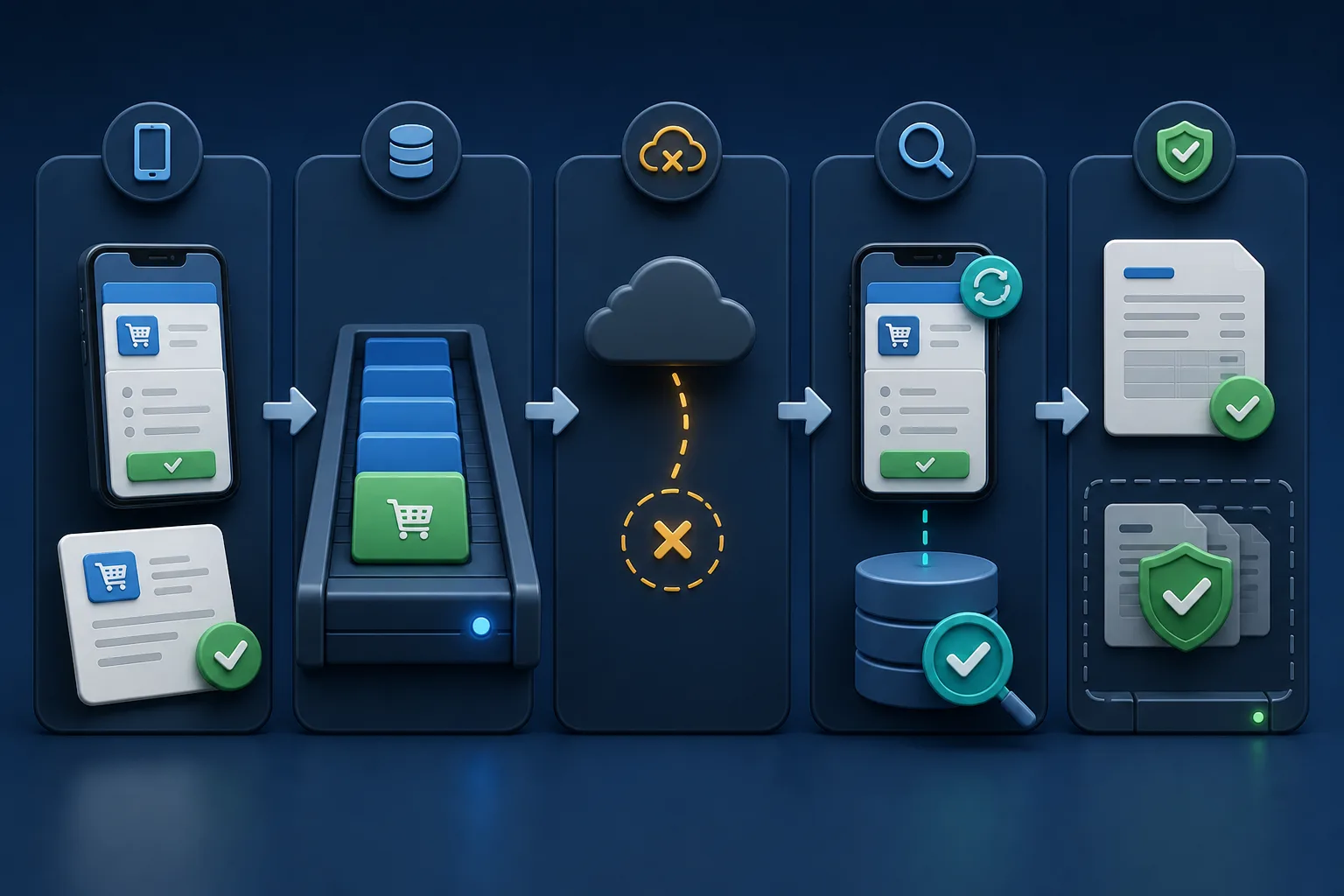
Retry-safe SAP Business One order flow using one stable field order reference to reconcile a committed ERP result without creating a duplicate

Reconcile before another create attempt

A lost response after commit must lead to an external lookup using the stable source identity, not an unsafe second sales-order request.

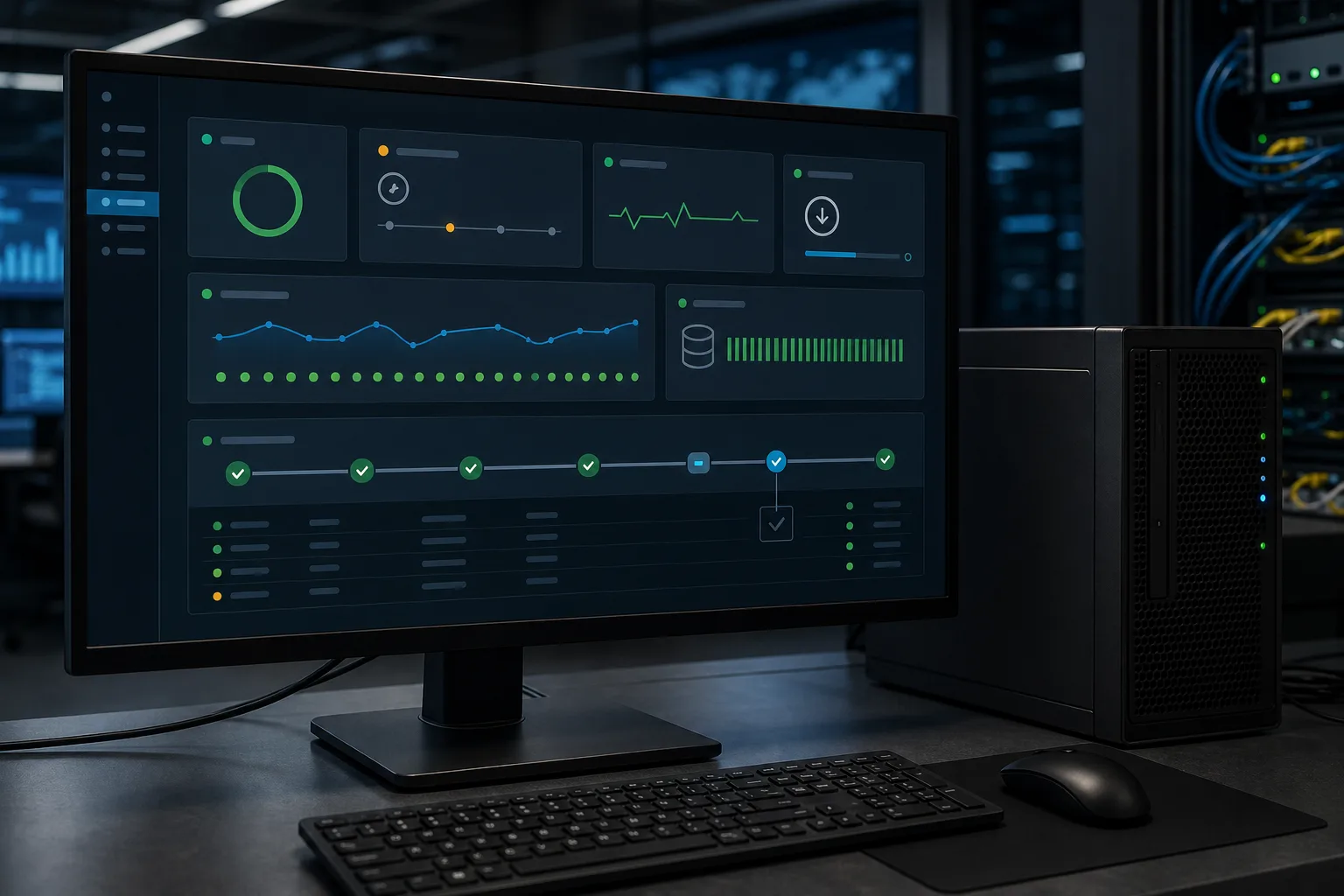
Enterprise connector monitoring view for SAP Business One session health heartbeat version retries remote configuration and one actionable exception

Make session and connector health visible

Authentication expiry, version drift, retries and permanent mapping failures need distinct states and owners instead of an invisible background task.

South African SAP finance IT warehouse and sales operations team reconciling field orders totals VAT document references and exceptions before release

Require representative acceptance evidence

The controlled preview should remain disabled until stakeholders reconcile counts, quantities, values, tax, identities, replay behaviour and exception ownership.

Architecture and ownership

Design the SAP Business One operating contract before the data flow

The controlled-preview pattern uses SAP Business One Service Layer over HTTPS from a customer-approved connector host. The connector authenticates to one company database, reads paged business-partner, item and order data, and keeps the session cookies out of ordinary logs. SalesPro Hub remains the field workflow. A bounded order-posting path may use the field order number as an approved SAP source reference, but automatic production publication stays disabled until the Hub producer, customer mapping and representative acceptance gate are complete.

SAP Business One normally owns the official business-partner code, item code, warehouse and accounting document identity after the external transaction is committed.

SalesPro Hub owns mobile drafts, visit context, the submitted field order and the stable source operation before an SAP hand-off.

The buyer must assign one owner for price lists, discounts, VAT, available stock, ship-to addresses and fulfilment status instead of enabling implicit two-way updates.

User-defined fields, approval procedures and partner extensions are customer-specific contract items and cannot be inferred from a generic Service Layer schema.

Security review boundary

Use a dedicated least-privilege SAP Business One service user restricted to the approved company database and operations. Protect the Service Layer password as a write-only managed secret, keep session cookies in memory, verify HTTPS certificates and record proxy or TLS-inspection behaviour. The Windows service should initiate hub traffic outbound and expose no arbitrary remote command path. Review SAP licensing, partner requirements, audit retention, secret rotation and the local break-glass owner before activation.

Failure recovery

Decide what happens when the happy path stops

A useful SAP Business One integration is not defined by one successful demo. It is defined by what remains durable, what can be replayed safely, what must stop, who sees the exception and how both systems are reconciled.

Failure or conflictRequired response
Service Layer session expiresPerform one controlled re-login, replay the same read or idempotent operation and stop visibly if authentication still fails.
Unknown item, warehouse or tax codeQuarantine the permanent mapping error with the exact external identity; never guess a similar code.
Response lost after SAP commitQuery by the approved stable source reference and reconcile the existing DocEntry or DocNum before another create request.
Service Layer or network unavailableKeep the operation durable, apply bounded retry and retain its identity across connector and machine restarts.
Company configuration changesValidate a versioned candidate setting locally and preserve the previous known-good configuration for controlled rollback.

Acceptance plan

Tests to run with the buyer’s real edition and workflow

A sandbox proves API syntax. Production readiness requires representative identities, accounting or CRM rules, failures and reconciliation. Record the result against the exact product edition and adapter release; do not transfer evidence from a different vendor version by assumption.

  • Log in to the intended company database and reject an invalid database, user and certificate path.
  • Read paged business partners, items and orders across a page boundary without skips or repeats.
  • Map active and inactive customers, ship-to addresses, items, units, warehouses, price lists, VAT and one user-defined field.
  • Replay the same authorised field order and simulate a lost response after external commit.
  • Expire the Service Layer session, interrupt the network and restart both the connector and customer host.
  • Reconcile source and SAP counts, quantities, rand values, VAT, DocEntry, DocNum, rejected records and applied configuration version.

Delivery lifecycle

From SAP Business One discovery to a supportable steady state

Treat the connection as a small operational product with owners, release evidence and a lifecycle. These phases stop a promising prototype from becoming an invisible production dependency that only one developer understands.

  1. 1

    Discover the real workflow

    Name the exact SAP Business One product, edition, company or tenant, licensed interface and deployment. Follow one representative customer and order from field capture to its final external state. Record current manual checks, approval points, cut-off times, volumes and the people who resolve errors. Brand-level assumptions are not a technical scope.

  2. 2

    Write the data contract

    List required and optional fields, types, formats, allowed values and stable identities. Declare a source of truth for customers, outlets, products, prices, tax, stock, documents and status. Define create, update, deactivate and delete behaviour separately. Include the idempotency key, cursor or event identity and the external reference returned after a successful commit.

  3. 3

    Build the exception contract

    Classify authentication, rate-limit, connectivity, validation, mapping, conflict and external-service errors. Decide which faults retry, how often and with what backoff; which stop immediately; and where exhausted work becomes visible. Assign a named business or technical owner and define the evidence needed to replay, correct, reject or manually reconcile an operation.

  4. 4

    Prove a controlled pilot

    Use representative South African customers, addresses, SKUs, rand values, VAT rules, discounts, warehouses and approval cases. Include duplicates, missing mappings, offline or network loss, service restart, expired credentials and a lost response after external commit. Reconcile counts and commercial totals in both systems; a green API response alone is not acceptance.

  5. 5

    Release with a rollback plan

    Version the mapping, adapter and configuration together. Record the approved package, supported architectures, required runtime, database or API prerequisites and the previous known-good state. Start with a bounded customer or order cohort, monitor exceptions and keep a tested way to pause new work without deleting the durable queue or losing reconciliation evidence.

  6. 6

    Operate and review

    Monitor reachability, authentication, latency, retry and dead-letter trends, external rate limits, installed version and reconciliation differences. Rotate credentials and exercise recovery before an emergency. Review vendor API or SDK changes and the adapter support matrix before upgrades. Retire obsolete credentials, mappings and data under the agreed security and POPIA operating process.

South African procurement note: confirm the parties’ POPIA roles, purposes, access, retention, operator terms and incident process during procurement. Hosting and subprocessors should be confirmed from current contractual evidence. Product controls can support a lawful implementation, but an integration page cannot certify the buyer’s operating practices or replace legal and security review. Before expanding the pilot, agree measurable release criteria: the maximum acceptable age of a pending operation, expected daily reconciliation window, alert response owner, acceptable mapping-error rate, retry ceiling and the evidence required to close an incident. Keep deployment, configuration and mapping versions beside the reconciliation result so a later difference can be traced to the exact operating state. Review those criteria when order volume, product range, warehouses, tax treatment or the external vendor version changes. A technically healthy connector can still create the wrong commercial result if ownership or mapping assumptions have drifted. Keep the sign-off, evidence and named operational owners accessible for every later support and change review.

Decision-maker intent

Questions different buyers ask about SAP Business One

SAP partner and ERP owner

Is this a supported SAP Business One add-on?

No public support claim is made. The adapter is a controlled preview using Service Layer and stays disabled until the exact company environment and reconciled acceptance evidence are approved.

Finance and operations

Will field orders post into SAP automatically?

Not as a generally enabled feature today. The preview contains an external order path, but the Hub producer, mapping, approval and end-to-end acceptance gate must be completed first.

CTO, CIO and security

What network and credential access is introduced?

The managed service calls the hub outbound and reaches the approved Service Layer endpoint. The review should verify service-user permissions, secret protection, certificates, destinations, logs, session behaviour and local recovery ownership.

Development and support

How will duplicates and expired sessions be handled?

The design keeps a stable order identity, reconciles after a lost response and permits only one controlled re-authentication before raising a visible exception.

Professional includes scoped APIs and signed webhooks for custom, customer-operated middleware. A managed Windows connector, remote configuration, heartbeat/version monitoring and managed recovery require Enterprise—and only become available for this named system after its real adapter passes the published release boundary.

Buyer decision guide

Scope the SAP Business One connection before buying implementation

A good trial should prove the workflow with your data—not rely on a sales promise.

Strong fit when you need

  • Teams that have already proved the SalesPro Hub field workflow with real data.
  • Businesses able to assign an owner for mapping, credentials and exception handling.
  • Integrations built around stable customer, order or product identifiers.

Confirm during the trial

  • The exact SAP Business One product, edition and API access available to your account.
  • The system of record for customers, stock, tax, status and accounting documents.
  • Whether polling, signed webhooks or middleware best fits your network and support model.

Implementation flow

How the connection works

  1. 1

    Confirm SAP edition and Service Layer boundary

    Record the SAP Business One version, platform, company database, Service Layer endpoint, licensed access, certificates, service user and relevant partner or change-control requirements.

  2. 2

    Write the source-of-truth matrix

    Assign ownership for business partners, ship-to addresses, item codes, warehouses, prices, VAT, available stock, field orders, SAP documents and fulfilment status.

  3. 3

    Map and validate representative data

    Exercise active and inactive customers, items, warehouse codes, price lists, tax treatment, discounts, currencies, user-defined fields and approvals before enabling transaction work.

  4. 4

    Run a controlled bidirectional pilot

    Read approved master data and orders, then post only a bounded set of authorised field orders using the stable source reference and a visible exception path.

  5. 5

    Prove session and replay recovery

    Expire the Service Layer session, interrupt the network, restart the connector and lose a response after commit; confirm that work recovers without creating a second SAP order.

  6. 6

    Reconcile and approve the release

    Finance, operations, SAP administration and IT compare source and external counts, quantities, values, tax, references and exceptions before the adapter is activated for the tenant.

Field mapping starting point

SalesPro Hub field/eventSAP Business One equivalentImplementation note
customer.external_idBusinessPartners.CardCodeUse the immutable SAP business-partner code, not the display name.
items[].skuItems.ItemCodeValidate inactive items, units and warehouse availability before order release.
order_numberOrders.NumAtCard or approved source fieldPreserve one stable source reference for replay lookup and reconciliation.
external_referenceOrders.DocEntry and DocNumReturn the durable SAP identity only after the external commit can be reconciled.
items[].quantityDocumentLines.QuantityReconcile unit-of-measure conversion and partial fulfilment rules.
outlet.addressApproved ship-to address codeDo not infer a ship-to location from free-text address similarity.
stock_qtyAgreed warehouse available quantityDefine the warehouse set, refresh timing and owner of stock deductions.

SAP Business One integration questions

Does SalesPro Hub support SAP Business One today?

There is a Service Layer adapter in controlled preview, disabled by default. It is not advertised as generally supported until a representative SAP environment, customer mappings and the full reconciled acceptance suite pass for an approved Enterprise release.

Can field sales orders be created in SAP Business One automatically?

The preview adapter contains a retry-safe external order path, but automatic Hub-to-SAP publication is not enabled as a general production feature. The producer, tenant approval, mapping and acceptance gate must be completed before activation.

Does the connector require an inbound firewall port?

The managed runtime calls SalesPro Hub outbound. It still needs customer-network access to the approved SAP Business One Service Layer endpoint, with the customer’s certificate, proxy and firewall policy applied.

How are expired SAP Business One sessions recovered?

The preview client keeps the Service Layer session cookies in memory and permits one controlled re-login after an unauthorised response. Repeated authentication failure stops and becomes an operational exception.

How are duplicate SAP sales orders prevented?

The design retains the SalesPro Hub order number as a stable source reference, persists the operation identity through retries and reconciles an existing external result before another create attempt. The exact SAP field and uniqueness checks are approved in the pilot.

What should a CIO or SAP partner validate?

Validate the Service Layer endpoint, company database, service-user permissions, outbound destinations, credential storage, logging, UDF and approval mappings, idempotency lookup, support ownership, upgrade path and reconciled evidence for the intended SAP version.

Validate the field workflow before connecting accounting

Import real products and customers, capture a representative order, then scope the integration against evidence instead of assumptions.

Start the free trial