ERP and finance
Does SalesPro Hub already have a SYSPRO connector?
No. The site documents the intended Enterprise architecture and acceptance contract; the SYSPRO-specific adapter and licensed release evidence still need to be built.
ERP and manufacturing distribution
SalesPro Hub can provide the tenant APIs, signed webhooks and managed Windows runtime needed for a custom SYSPRO field-sales connection, but a native managed SYSPRO adapter is not released. An Enterprise implementation must confirm the exact SYSPRO version, licensed e.net or other approved interface, company and operator access, business objects, mappings and reconciled sales-order workflow before support is promised.
Test the field workflow firstSupport level: Enterprise integration plan — managed SYSPRO adapter not released. The workflow below separates shipped SalesPro Hub capabilities from connector work your implementation must provide.
Client-provided ERP licence required: SalesPro Hub Enterprise covers the managed connector service only. It does not include or resell the ERP product, ERP modules, API, SDK, e.net, runtime, user or vendor-partner licences. The client must provide and maintain every third-party licence, supported integration interface, vendor permission and licensed test or production environment required by their ERP.
What this solves
For a South African manufacturer or distributor, the likely operating pattern is a customer-hosted Windows connector close to SYSPRO. The connector can use an approved SYSPRO integration interface to exchange customer, stock-code, warehouse, availability and sales-order information while SalesPro Hub remains the field workflow. SYSPRO’s business-object layer is designed to apply product business logic to XML input and output, and the Sales Order Import transaction is a relevant candidate for order creation. Those are architecture inputs, not evidence that a SalesPro adapter exists: the selected objects, licences, logon context, parameters, warehouse rules, back-order policy and result reconciliation still have to be implemented and tested.
SYSPRO integration evidence
A useful SYSPRO connection needs stable identities, explicit ownership and a visible exception path. These are the SalesPro Hub records the implementation must map and reconcile.
Written and maintained by Paul · Updated 7 August 2026

A future managed adapter should keep hub traffic outbound and use only the licensed customer-approved SYSPRO interface for queries and transactions.

Customer, branch, stock-code, unit, warehouse and pricing decisions form the data contract that a SYSPRO adapter would need to enforce.
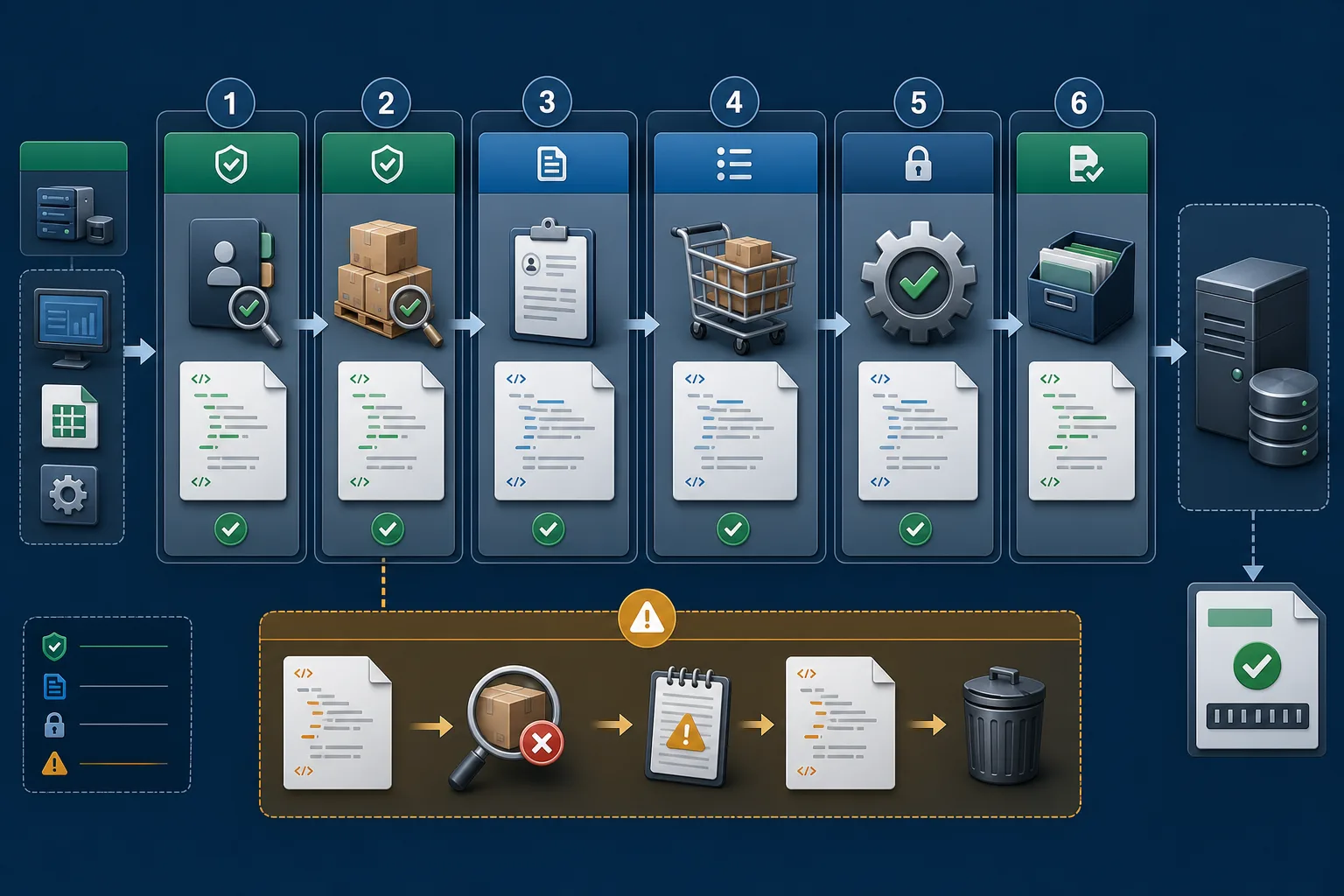
Order posting should validate the complete transaction, retain one source identity and expose a rejected line without endlessly retrying a permanent error.

The pilot must reconcile requested, supplied and back-ordered quantities across every approved warehouse rather than treating order creation as the end state.

Reachability, authentication, retry age, mapping failures, installed version and recovery ownership should be observable without routine RDP access.

A managed SYSPRO adapter should only be released for the tested version and business-object contract after commercial values and failure recovery reconcile.
Architecture and ownership
The planned SYSPRO pattern places a managed Windows connector inside the customer network and uses the licensed vendor integration surface selected with the ERP partner. Query work may use an approved query interface, while order creation should pass through the SYSPRO business-logic contract chosen for the exact version, such as the relevant e.net business objects. XML input, parameters, output, warnings and errors become a versioned adapter contract. No native SYSPRO adapter is currently released.
SYSPRO normally owns the official customer, branch, stock-code, warehouse, sales-order, back-order and ERP fulfilment records.
SalesPro Hub owns the rep’s offline capture, visit context, mobile draft and authorised submitted field order before the hand-off.
The implementation must assign authority for customer changes, prices, discounts, tax, available stock and allocation by warehouse.
The SYSPRO operator, company and business-object parameter set are security and business-policy inputs, not merely technical credentials.
Use a dedicated least-privilege SYSPRO operator and Windows service identity with access only to the approved company and business objects. Protect credentials as write-only managed secrets, restrict local SDK or interface access and record outbound hub destinations. Logs may retain source operation IDs, response classes and approved document references but should exclude passwords, full sensitive XML and unrelated ERP data. Review e.net licensing, partner ownership, audit retention, upgrades and local break-glass access.
Failure recovery
A useful SYSPRO integration is not defined by one successful demo. It is defined by what remains durable, what can be replayed safely, what must stop, who sees the exception and how both systems are reconciled.
| Failure or conflict | Required response |
|---|---|
| SYSPRO logon or operator failure | Stop transaction work, preserve the durable queue and surface the exact company or permission boundary for an authorised owner. |
| Invalid customer, stock code or warehouse | Treat the business-object rejection as a permanent mapping exception until master data is corrected. |
| Back-order or credit outcome differs | Capture the vendor result explicitly and reconcile supplied, held and back-ordered quantities instead of reporting a generic success. |
| Lost response after transaction | Look up the stable source reference or reconciliation record before repeating the same sales-order import. |
| Service, host or network restart | Resume the locally persisted operation under the same identity and apply bounded retry only to temporary failures. |
Acceptance plan
A sandbox proves API syntax. Production readiness requires representative identities, accounting or CRM rules, failures and reconciliation. Record the result against the exact product edition and adapter release; do not transfer evidence from a different vendor version by assumption.
Delivery lifecycle
Treat the connection as a small operational product with owners, release evidence and a lifecycle. These phases stop a promising prototype from becoming an invisible production dependency that only one developer understands.
Name the exact SYSPRO product, edition, company or tenant, licensed interface and deployment. Follow one representative customer and order from field capture to its final external state. Record current manual checks, approval points, cut-off times, volumes and the people who resolve errors. Brand-level assumptions are not a technical scope.
List required and optional fields, types, formats, allowed values and stable identities. Declare a source of truth for customers, outlets, products, prices, tax, stock, documents and status. Define create, update, deactivate and delete behaviour separately. Include the idempotency key, cursor or event identity and the external reference returned after a successful commit.
Classify authentication, rate-limit, connectivity, validation, mapping, conflict and external-service errors. Decide which faults retry, how often and with what backoff; which stop immediately; and where exhausted work becomes visible. Assign a named business or technical owner and define the evidence needed to replay, correct, reject or manually reconcile an operation.
Use representative South African customers, addresses, SKUs, rand values, VAT rules, discounts, warehouses and approval cases. Include duplicates, missing mappings, offline or network loss, service restart, expired credentials and a lost response after external commit. Reconcile counts and commercial totals in both systems; a green API response alone is not acceptance.
Version the mapping, adapter and configuration together. Record the approved package, supported architectures, required runtime, database or API prerequisites and the previous known-good state. Start with a bounded customer or order cohort, monitor exceptions and keep a tested way to pause new work without deleting the durable queue or losing reconciliation evidence.
Monitor reachability, authentication, latency, retry and dead-letter trends, external rate limits, installed version and reconciliation differences. Rotate credentials and exercise recovery before an emergency. Review vendor API or SDK changes and the adapter support matrix before upgrades. Retire obsolete credentials, mappings and data under the agreed security and POPIA operating process.
Decision-maker intent
ERP and finance
No. The site documents the intended Enterprise architecture and acceptance contract; the SYSPRO-specific adapter and licensed release evidence still need to be built.
Operations
Only after warehouse scope, stock timing, allocation and back-order policy are explicit and the pilot reconciles requested, supplied and held quantities.
CTO, CIO and developers
Discovery selects the supported query and business-transaction surfaces for the exact version and licences. Transaction work should preserve SYSPRO business logic rather than writing around it.
IT support
The Enterprise runtime provides heartbeat, version, approved settings, retry and recovery controls. The named adapter remains unavailable until its own tests pass.
Professional includes scoped APIs and signed webhooks for custom, customer-operated middleware. A managed Windows connector, remote configuration, heartbeat/version monitoring and managed recovery require Enterprise—and only become available for this named system after its real adapter passes the published release boundary.
Buyer decision guide
A good trial should prove the workflow with your data—not rely on a sales promise.
Implementation flow
Record the version, deployment, company, licensed interfaces, e.net operator, business objects, warehouses, branches, stock rules and implementation-partner ownership.
Choose the approved read paths for customers, stock and warehouse context and the business object for sales-order validation and import; document parameters and XML schemas.
Align customer and branch codes, stock codes, units, warehouses, price and discount policy, tax, salesperson, order type and back-order behaviour.
Persist one source operation identity, apply the vendor transaction logic, capture validation output and return the committed SYSPRO order reference to SalesPro Hub.
Test logon failure, partial batches, unknown stock codes, warehouse constraints, credit holds, network loss, service restarts and a lost response after commit.
Reconcile source and SYSPRO quantities, values, VAT, order numbers, back orders and exceptions, then bind support to the tested product and adapter versions.
| SalesPro Hub field/event | SYSPRO equivalent | Implementation note |
|---|---|---|
| customer.external_id | SYSPRO customer code and branch | Preserve the approved immutable account identity and branch semantics. |
| items[].sku | SYSPRO stock code | Validate alternate customer part numbers, units and discontinued codes explicitly. |
| order_number | Customer purchase order or approved source reference | Use one stable source identity for lookup and duplicate prevention. |
| external_reference | SYSPRO sales-order number | Write back only after the business object reports a reconcilable commit. |
| items[].warehouse | SYSPRO warehouse | Define defaulting, split, transfer and invalid-warehouse behaviour. |
| items[].quantity | Order quantity and back-order quantity | Reconcile fulfil-now and back-order outcomes rather than only the requested amount. |
No. SalesPro Hub has the API and managed-runtime foundations for an Enterprise project, but the SYSPRO-specific adapter, licensed environment and acceptance evidence are not released.
A custom implementation can map submitted field orders into the appropriate SYSPRO sales-order business-object workflow. It must be built and reconciled for the exact customer environment before automatic posting is enabled.
That is decided during discovery. SYSPRO business objects and e.net are relevant for product business logic and transactions, while OData may support approved query cases. Licensing, version and partner guidance determine the final contract.
That is the expected managed pattern. A Windows service initiates its hub connection outbound and accesses only the customer-approved SYSPRO interfaces locally.
The adapter must keep the SalesPro Hub order identity stable through retries, include the approved source reference in the SYSPRO transaction and reconcile an existing result before creating another order.
Require an exact support matrix, licensed-interface proof, mapping catalogue, service identity, failure taxonomy, replay test, order and back-order reconciliation, monitoring owner, upgrade procedure and signed acceptance result.
SalesPro Hub Enterprise covers the managed connector service only. It does not include or resell the ERP product, ERP modules, API, SDK, e.net, runtime, user or vendor-partner licences. The client must provide and maintain every third-party licence, supported integration interface, vendor permission and licensed test or production environment required by their ERP.
Connected buying journey
Review the managed runtime, ERP, accounting, CRM and automation options before choosing a delivery model. Every page publishes its current support boundary, required custom work and Enterprise plan status.
Import real products and customers, capture a representative order, then scope the integration against evidence instead of assumptions.